
When something goes wrong at a property: a break-in, a damaged vehicle, a missing parcel, a workplace dispute: the first question is almost always the same: do we have footage? This guide covers everything you need to know about CCTV systems in Singapore, from camera types and resolution to storage, night vision, analytics, PDPA obligations, and the latest AOV technology.
- The most common CCTV failure is not equipment failure: it is poor design. A camera installed in the wrong position, at the wrong height, or with the wrong lens will not deliver useful footage regardless of its resolution.
- Higher resolution does not automatically mean better CCTV. What matters is whether enough pixels fall on the subject you are trying to identify: a high-resolution camera covering a wide area may deliver less useful detail on a face at ten metres than a lower-resolution camera positioned closer.
- Starlight technology allows cameras to capture full-colour images in very low light without infrared illumination. For Singapore properties where colour identification matters after dark, this is worth specifying.
- Securevision's standard CCTV retention period is 30 days: our default recommendation for residential and commercial installations.
- Face detection and face recognition are fundamentally different capabilities with very different PDPA implications. Most Singapore residential and commercial installations should use face detection: not face recognition.
- CCTV footage constitutes personal data under Singapore's Personal Data Protection Act. How footage is collected, stored, accessed, and retained must be managed accordingly.
- The best time to plan and install CCTV cabling is during renovation, before walls and ceilings are closed. Retrofitting cabling costs significantly more and usually involves compromises.
- AOV (Always-On Video) solar and 4G cameras solve a genuine problem: monitoring locations where permanent cabling is impossible: but they require active ongoing management. They are install-and-remove, not install-and-forget.
1. What Is a CCTV System?
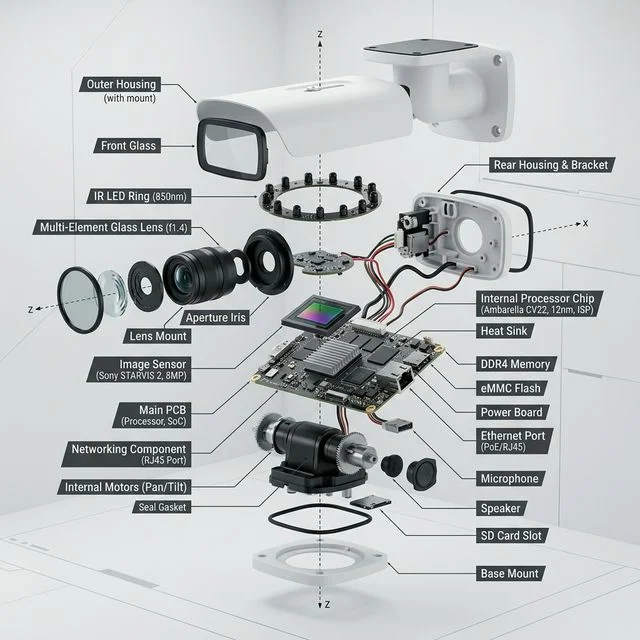
Bullet camera anatomy: lens, sensor and circuit board work together to capture and process the image.
CCTV: Closed-Circuit Television: is a video surveillance system where camera feeds are transmitted to a specific set of authorised monitors or recorders, rather than being broadcast publicly. Only authorised users can access the footage. In simple terms, it is a system that captures video and stores it for viewing either live or at a later time.
Most people think CCTV is installed to prevent crime. In reality, a well-designed CCTV system serves three distinct purposes, and understanding the difference matters when deciding how to design one.
Deter. Visible cameras signal to anyone approaching the property that their actions are being recorded. This applies not only to potential intruders but also to vandalism, misconduct, and unauthorised access. Many incidents never occur because the cameras are there. This is the system's first and most valuable function.
Document. When an incident does occur, CCTV provides an objective record of what happened. Memories fade, accounts differ, and details that seem clear immediately after an incident often become uncertain days later. Footage provides a record that does not change. For insurance claims, police reports, employment disputes, and legal proceedings, this documentation function is often the most practically important thing the system does.
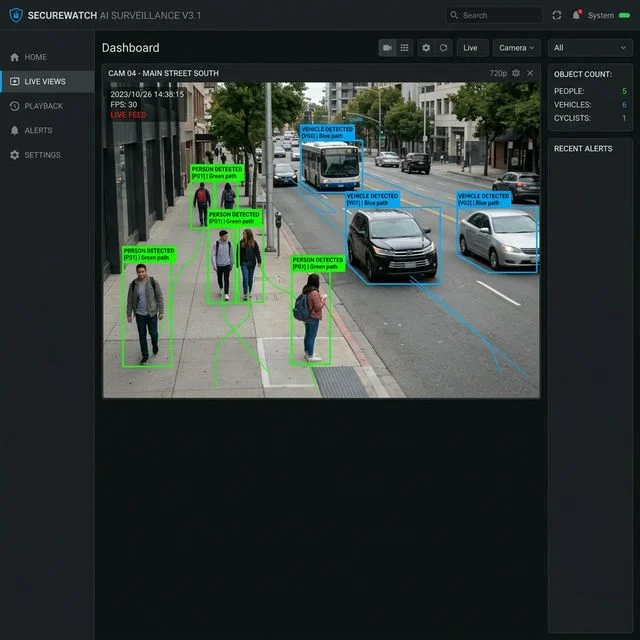
Detect. Modern CCTV systems can do much more than simply record video. Many cameras and recorders can now detect human movement, vehicle movement, intrusions into restricted areas, loitering, and unusual activity patterns. When configured correctly, the system can generate alerts and notify users in real time rather than waiting for someone to review footage after an event.
CCTV is no longer purely a security tool. In many commercial and industrial environments today, the question has shifted. It is no longer simply: do we have footage? The question is: what information can we obtain from the footage? Businesses use CCTV for workplace safety, PPE compliance, operational monitoring, visitor counting, vehicle management, and process verification. In many industrial environments, the operational value of CCTV is just as important as its security function.
A poorly designed CCTV system can still leave important areas uncovered regardless of the quality of the equipment. Cameras installed too high, blind spots at critical entry points, insufficient lighting at night, and inadequate storage are all common failures. The effectiveness of a CCTV system depends not only on the equipment but on how it is designed, positioned, and maintained.
2. Core Components of a CCTV System
Although CCTV systems come in many forms and at many price points, most systems are built around the same core components. Understanding how these work together makes it easier to evaluate options and have a meaningful conversation with your installer.
The Camera
The camera captures the video image. Different cameras are designed for different purposes and environments: a camera monitoring a car park entrance for vehicle identification has very different requirements from a camera covering a retail shop floor for general monitoring. Selecting the right camera for the specific purpose is often more important than choosing the highest resolution. Camera types are covered in detail in Section 5.
The Network Video Recorder (NVR)
The NVR receives video from the cameras over the network and stores it on internal hard drives. When users want to review an event, they access the footage through the NVR. Without a recorder, there is no stored video history. Older systems use a Digital Video Recorder (DVR), which connects to cameras via coaxial cable rather than network cable. DVRs and NVRs are not interchangeable: they use different camera types, different cabling, and different software. When upgrading an older system, understanding which recorder type is in place determines what upgrade options are available.
The Hard Drive
The hard drive inside the NVR determines how much video can be retained and for how long. The retention period depends on the number of cameras, camera resolution, recording quality settings, and the size of the hard drive. Surveillance-grade hard drives are designed for continuous 24-hour write operation: consumer-grade hard drives are not and will fail much earlier in a CCTV application.
The Network and PoE Switch
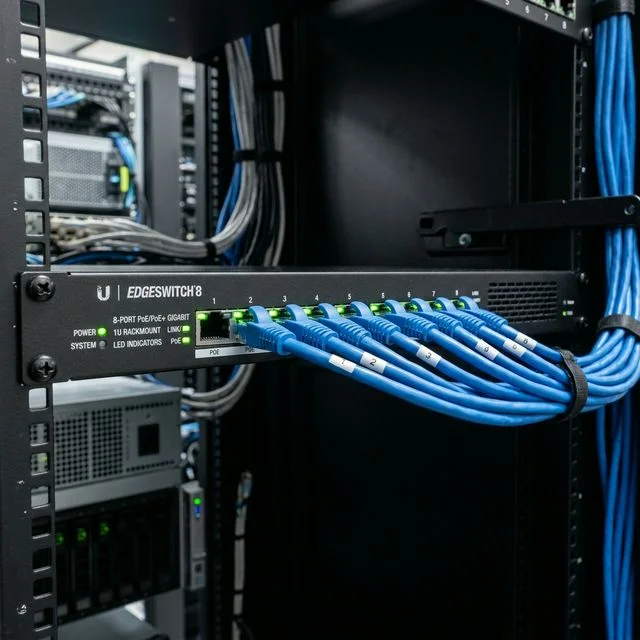
A PoE switch: Power over Ethernet switch: connects the cameras to both the network and the power supply through a single cable. Rather than running a separate power cable to each camera, the PoE switch delivers electrical power through the same network cable that carries the video data. The result is a cleaner installation with fewer cables and no need for a power adapter at each camera location. For larger installations, a reliable and correctly specified network is just as important as the cameras themselves.
Backup Power (UPS)
Power failures can happen unexpectedly. A UPS: Uninterruptible Power Supply: provides temporary backup power during an outage, allowing cameras and the recorder to continue operating and ensuring the system shuts down safely if the outage is extended. For critical sites and any installation where continuous recording is important, backup power is strongly recommended.
Mobile Applications
Most modern CCTV systems allow users to view live video, review recordings, receive alerts, and check system status from a smartphone, tablet, or PC. For many homeowners and business owners, the mobile application has become the primary way they interact with their CCTV system. Remote viewing requires an internet connection at the site and proper network configuration: this is covered in Section 12.
Monitors and Displays
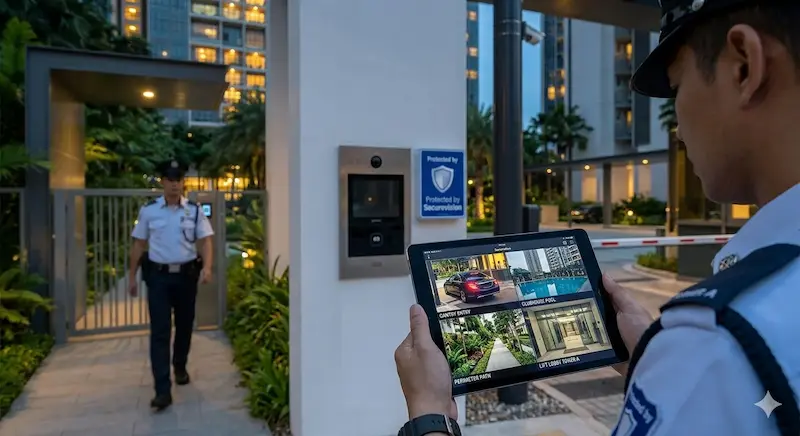
Security guard reviewing four live camera feeds on a tablet at a condominium entrance.
How a CCTV system is monitored depends on who is watching it, how often, and in what operational context.
For most homeowners, no dedicated monitor is needed at all. The NVR's mobile application on a smartphone or tablet, or the desktop client on a PC, provides full access to live and recorded footage. For those who prefer a larger screen, every modern NVR includes an HDMI output that connects directly to a domestic television: the same TV used for normal viewing. This is entirely appropriate for residential use.
Many offices use consumer-grade flat-panel televisions as displays for their CCTV system: typically mounted in a back office, reception area, or manager's room. Consumer televisions cost significantly less than professional security monitors and for this application they are generally adequate. The display is not running 24 hours a day, the environment is not a dedicated security monitoring post, and if the screen develops a fault, the downtime while sourcing a replacement is bearable.
For dedicated security monitoring environments: condominium guardhouses, facility control centres, and industrial security posts: the specification changes fundamentally. Consumer televisions and standard commercial monitors are typically rated for 8 to 12 hours of daily operation. Run continuously at a guardhouse, component wear accelerates well beyond the display's design life. A professional security monitor is designed and rated for continuous 24/7 operation: 365 days a year: under the specific demands of a security monitoring environment.
Professional security monitors are also calibrated for the specific requirements of watching multiple camera feeds simultaneously for extended periods. Consumer displays optimise for peak entertainment performance. Security monitoring requires stable, consistent image reproduction across the entire screen at all times. Displaying the same multi-camera grid layout continuously also creates image retention risk on consumer panels not designed for static content.
The cost argument for consumer displays at a security post is straightforward: a professional security monitor may cost three times as much as an equivalent consumer television. For a home or office where downtime is tolerable, buying consumer displays and replacing them as they fail has some merit. But in a 24/7 security environment, when the monitor fails at 3am the guard cannot see the camera feeds. Every minute the screen is dark is a minute during which the security function is compromised. In a 24/7 security environment, even an hour of monitor downtime is a gap that cannot be accepted. The professional monitor is the correct specification for the application.
3. Types of CCTV Systems
Not all CCTV systems are built the same way. Understanding the main types helps when installing a new system or evaluating an upgrade.
IP CCTV Systems
IP cameras are the standard for new installations today. Each camera operates as a network device and communicates with the NVR over the network. IP systems offer higher image quality, easier expansion, better remote access, advanced analytics capability, and greater flexibility than older technologies. For any new installation, an IP system is the correct choice.
HD Analogue Systems
HD analogue systems transmit high-definition video over traditional coaxial cable. They offer significantly better image quality than the legacy analogue systems they replace, while allowing existing coaxial cabling to be reused in properties where it is already in place. This makes HD analogue a cost-effective upgrade path for older properties where replacing all the cabling would be disruptive or expensive. HD analogue systems require a compatible recorder: the existing DVR from a legacy analogue system cannot be reused.
Legacy Analogue Systems
Many older properties still operate on legacy analogue CCTV systems installed more than ten years ago. These systems are characterised by low image quality, limited or no remote viewing capability, and restricted storage. Spare parts and replacement cameras for these systems are increasingly difficult to obtain as manufacturers discontinue legacy product lines. If your current system is more than ten years old, the question is not whether to upgrade but which upgrade path makes the most sense: a full IP replacement, or an HD analogue upgrade using existing coaxial cabling where it remains in good condition.
Wired vs Wireless: and What Wireless Actually Means
One of the most common misunderstandings about CCTV is the term wireless. Many people assume a wireless camera has no cables at all. In practice, wireless refers to how the camera communicates: not necessarily how it receives electrical power. Understanding the distinctions between the different types of wire-free and wireless cameras matters when choosing the right solution for a specific location.
Wired CCTV Systems
A wired CCTV system uses network cables between cameras and the recorder, with power delivered via the PoE switch. Wired systems offer stable communication, better reliability, higher performance, and are suitable for systems of any size. For any permanent installation where infrastructure can be installed, wired systems are the preferred and correct choice. Recording is continuous, storage is on the NVR hard drive with weeks or months of retention, and the system requires only annual maintenance once installed.
Wi-Fi Cameras
Wi-Fi cameras communicate with the NVR or cloud service wirelessly over the local Wi-Fi network, but they still require a power cable to each camera location. This is what most so-called wireless CCTV systems actually are: the cable requirement is for power, not data. Wi-Fi cameras offer faster installation and greater flexibility in locations where running a network cable is difficult, but a power point must still be accessible at each camera position.
Wi-Fi systems are affected by signal interference, network congestion, and coverage limitations. In Singapore's built environment: particularly in HDB blocks, condominiums, and commercial buildings with thick reinforced concrete walls and floors: Wi-Fi signals can be significantly attenuated. Signal coverage should always be assessed during the site survey before committing to a Wi-Fi camera installation.
Battery-Powered Cameras
Battery-powered cameras require no cables at all: no power cable and no network cable. They communicate over Wi-Fi and store footage on an internal SD card. The traditional limitation of battery cameras is that they conserve power by sleeping between events. When motion occurs, the camera wakes up and begins recording: but the wake-up process typically takes 1 to 3 seconds, during which the event is already in progress. The result is footage that catches the person leaving but not arriving, or a vehicle already in motion rather than the moment it entered the frame. Battery replacement is an ongoing maintenance requirement. Battery cameras are appropriate for locations where temporary monitoring is needed and permanent cabling is not justified: not as primary cameras in a permanent installation.
Solar-Powered Cameras
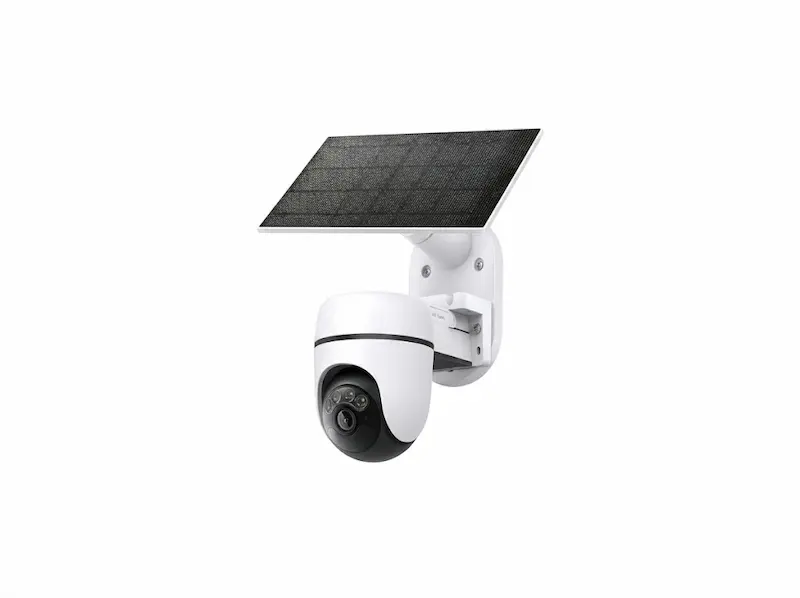
Solar-powered AOV camera on a construction site: genuinely off-grid, 4G cellular.
Solar-powered cameras pair a solar panel with an internal rechargeable battery, eliminating both the power cable and the regular battery replacement cycle. The solar panel charges the battery continuously during daylight hours, and in adequate sunlight conditions the system can sustain itself indefinitely. In Singapore's climate, solar reliability requires careful assessment for each specific installation location. Singapore has high solar irradiance but also frequent cloud cover, heavy rainfall, and significant shading from buildings and mature tropical vegetation. Before committing to a solar camera at any location, confirm whether the panel will receive at least 1 to 2 hours of direct sunlight daily.
AOV Cameras: Always-On Video
AOV stands for Always-On Video. It is the technology development that addresses the fundamental weakness of standard battery cameras: the wake-up delay that causes the beginning of every event to be missed.
An AOV camera stays continuously active rather than sleeping between events. During quiet periods, it records at a very low frame rate: typically 1 frame per second: directly to the internal SD card. This ultra-low frame rate consumes only a fraction of the power that full continuous recording would require, making it compatible with solar and battery power. The moment the camera's onboard AI detects a person or vehicle, it ramps immediately to full frame rate: typically 25 frames per second: capturing the entire event from the very first moment, with no wake-up delay and no missed pre-event footage.
Most AOV cameras use 4G cellular connectivity with a SIM card rather than Wi-Fi, making them genuinely off-grid: no mains power cable, no network cable, and no dependency on a local Wi-Fi network.
AOV cameras operate across three power modes. In full continuous AOV mode, the camera records at low frame rate during quiet periods and full frame rate during detected events: battery life without solar is typically 8 to 14 days. In AOV pre-record mode, the camera buffers video continuously but only commits footage to the SD card when an event is detected: battery life without solar is typically 14 to 26 days. In standard PIR mode with AOV disabled, the camera reverts to traditional battery camera behaviour: battery life extends to 6 to 18 months without solar, but the wake-up delay returns and pre-event footage is lost.
When battery level drops below approximately 20%, the camera automatically transitions from AOV mode to standard PIR mode to conserve power, and the user receives a low-battery notification on their smartphone. At critical low, the camera performs a controlled safe shutdown, preserving all footage on the SD card. When solar charging restores the battery to approximately 5 to 10%, the camera automatically powers back on and resumes AOV operation without any manual intervention.
AOV cameras solve a genuine and specific problem: monitoring locations where permanent cabling is impossible, impractical, or not justified for a temporary need. The correct framing is install and remove, not install and forget. A cabled IP system requires essentially no active management between annual service visits. An AOV camera requires ongoing attention: the SD card must be reviewed and cleared periodically; the solar panel must be kept clean and positioned for adequate sun; the 4G SIM data plan must be maintained; and the battery level must be monitored. For Singapore-specific applications, AOV cameras are well suited to monitoring a landed property during renovation before the permanent system is installed, construction site monitoring, and remote locations with no power or network infrastructure.
| Standard battery camera | AOV solar / 4G camera | Wired IP camera | |
|---|---|---|---|
| Power source | Battery only | Solar panel + battery | Mains via PoE switch |
| Connectivity | Wi-Fi | 4G cellular or Wi-Fi | Network cable |
| Records during quiet periods | No: camera is sleeping | Yes: 1fps to SD card | Yes: continuous to NVR |
| Pre-event footage captured | No: 1 to 3 second wake-up delay | Yes: immediate full frame | Yes |
| Storage | SD card only | SD card only | NVR hard drive |
| Typical retention | Days | Days to weeks | Weeks to months |
| Singapore shading risk | Low | Must assess each location | Not applicable |
| Ongoing management | Battery replacement | SD card, panel cleaning, SIM plan | Annual service only |
| Suitable for permanent install | Limited | No: install and remove | Yes |
| Best application | Simple temporary monitoring | Off-grid, construction, renovation | All permanent installations |
4. Upgrading an Existing CCTV System
Many property owners assume they need to replace everything when upgrading a CCTV system. In reality, the best approach depends on what is already in place and what the upgrade needs to achieve.
Common reasons for considering an upgrade include poor image quality that no longer supports identification, a recorder failure, the absence of mobile viewing capability, insufficient storage for the required retention period, expansion requirements as the property grows, or equipment approaching end of life with parts becoming unavailable.
A full IP upgrade: replacing cameras, recorder, and supporting infrastructure with a modern network-based system: is the preferred long-term solution. It delivers the best image quality, the most flexibility, and access to modern analytics capabilities. A hybrid approach is sometimes possible when existing cabling is in good condition: new cameras and a new recorder are installed while existing cable runs are retained where practical. A site assessment is required to determine whether this approach is viable for a specific property. Before deciding on an upgrade path, evaluate current image quality, recording retention adequacy, reliability, expansion requirements, and remote access capability. The goal is not simply to replace equipment: it is to ensure the system continues to provide useful information when it is needed.
5. Camera Types: Form Factor and Construction
Not all CCTV cameras are designed for the same purpose or environment. Choosing the right camera type involves understanding both the use case and the physical construction of the camera housing: these determine performance, durability, and suitability for the installation environment.
Dome Cameras
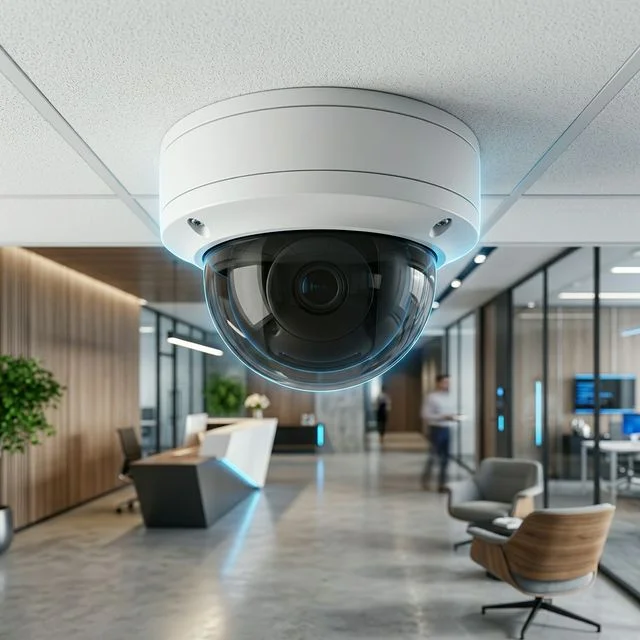
Vandal-resistant dome camera: IK-rated casing, concealed lens direction.
A dome camera encloses the lens and sensor inside a dome-shaped housing. The design conceals the direction the camera is pointing: from outside the dome it is not possible to see exactly where the lens is aimed: which is useful in environments where the camera's coverage area is intended to be ambiguous rather than visible. Dome cameras are available in standard and vandal-resistant variants. Vandal-resistant dome cameras use IK-rated polycarbonate or metal housings designed to withstand physical impact. The IK10 rating is the highest standard, indicating resistance to a 20-joule impact. For installations where the camera may be within reach of the public, a vandal-resistant dome is the appropriate specification.
One consideration with dome cameras is that the dome cover sits close to the lens. In cameras with built-in infrared illumination, the IR light can reflect off the interior of the dome cover and wash out the image: a problem known as IR flare. This is particularly noticeable if the dome cover becomes scratched or dirty over time, and is a common problem when dome cameras are mounted behind glass or in humid environments where the cover degrades faster.
Common applications: offices, retail shops, condominiums, schools, and common areas where a discreet appearance is preferred and vandal resistance is required.
Bullet Cameras
A bullet camera has an elongated cylindrical housing with the lens at the front. Unlike a dome camera, the direction the bullet camera is pointing is clearly visible: this is by design. The visible orientation contributes to its deterrent value, as anyone approaching can see exactly where the camera is aimed. Bullet cameras typically accommodate longer focal length lenses, making them well suited to monitoring longer distances. The housing usually includes a mounting arm that allows the camera to be aimed precisely after installation, and a sun visor to reduce lens flare in direct sunlight. The exposed mounting arm means bullet cameras are generally easier to adjust on site than dome cameras.
Common applications: building exteriors, car parks, driveways, loading bays, and perimeter monitoring where longer viewing distances are required and visible deterrence is a priority.
Turret Cameras
Turret camera: exposed lens eliminates IR reflection, ball-socket mount allows precise aiming.
A turret camera: also known as an eyeball camera: uses a ball-and-socket mounting where the camera module rotates freely within a fixed socket housing. This allows the camera to be aimed in any direction after installation simply by rotating the ball, without moving the mounting base. The key distinction from a dome camera is that the lens in a turret camera is exposed rather than enclosed behind a dome cover. This eliminates the IR reflection problem that dome cameras experience, making turret cameras a better choice in any environment where infrared night vision is being used. The exposed lens also makes it straightforward to verify exactly where the camera is aimed during and after installation.
Common applications: landed homes, offices, retail shops, and any installation where compact form factor, easy aiming, and reliable infrared night performance are all priorities.
PTZ Cameras
PTZ stands for Pan, Tilt and Zoom. A PTZ camera can rotate horizontally, tilt vertically, and zoom optically: either under manual operator control or automatically following programmed patterns or detected activity. Because a PTZ camera can actively follow movement, a single unit can monitor a much larger area than a fixed camera. PTZ cameras are not a substitute for fixed cameras at specific coverage points: a PTZ camera that is actively following one area is not covering the areas it has moved away from.
Common applications: large car parks, warehouses, industrial sites, and public spaces where active monitoring and wide-area coverage are required.
Thermal Cameras
Thermal cameras detect infrared heat radiation rather than visible light, producing an image based on the heat signature of objects and people in the scene. Because they do not rely on any light source, thermal cameras can detect people and objects in complete darkness, through smoke, and in challenging weather conditions. Thermal cameras are not typically used for identification: they do not show facial or number plate detail. Their strength is detection: identifying that a person or vehicle is present in an area regardless of lighting conditions. They are used for perimeter protection at industrial facilities, critical infrastructure sites, and high-security environments.
Fisheye Cameras
A fisheye camera uses an ultra-wide-angle lens: typically covering 180 to 360 degrees: to capture an entire area in a single image. The raw image is distorted by the wide lens, but the camera's software de-warps it to produce usable flat, panoramic, or multiple virtual camera views from a single physical device. In Singapore, fisheye cameras are commonly used in condominium lift lobbies, HDB common corridors, small retail shops, and compact spaces where a single camera needs to provide complete coverage without blind spots. A single fisheye camera can effectively replace two or three fixed cameras in the right environment, reducing both equipment cost and cabling complexity.
Weatherproofing and Vandal Resistance Ratings
For any outdoor camera or any camera in an environment where it may be exposed to moisture, dust, or physical interference, the IP and IK ratings of the housing are important specifications that should be confirmed before installation. The IP rating: Ingress Protection: indicates resistance to dust and water penetration. IP66 is the standard minimum for outdoor CCTV cameras, indicating complete dust protection and resistance to powerful water jets. IP67 adds resistance to temporary water immersion. For any outdoor installation in Singapore's climate: where cameras are routinely exposed to heavy rainfall and high humidity: an IP66 rating as a minimum is the correct specification. The IK rating: Impact Protection: indicates resistance to physical impact. IK08 indicates resistance to a 5-joule impact; IK10 indicates resistance to a 20-joule impact. For cameras within reach of the public: in car parks, corridors, lift lobbies, and common areas: an IK10-rated vandal-resistant housing is the appropriate specification.
6. Understanding Resolution and Image Quality
One of the most persistent misconceptions about CCTV is that higher resolution automatically means better security. Resolution is one factor in image quality: but it is not the only factor, and in many cases it is not the most important one. A 4MP camera installed correctly will often outperform an 8MP camera installed poorly: a point that is worth keeping in mind whenever a specification sheet leads a conversation about cameras.
What Resolution Actually Means
Resolution refers to the number of pixels a camera captures. A 2MP camera captures approximately two million pixels per frame; an 8MP camera captures approximately eight million. More pixels means more detail in the image: but only if those pixels are focused on the right subject at the right distance.
The concept that matters for identification is pixel density: how many pixels of detail fall on the specific subject you are trying to identify. A high-resolution camera covering a wide area spreads its pixels across a large scene. At ten metres distance, the number of pixels covering a person's face may be quite low even on an 8MP camera with a wide-angle lens. A 4MP camera with a narrower lens positioned closer to the entry point may deliver significantly more pixels on the same face and produce a much more useful identification image.
The most common camera specification mistake we see in the field is buyers choosing 8MP cameras for general area monitoring where 4MP cameras positioned correctly would deliver better identification results. Total resolution means nothing if the pixels are spread too thinly across a wide scene. Every camera position needs a specific objective: and the lens and placement should be chosen to serve that objective, not the resolution figure on the specification sheet.
Resolution Reference Table
| Resolution | Description | Typical Application |
|---|---|---|
| 2MP | Full HD | General monitoring, smaller installations |
| 4MP | Enhanced HD | Good balance of quality, storage, and cost: suitable for most applications |
| 5MP | Enhanced HD+ | Step up from 4MP where additional detail is needed without the full storage cost of 8MP |
| 8MP | 4K Ultra HD | Vehicle identification, facial identification, large open areas, critical locations |
For most Singapore residential and commercial installations, 4MP cameras provide an excellent balance between image quality, storage requirements, and cost. 8MP cameras are worth specifying where the use case demands greater detail: vehicle number plate capture at distance, or wide-area coverage of a large open space where digital zoom will be needed during playback.
Sensor Size and Low-Light Performance
The image sensor inside the camera converts light into an electronic signal. Sensor size matters primarily for low-light performance: a larger sensor has larger individual pixels that capture more light per pixel, producing a brighter and cleaner image in challenging lighting conditions. Two cameras with identical resolution specifications but different sensor sizes will perform very differently after dark. For outdoor cameras in Singapore: where lighting conditions after dark vary enormously between well-lit main roads and unlit side passages: sensor size has a direct impact on night performance and should be part of the camera selection decision.
Lens Quality
Lens quality affects sharpness, distortion, and the camera's ability to maintain focus across the entire image. A poor-quality lens will produce soft edges and distortion regardless of the sensor resolution. For cameras covering critical identification points: main gates, reception areas, access control points: lens quality is as important as megapixel count.
What CCTV Can and Cannot Do
CCTV can provide an objective record of incidents for later review; identify people when cameras are correctly positioned and configured for that purpose; identify vehicles including registration plates when appropriate cameras and configurations are used; verify events and help establish what actually happened; and deter unwanted behaviour through the visible presence of cameras and warning signage.
CCTV cannot see through walls or around obstructions: cameras require a direct line of sight to the subject; guarantee identification if the camera is installed too far away, at the wrong angle, or in insufficient lighting; compensate for poor design: even the most expensive camera cannot overcome incorrect positioning; or prevent crime by itself: CCTV is most effective as part of a broader security strategy that includes physical barriers, access control, lighting, and alarm systems.
7. Where Should CCTV Cameras Be Installed?
One of the most common questions property owners ask is how many cameras they need. The more useful question is what areas need to be covered and what information each camera needs to capture. Camera placement is almost always more important than the number of cameras installed.
Camera Height Guidelines
Mounting height directly affects what the camera captures and how useful the footage is. For facial identification, cameras are typically mounted at 2.4 to 3 metres. At this height the camera captures faces at a useful angle with adequate detail for identification. Above 4 metres, identifying individuals from CCTV footage becomes increasingly difficult: the camera is looking down at the top of the head rather than at the face. For number plate capture, the camera angle relative to the vehicle and the distance from the plate are the critical factors: mounting height is secondary to angle and distance.
Landed Homes
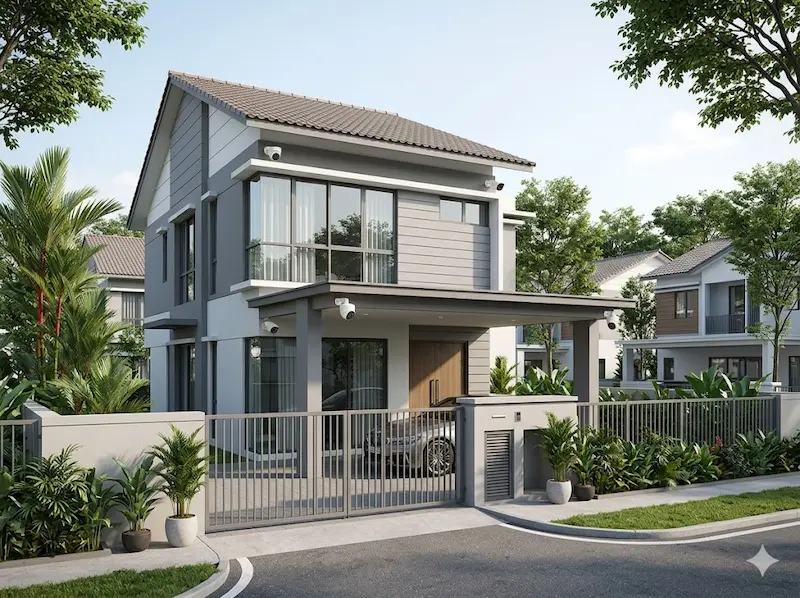
Typical landed home CCTV layout: gate, car porch and side passage cameras.
A landed home's primary vulnerability points are the entry routes an intruder is most likely to use. Typical camera positions include the front gate, the main entrance, the car porch, side passages on both sides of the property, and the rear yard. The front gate is the obvious starting point but side passages and rear access points are often the most overlooked: and the most commonly used by opportunistic intruders who prefer not to be seen from the street. Combining a gate-level camera capturing faces at entry with a wider coverage camera capturing vehicle movements in the car porch covers the majority of incidents that homeowners need to investigate.
HDB Flats
Camera placement for an HDB flat is constrained by the building environment. The main entrance door is the primary coverage point. Interior cameras in the living area are sometimes installed by homeowners who employ domestic helpers or have elderly relatives at home: this is a legitimate use case but involves privacy and consent considerations that should be discussed openly within the household before installation. Cameras should not be positioned to capture common corridor areas beyond the immediate entrance to the unit. HDB has guidelines on installations affecting common areas: check these before installing any camera with a field of view that extends beyond the unit's own entrance.
Condominium Units and Common Areas
A condominium unit's own entry points are the primary focus: the main door and any windows accessible from common corridors or adjacent structures. The building's common area CCTV managed by the MCST covers lift lobbies, car parks, and estate perimeters but does not extend into individual units.
For condominium common areas managed by the MCST, typical camera positions include lift lobbies on every floor, the main vehicle entrance and exit, pedestrian access points, the car park, pool and gym facilities, and perimeter fencing. The objective is a combination of security monitoring, incident investigation, and operational management. Retention policies and access rights for common area CCTV should be documented in the estate's security management procedures.
Offices
Office CCTV typically focuses on the main entrance and reception area, the server room and any room containing sensitive equipment, store rooms and areas where inventory or valuables are kept, and cash handling areas. For offices with public-facing reception areas, a camera covering the reception counter is particularly important for recording interactions that may later become the subject of a dispute.
Factories and Warehouses
Industrial environments require a combination of security and operational monitoring. Typical camera positions include vehicle entrances and exit points, loading bays, production areas where product quality or process compliance needs to be monitored, warehouse storage areas, and perimeter fencing. In industrial environments, operational visibility is often as important as security monitoring, and camera specifications should reflect both objectives.
8. Planning Your CCTV System
The best CCTV systems are designed around the objectives of the user rather than simply the number of cameras or the camera specifications. Before selecting equipment, it is worth working through several questions that determine the correct system design.
What am I trying to protect: people, assets, or both? What specific incidents am I trying to capture footage of: entry events, vehicle movements, incidents in specific areas? Who will review the footage and how: is this a homeowner checking their smartphone after a notification, a security team actively monitoring during operating hours, or a management team reviewing footage after an incident is reported? For condominiums and commercial properties, access rights to footage should be defined clearly: not everyone who works at a property should have access to CCTV recordings. How long do I need to retain recordings: and does that duration meet any insurance, regulatory, or contractual requirements that apply to the property?
Planning for Cabling During Renovation
The cheapest CCTV cable is the one installed before the ceiling is closed. The best time to run CCTV network cables is during a renovation, before walls, ceilings, and floor finishes are completed. At this stage, cables can be routed cleanly inside conduits within the wall or ceiling structure, camera positions can be chosen without compromise, and additional cable runs for future expansion can be installed at minimal additional cost. Retrofitting cabling into a completed property is significantly more expensive, more disruptive, and almost always involves compromises: surface-mounted trunking, limited camera positions, and visible cable runs that affect the appearance of the space. If a renovation is planned, CCTV cabling should be on the discussion list from the start, not an afterthought at the end.
Avoiding Blind Spots and Planning Overlapping Coverage
Blind spots: areas not covered by any camera: often become apparent only after an incident has occurred in exactly the area that was not covered. Systematic camera placement planning, starting from the property boundary and working inward through each likely intrusion or access route, is more effective than positioning cameras based on where they are easiest to install. For important areas, coverage by more than one camera provides better evidence, multiple viewing angles, and redundancy if one camera fails or is obscured. At entry points where identification is critical: main gates, reception areas, loading bays: overlapping coverage from two cameras at different angles is worth the additional investment.
Planning for Future Expansion
Security requirements change over time. Installing additional cable runs at the time of initial installation costs relatively little. Adding cameras to a location where no cable was originally run is significantly more expensive. An NVR with spare channel capacity and a PoE switch with unused ports are worth specifying if expansion is anticipated.
Before selecting any camera, ask: if an incident happens at this location tomorrow, what information would I need from the footage? The answer to that question: a face, a vehicle plate, movement in a specific zone, evidence of what was touched or taken: determines the correct camera type, lens, mounting height, and position far more effectively than starting with a resolution specification.
9. Video Storage and Retention
Capturing video is only part of the CCTV system. The equally important question is how long the recordings are kept and whether the system is configured to retain footage long enough to be useful when an incident is investigated.
How CCTV Footage Is Stored
Most modern CCTV systems store recordings on surveillance-grade hard drives installed inside the NVR. As cameras record, footage is automatically organised by date, time, camera, and event type. The NVR automatically overwrites the oldest footage when storage capacity is reached: provided the system is correctly configured to do so. When users need to review an event, they search by camera and time period.
How Long Should Footage Be Retained?
Securevision's standard recommendation is 30 days of retention for residential and most commercial installations. This covers the practical reality that many incidents: a vehicle scratch, a disputed delivery, a workplace complaint: are not reported immediately. Thirty days provides sufficient history to investigate most events reported within a normal timeframe.
| Property Type | Typical Retention | Notes |
|---|---|---|
| Landed homes | 14–30 days | Securevision standard: 30 days |
| Condominium units | 14–30 days | As above |
| Condominium common areas | 30–90 days | MCST policy should specify this |
| Offices | 30–60 days | Longer for sensitive areas |
| Factories | 30–90 days | Operational and insurance requirements |
| High-security sites | 90 days or longer | Confirm with insurer |
Retention periods should also be considered in the context of the PDPA: footage should not be retained longer than the period necessary for the purpose for which it was collected. The retention period should be a deliberate policy decision, not simply whatever the hard drive happens to hold before it overwrites.
H.265 Compression: Why It Matters
H.265 video compression: the current standard for modern NVRs and cameras: reduces storage requirements by approximately 50% compared to the older H.264 standard for the same image quality. When specifying a CCTV system, confirm that both the cameras and the NVR support H.265. A system using H.264 throughout will require approximately twice the hard drive capacity to achieve the same retention period as an equivalent H.265 system: a significant difference in both upfront storage cost and ongoing capacity.
Continuous vs Event-Based Recording
Continuous recording captures video from all cameras 24 hours a day. It provides a complete history and ensures no events are missed, but requires more storage. Event-based recording captures video only when motion or activity is detected. It reduces storage requirements and makes reviewing footage easier: but if detection settings are incorrectly configured, genuine events can be missed. For most installations, combining both approaches provides the best balance: continuous recording on critical cameras covering entry points, and event-based recording on lower-priority cameras covering general areas.
Local Storage vs Cloud Storage
For most Singapore residential and commercial CCTV installations, local storage on a surveillance-grade hard drive inside the NVR remains the preferred solution. It offers lower long-term cost, faster playback, no ongoing subscription fee, and suitability for systems of any size. Cloud storage is a useful supplement: providing off-site backup of critical footage and reducing the risk of footage loss if the NVR is stolen or damaged. However, cloud storage for continuous video from multiple cameras involves significant bandwidth consumption and ongoing subscription costs that make it impractical as the primary storage solution for most installations. SD card storage in individual cameras is useful as a backup but should not be relied upon as the primary storage method.
Hard Drive Lifespan
Surveillance-grade hard drives typically last 3 to 5 years under continuous write conditions. Consumer-grade hard drives used in cheaper systems are not designed for this duty cycle and will fail significantly earlier. Replacing the hard drive before it fails: rather than waiting for it to fail and losing weeks of footage: is part of a sensible maintenance programme. Most NVRs provide hard drive health monitoring that gives advance warning of impending failure.
10. What Does a CCTV System Cost?
The cost of a CCTV system depends on the objectives of the system, not simply the number of cameras. Two systems with the same number of cameras can have very different costs depending on camera type, resolution, lens specification, storage requirements, cabling complexity, network infrastructure, and analytics requirements.
Indicative Budget Ranges for Singapore Properties
Because every property and every set of objectives is different, there is no standard price for a CCTV system. The following ranges reflect typical installed costs for straightforward residential and commercial installations in Singapore: including cameras, recorder, cabling, PoE switch, and basic commissioning. They do not include analytics, LPR, significant civil works, or UPS backup power.
| Property Type | Typical Installed Budget | Notes |
|---|---|---|
| HDB flat | $800 – $2,000 | 2 to 4 cameras, wireless or minimal cabling, NVR or cloud-based recorder |
| Condominium unit | $1,500 – $3,500 | 2 to 4 cameras, NVR, cabling within unit |
| Terrace house | $3,000 – $6,000 | 4 to 6 cameras, NVR, full perimeter coverage |
| Semi-detached home | $5,000 – $10,000 | 6 to 8 cameras, NVR, perimeter and interior coverage |
| Detached house / bungalow | $8,000 and above | Depends significantly on site size, perimeter length, and access points |
| Small office or retail shop | $2,000 – $5,000 | 4 to 8 cameras, NVR, basic analytics |
| Commercial office floor | $5,000 – $15,000 | Depends on floor area, number of cameras, and network infrastructure |
| Condominium common areas | $15,000 and above | Depends on estate size, camera count, and existing infrastructure |
These figures are planning estimates: not quotations. The actual scope and cost for any specific property depends on the layout, the number of access points, the camera specifications required, the cabling infrastructure already in place, and the specific objectives of the system. A site assessment is required before a meaningful quotation can be prepared.
What You Are Actually Paying For
When comparing quotations, the headline camera and recorder price is often only part of the total cost. Items frequently omitted from lower-priced quotations include cabling and conduit, PoE switches, UPS backup power, civil works where cable trenching or ceiling access is required, network configuration, mobile application setup and user training, commissioning and testing, and warranty and after-sales support terms. Two quotations that appear similar in camera count and price may include very different scopes of work. Before accepting any quotation, confirm exactly what is and is not included.
Why Cheap CCTV Can Be Expensive
A CCTV system that fails to capture useful footage when an incident occurs has delivered no value regardless of its purchase price. Common problems with poorly specified systems include image blur that prevents identification, insufficient storage that overwrites footage before an incident is reported, poor night performance that produces unusable footage after dark, limited or no remote viewing capability, and early equipment failure from consumer-grade components used in a demanding continuous-operation environment. A system that needs to be replaced after three years costs more over time than a correctly specified system that operates reliably for ten.
11. Night Vision and Low-Light Performance
Many of the incidents that CCTV is installed to record occur after dark. Night performance is one of the most critical aspects of a CCTV system, and one of the areas where the difference between a well-specified and a poorly specified system is most visible. Poor night footage is almost always caused by a combination of insufficient lighting at the camera location, incorrect camera selection for the site's lighting conditions, incorrect camera placement, and reflections. Installing more cameras does not solve a night performance problem if the underlying cause is inadequate lighting or cameras that are not suited to the environment.
Infrared Night Vision
Infrared cameras use built-in infrared LED illuminators to light the scene in a wavelength invisible to the human eye but visible to the camera sensor. The resulting footage is monochrome: black and white: because infrared illumination does not carry colour information. Infrared cameras are reliable, effective in complete darkness, and available at modest cost. They are appropriate for applications where the primary objective is detecting presence and movement rather than colour identification.
The most common night vision installation mistake we encounter is a dome camera mounted behind glass: inside a building looking out through a window: with infrared illuminators active. The IR light reflects off the glass and produces a completely washed-out image. This is almost always only discovered when the homeowner reviews footage for the first time at night and finds the image unusable. A turret or bullet camera mounted outside the glass is the correct solution. The fix after the fact requires remounting the camera: avoid the problem in the site assessment stage.
Starlight Technology
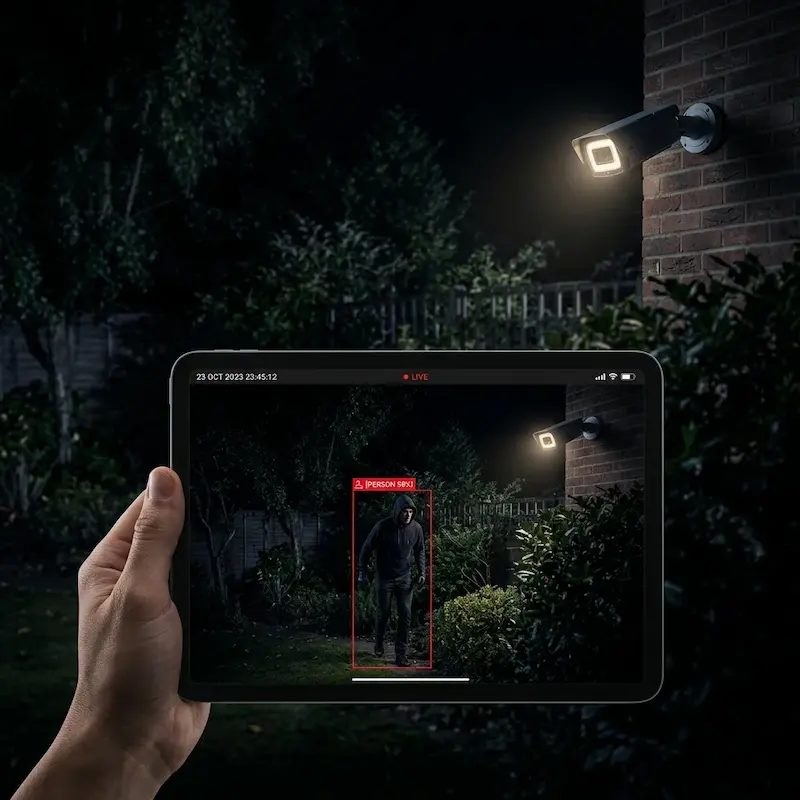
AI-assisted low-light CCTV: colour night footage with person detection bounding box.
Starlight technology refers to cameras designed with large imaging sensors and wide-aperture lenses that allow them to capture full-colour images under very low ambient light: without any infrared illumination. In conditions where a standard camera would switch to infrared and produce monochrome footage, a starlight camera continues to capture colour images using the available ambient light.
Colour information matters significantly for identification and investigation. A person's clothing colour, a vehicle's colour, the colour of a bag or helmet: these details are invisible in monochrome infrared footage and immediately visible in colour footage. For any camera position where colour identification after dark is important: driveways, car parks, main entrances: starlight technology is worth specifying.
White Light Illuminator Cameras
Beyond starlight passive low-light technology, some cameras include built-in white light LED illuminators that actively light the scene at night. Unlike infrared illuminators which are invisible, white light illuminators produce visible light: effectively a small spotlight attached to the camera. These cameras capture full-colour footage at night regardless of ambient lighting because they are actively illuminating the scene. White light illuminator cameras are useful for driveways, car park entrances, and any position where actively lighting the scene is acceptable. The visible white light also functions as a deterrent. The trade-off is that the light is visible to everyone in the area, which may be undesirable in some residential contexts.
12. Mobile Apps and Remote Viewing
One of the most significant changes in CCTV over the past decade has been the move to remote access via smartphone. Today, many users rarely view footage from the recorder itself: they use their smartphone, tablet, or PC for live viewing, playback, and alert management. Most modern CCTV applications allow users to view live camera feeds, review recorded footage by camera and time period, receive push notifications when motion or specific events are detected, check system status and storage health, and share footage clips with family members, security personnel, or the police.
Remote Viewing Requirements
Remote viewing requires an internet connection at the camera site and correct network configuration. Most modern NVRs use cloud-based connectivity that simplifies remote access setup, but a stable internet connection at the site is still required. Where multiple users need access: family members, a building manager, a security team: each user should have their own account with appropriate access rights.
Cybersecurity for Remote Access
Enabling remote access to a CCTV system also requires proper cybersecurity configuration. Default passwords on cameras and NVRs must be changed immediately during installation: default credentials are publicly known and are routinely exploited by automated scanning tools that probe internet-connected devices. Firmware must be kept updated to address security vulnerabilities. User access should be managed, with each user having their own account at the minimum access level required for their role. Network segmentation: placing CCTV cameras on a separate network VLAN from the main office or home network: is worth implementing for any system where security is a priority. Cybersecurity is covered in more detail in Section 17.
What Happens If the Internet Fails?
The CCTV system continues recording locally even if the internet connection fails. Remote viewing and push notifications will be unavailable until connectivity is restored, but the cameras continue to capture and the NVR continues to store footage throughout the outage.
CCTV and Alarm Systems: Better Together
Many property owners view CCTV and burglar alarms as separate systems that address separate problems. In practice, they work best when designed together.
The alarm answers one question: has something happened? An intrusion detector activates, a door contact opens, a motion detector triggers. The alarm generates an alert.
CCTV answers a different question: what happened? The footage provides visual confirmation, context, and evidence. Without CCTV, an alarm activation leaves a property owner knowing that something triggered the system: but not what, where, or whether it was a genuine incident or a false alarm.
Video Verification
Video verification combines alarm events with CCTV footage. When an alarm activates, relevant cameras are automatically brought up for review. The situation can be assessed visually before deciding whether to respond, contact a monitoring centre, or dismiss the activation as a false alarm. This significantly improves decision-making and reduces the cost and disruption of responding to false alarms.
We design CCTV and alarm systems together wherever possible. The camera covering the main entrance should be the same camera that appears on screen when the door contact at that entrance triggers. The camera covering the rear passage should be the one associated with the motion detector in that zone. Integration at the design stage is far more effective than retrofitting connectivity between systems installed independently.
For any property where both CCTV and a burglar alarm are being specified, we design the two systems as a single integrated solution: not two separate ones installed by different contractors and connected as an afterthought. The integration between what the alarm detects and what the camera captures is where the real operational value of both systems is realised.
13. What Modern CCTV Analytics Can Do
Many people still think of CCTV as a passive recording device. Modern systems: particularly those using AI-based video analytics: can analyse what is happening in the scene and generate alerts, reports, and insights in real time.
Human and Vehicle Detection
Basic video analytics can distinguish human movement and vehicle movement from general background motion: swaying trees, rain, changing light conditions, small animals. This significantly reduces false alerts compared to simple motion detection. A system configured to alert only when a person enters a specific area after hours is far more useful than one that generates alerts every time a car passes on the road beyond the fence.
Face Detection vs Face Recognition
These are two fundamentally different capabilities that are frequently confused. Understanding the distinction matters for both technology selection and regulatory compliance.
Face detection identifies that a human face is present in the camera's field of view. The system detects that a face is there: it does not know whose face it is. Face detection is used to trigger alerts when a person approaches a camera, to filter out vehicle-only events, to count the number of people who have passed a point, and to improve the accuracy of other analytics. Face detection does not identify individuals and has no significant PDPA implications for standard use.
Face recognition goes much further. The system captures the detected face and compares it against a database of enrolled individuals, attempting to identify who the person is. Face recognition involves biometric personal data: one of the most sensitive categories of personal information under Singapore's Personal Data Protection Act (PDPA). Deploying face recognition requires a clear and documented legitimate purpose, a legal basis under the PDPA, appropriate consent or other justification for collecting biometric data, data governance procedures covering enrolment, access, retention, and deletion of the biometric database, and a clear understanding of the accuracy limitations of the system and the implications of false matches. For most Singapore residential and small commercial installations, face detection is the appropriate capability. Face recognition is appropriate only in specific, well-governed use cases with proper legal advice on PDPA compliance.
Licence Plate Recognition
Specialised cameras and software can read vehicle registration plates and match them against an approved or flagged list. Reliable licence plate recognition requires a camera positioned at a specific angle relative to the vehicle, adequate and consistent lighting without headlight glare, and correct distance from the plate. A general-purpose camera positioned for wide-area coverage will not reliably read number plates. LPR is increasingly used in Singapore condominiums for automated vehicle access management and visitor vehicle logging. For more detail, see our Vehicle & LPR Management systems page.
People Counting and Heat Mapping
People counting analytics track the number of individuals entering and exiting a defined area: applications include retail environments counting customer traffic, facilities managing occupancy against fire safety limits, and visitor attractions monitoring throughput. Heat mapping generates a visual representation of where people spend the most time within a monitored space, providing operational intelligence for retail planning and facilities management.
PPE Detection and Fall Detection
In industrial environments, AI analytics can identify whether workers in the camera's field of view are wearing required personal protective equipment: safety helmets, high-visibility vests, safety footwear: and generate an immediate alert when PPE is absent. Fall detection analytics identify when a person falls and remains on the ground without getting up, a pattern associated with a medical emergency or incapacitation. Applications include elderly care facilities and nursing homes where staff cannot maintain visual observation of all areas at all times.
Where Video Analytics Processing Occurs
Edge analytics processes video inside the camera itself: the camera analyses what it sees and sends only events and alerts to the NVR, reducing network bandwidth requirements and allowing analytics to function even if connectivity to the NVR is interrupted. Server-based analytics processes video centrally on a dedicated server or the NVR, allowing more complex analysis. Most modern installations use a combination: basic detection at the camera edge, more complex analysis centrally. For most users, the important question is not where the processing occurs but whether the system provides the information needed to address the specific operational question being asked.
14. Can CCTV Identify a Face or Number Plate?
One of the most common questions property owners ask is whether their cameras can identify a person's face or read a vehicle registration plate. The honest answer is: it depends: and the factors that determine whether identification is possible are almost entirely about design and placement, not camera specification.
Distance and Pixel Density
The further a subject is from the camera, the fewer pixels fall on that subject in the image. Whether those pixels are sufficient for identification depends on the camera's resolution, its lens focal length, and the distance to the subject. A camera covering a wide area from a long distance will not provide reliable facial identification even at high resolution. A camera with a narrower field of view positioned closer to the identification point will deliver significantly more pixels on the subject and much better identification results.
Camera Placement for Facial Identification
If facial identification is a specific requirement, the camera must be designed and positioned for that purpose. Typical positions include building entrances where people pass close to the camera, lift lobbies where people face the camera as they wait, reception areas where visitors approach a fixed point, and access control points. A camera mounted high on a building exterior for general area coverage is not a facial identification camera, regardless of its resolution.
Camera Placement for Number Plate Recognition
Reading a vehicle registration plate reliably requires a camera specifically positioned for that purpose. Critical factors include the camera angle relative to the vehicle: ideally between 0 and 30 degrees from horizontal: the distance from the plate, adequate and consistent lighting without headlight glare, and the vehicle's speed relative to the camera's frame rate. A general-purpose area camera will not reliably read number plates. A dedicated number plate recognition camera at a controlled entry point will deliver reliable results when correctly positioned and configured.
The Right Camera for the Right Objective
When planning a CCTV system, define the specific objective of each camera position before selecting the camera. A camera intended for general area monitoring has different requirements from a camera intended for facial identification, which has different requirements from a camera intended for number plate capture. This is why a site assessment that considers specific objectives for each camera position is more valuable than simply selecting cameras from a specification sheet.
15. Common CCTV Problems and Questions
Most CCTV issues have straightforward causes. Understanding the symptoms helps determine whether a problem can be addressed with a simple check or whether professional attention is needed.
| Problem | Most Common Cause | First Check |
|---|---|---|
| Image is blurry | Dirty lens, incorrect focus, or poor lighting | Clean the lens first. If still blurry, check focus setting and lighting conditions |
| Cannot see clearly at night | Insufficient lighting, wrong camera type, or IR reflection off glass | Check if camera is mounted behind glass. Add supplementary lighting if needed |
| NVR beeping | Hard drive health warning: most common cause | Check NVR system log for fault code. Act on hard drive warnings promptly |
| CCTV not recording | Hard drive failure, incorrect schedule, or storage full | Check NVR storage status and recording schedule settings |
| Cannot view cameras on phone | Internet connectivity problem at site | Cameras are still recording: check site internet connection first |
| Hard drive reported as full | Overwrite function not configured correctly | Check NVR overwrite settings. If overwriting correctly but retention is short, storage capacity is insufficient |
| Camera not showing image | Camera failure, power fault, or network issue | Check PoE switch port status for the affected camera. Try replacing the network cable |
| Suspected unauthorised access to cameras | Default passwords not changed, outdated firmware | Disconnect from internet immediately. Change all passwords and update firmware before reconnecting |
| Power failure: cameras stopped | No UPS backup power | Install UPS for future protection. Review what footage was lost during the outage |
16. Maintenance and Best Practices
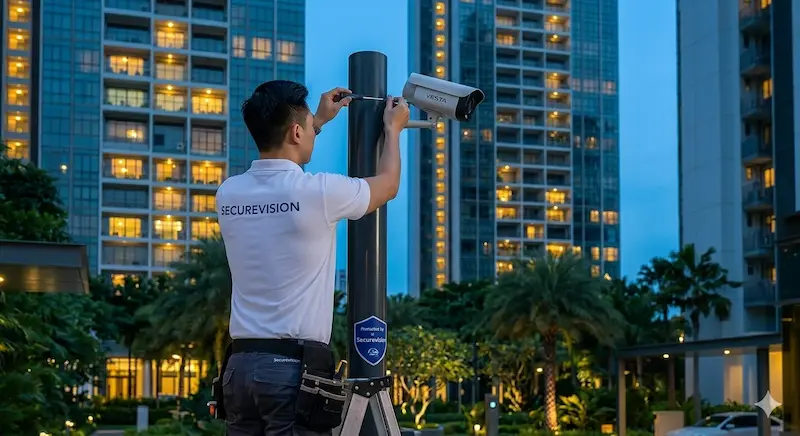
Securevision technician installing and servicing a camera at a Singapore high-rise property.
Like any electronic system, a CCTV installation requires periodic maintenance. A system that is never inspected may not perform as expected when an incident occurs: and the failure is often only discovered when the footage is needed and is not there.
Simple Checks Users Can Perform
Between professional service visits, users can perform simple checks to verify the system is functioning correctly. Viewing a selection of live cameras confirms they are online and producing a clear image. Reviewing a short clip of recorded footage confirms recording is functioning. Checking the NVR's storage status confirms drive health and available retention period. Checking night performance on key cameras after dark confirms the system is performing as expected in low-light conditions. Confirming mobile app access and push notifications are working ensures remote monitoring is available. Most NVRs also notify users when firmware updates are available: these should be applied promptly.
Annual Professional Maintenance
An annual professional maintenance visit should include physically cleaning all camera lenses and dome covers, checking and adjusting camera focus where required, reviewing the NVR's system log for recorded faults or warnings, testing hard drive health and replacing any drive approaching end of life, verifying recording is functioning correctly on all cameras, updating camera and NVR firmware to the current stable release, testing backup power if a UPS is installed, and reviewing camera alignment to confirm coverage has not shifted.
Hard Drive Replacement Planning
Surveillance-grade hard drives typically last 3 to 5 years under the continuous write conditions of a CCTV system. Consumer-grade hard drives fail significantly earlier. Planning for hard drive replacement within this cycle: rather than waiting for the drive to fail: ensures continuity of recording and avoids the loss of stored footage that a sudden drive failure can cause.
17. Privacy, PDPA and Cybersecurity
CCTV systems collect video footage of people. Under Singapore's Personal Data Protection Act (PDPA), this footage constitutes personal data: information that identifies or could be used to identify an individual. The obligations that flow from this are relevant to homeowners, businesses, and organisations operating CCTV systems.
CCTV and the PDPA
The most common PDPA compliance gap we encounter in condominium CCTV is the absence of a documented retention policy and undefined access rights. This typically only becomes apparent when a resident makes a footage request following an incident: and the MCST has no procedure in place to respond. A CCTV policy does not need to be complex, but it does need to exist and be followed before an incident occurs, not drafted in response to one.
Organisations: including companies, MCSTs, and other legal entities: that operate CCTV systems are data controllers under the PDPA and must handle footage in accordance with the Act. Key obligations include collecting footage only for a clearly defined legitimate purpose; retaining footage only for the period necessary for that purpose; controlling and limiting access to footage to individuals with a genuine operational need; and being prepared to respond to data access requests from individuals who appear in the footage. For MCST-operated CCTV systems in condominiums, the MCST should have a documented CCTV policy covering the purpose of the system, retention periods, access rights, and procedures for responding to footage requests.
Individual homeowners operating CCTV at their own residential property for home security purposes are generally exempt from many of the PDPA's organisational requirements. However, where cameras capture areas beyond the homeowner's own property, privacy considerations should be taken seriously.
Camera Placement and Privacy
Cameras should primarily monitor the property owner's own premises. For landed properties, cameras covering the gate, driveway, car porch, and garden are straightforward. Cameras at the front of the property will inevitably capture some footage of the public footpath and road: this is generally acceptable as these are public spaces. Cameras intentionally positioned to capture a neighbour's interior spaces, garden, or private areas cross a clear privacy boundary and should be avoided. For HDB flats, cameras should not be positioned to capture the common corridor beyond the immediate vicinity of the unit entrance: this affects the privacy of other residents and may contravene HDB guidelines.
Audio Recording
Some cameras support audio recording alongside video. Audio recording in Singapore raises specific legal considerations that differ from video recording alone. Covert audio recording: recording conversations without the knowledge of the participants: can have legal implications under Singapore law. As a general principle, audio recording should not be deployed in a CCTV context without proper legal advice, and where audio is recorded, appropriate signage should inform people that audio as well as video is being captured.
CCTV Warning Signage
In environments where members of the public or visitors may not be aware that CCTV is in operation, warning signage contributes to transparency and PDPA compliance. Signage notifying people they are entering a CCTV-monitored area is recommended for commercial premises, condominium common areas, and any location where members of the public are regularly present. Signage also reinforces the deterrent effect of the cameras themselves.
Cybersecurity
Modern CCTV cameras and NVRs are networked devices and can be compromised if not properly secured. Essential cybersecurity practices include changing all default passwords immediately on installation for every camera and the NVR; keeping firmware updated on all devices as updates become available; using strong, unique passwords for each device and each user account; implementing network segmentation by placing CCTV cameras on a separate network VLAN from the main office or home network; disabling unused network services and ports; and reviewing user access periodically to remove accounts that are no longer required.
18. Choosing a CCTV Brand
Many property owners begin by asking which CCTV brand is best. In reality, brand selection is one part of the decision: system design, camera placement, installation quality, and ongoing support are equally important. A well-designed system using a mid-range brand will almost always outperform a poorly designed system using premium equipment. That said, brand matters for several practical reasons: spare parts availability, firmware update continuity, local technical support, and cybersecurity track record.
We work with several major manufacturers: including global brands known for enterprise-grade cybersecurity, broad product ranges spanning residential to industrial, and strong local distributor support in Singapore. The right brand for a project depends on the scale, the security requirements, and the long-term support needed. Rather than recommending one brand universally, we assess the specific requirements of each site and specify accordingly. The manufacturer sections below describe what to evaluate: not a ranked list.
What Makes a Manufacturer Worth Specifying
Rather than naming a preferred brand, we evaluate manufacturers on four criteria for every project.
Product range breadth. Does the manufacturer offer the right camera type, resolution, lens specification, and housing format for this specific application? A manufacturer strong in residential bullet cameras may not offer the enterprise PTZ or thermal camera needed at a different site.
Local support and spare parts. A brand with no local distributor support in Singapore creates a problem the moment a component fails. We specify brands whose distributors hold local stock and can provide technical support in Singapore.
Firmware update continuity. Networked cameras and NVRs require ongoing firmware updates to remain secure. We look at the manufacturer's track record: how long they have supported existing product lines with updates, and how quickly they issue patches in response to identified vulnerabilities.
Cybersecurity architecture. Some manufacturers have made cybersecurity a core engineering priority: dedicated security teams, published vulnerability disclosure programmes, and default-secure configurations. Others have historically shipped with known default credentials and slow patch cycles. For any system connected to a network, this matters.
We work with several major manufacturers across the residential, commercial, and enterprise segments. The right brand for a project depends on the scale, the application, and the long-term support required. We assess this on a per-project basis.
Verify Your Installer's PLRD Licence
In Singapore, companies installing CCTV systems are required by law to hold a licence issued by the Police Licensing and Regulatory Department (PLRD) under the Private Security Industry Act (PSIA). This requirement applies to CCTV installation in the same way it applies to burglar alarm installation: it is a legal requirement, not a voluntary accreditation.
The licensing requirement exists because before the regime was introduced, anyone could install a security system regardless of competence or training. A PLRD-licensed installer has met the legal minimum standard for operating in the security industry in Singapore. Before engaging any CCTV installer, ask to see their PLRD licence and confirm that it is current. An unlicensed installer is operating outside the law, and a system installed without proper licensing may not be recognised by your insurer or comply with the requirements of your building management.
Securevision holds Police Licence L/PS/000267/2023P and has maintained its licence since the licensing regime began. A PLRD licence is the minimum legal standard: it confirms the company is eligible to install security systems. It does not, by itself, guarantee quality of design, quality of installation, or quality of after-sales support. The licence is the starting point for your evaluation, not the end of it.
19. Choosing a CCTV Contractor
The quality of the contractor often has more impact on the outcome than the brand selected. A well-designed system using mid-range equipment will almost always outperform a poorly designed system using premium cameras. Before committing to any contractor, it is worth understanding what separates a competent CCTV installer from one who simply supplies and mounts cameras.
Verify the PLRD Licence First
Before anything else, confirm the contractor holds a current PLRD licence under the Private Security Industry Act. This is a legal requirement for CCTV installation in Singapore: not a voluntary accreditation. Ask to see the licence number and verify it directly. An unlicensed installer is operating outside the law, and a system installed without proper licensing may not be recognised by your insurer.
Look for Design Before Equipment
A good contractor should be able to explain why each camera is being positioned where it is, what specific information each camera is intended to capture, and what lens specification makes that possible. If the conversation immediately focuses on brand names, megapixel counts, and package prices without first establishing the coverage objectives, that is a warning sign. Equipment selection should follow from design: not the other way around.
Ask About After-Sales Support
The installation is the beginning of a long-term relationship, not the end of it. Before committing, understand the warranty coverage and what it includes, typical response times for support calls, spare parts availability for the equipment being proposed, and whether the contractor offers a maintenance programme. A contractor who disappears after installation leaves you managing a system without support when something goes wrong.
Ask to See Similar Projects
Relevant project experience matters. A contractor who has designed and installed systems for similar properties: whether HDB flats, landed homes, condominiums, offices or industrial facilities: is more likely to anticipate the specific challenges your property presents. Ask for references or examples of comparable work.
Compare Scope, Not Just Price
When evaluating quotations, confirm exactly what is included. Lower-priced quotations frequently omit cabling and conduit, PoE switches, UPS backup power, civil works, network configuration, commissioning and testing, and after-sales support. Two quotations with the same camera count and a different total price are rarely comparable without understanding what the difference in scope represents.
The best CCTV system is not the one with the highest resolution or the most cameras. It is the one that captures the information you need, in the locations that matter, in conditions that reflect how the property actually operates: including at night, in poor weather, and at the entry points that are most at risk rather than the ones that are most convenient to cover. The four questions worth asking before committing to any CCTV system are: is each camera positioned to capture the specific information it is intended to capture: a face, a vehicle plate, a specific area: rather than simply covering as wide an area as possible? Is the storage adequate for the retention period the property actually requires, not just what the default settings provide? Is night performance adequate for the lighting conditions at each camera location: and has this been verified rather than assumed? And will the installer still be available to support and maintain the system in five years' time? A well-designed, correctly installed, and properly maintained CCTV system provides years of valuable security, operational visibility, and peace of mind. A poorly designed system: regardless of its specification: provides the illusion of security without the substance.
Frequently Asked Questions
How many cameras do I need?
The answer depends on what areas need to be covered and what information each camera needs to capture. Camera placement is almost always more important than the number of cameras. A site assessment that maps specific coverage objectives to camera positions is more useful than starting with a target number.
Do I need 4K cameras?
Not necessarily. For most Singapore residential and commercial installations, 4MP cameras provide an excellent balance between image quality, storage requirements, and cost. 8MP cameras are worth specifying where the use case demands greater detail: vehicle identification at distance, wide-area coverage requiring digital zoom, or critical identification points.
Can CCTV work without internet?
Yes. The cameras continue recording to the NVR locally regardless of internet connectivity. Remote viewing and push notifications will be unavailable during an internet outage, but recording continues normally.
Can I view my cameras overseas?
Yes, provided the system has internet connectivity at the site and remote access has been correctly configured. Most modern NVR systems use cloud-based connectivity that simplifies remote access setup.
How long should I keep CCTV footage?
Securevision's standard recommendation is 30 days for residential and most commercial installations. The appropriate period depends on the property type, operational requirements, and any contractual or regulatory requirements. Footage should not be retained longer than necessary under the PDPA.
Does CCTV footage fall under PDPA?
Yes. CCTV footage constitutes personal data under Singapore's Personal Data Protection Act. Organisations operating CCTV must handle footage in accordance with the Act's requirements: including having a legitimate purpose, controlling access, and managing retention periods appropriately.
Can CCTV identify faces?
Yes, if the camera is positioned and configured specifically for facial identification. A camera designed for general area coverage will not reliably identify faces. Facial identification requires a camera positioned close to the identification point at an appropriate height and angle.
What is the difference between face detection and face recognition?
Face detection identifies that a human face is present in the camera's view: it does not know who the person is. Face recognition compares detected faces against a database of enrolled individuals and attempts to identify them. Face recognition involves biometric personal data and has significant PDPA implications that must be properly managed before deployment.
Can CCTV read vehicle number plates?
Yes, but reliable number plate recognition requires a camera specifically positioned for that purpose: correct angle, adequate lighting, and appropriate distance from the plate. A general-purpose area camera will not reliably read number plates.
What is an AOV camera?
AOV stands for Always-On Video. An AOV camera records continuously at a very low frame rate: typically 1 frame per second: to an SD card during quiet periods, then ramps immediately to full frame rate when its AI detects a person or vehicle. This eliminates the wake-up delay of standard battery cameras. AOV cameras typically use 4G cellular connectivity and solar power, making them genuinely off-grid. They are designed for temporary and off-grid deployments: install and remove, not install and forget.
Do CCTV cameras record audio?
Some cameras support audio recording. Audio recording raises specific legal considerations in Singapore and should not be deployed without proper legal advice. Appropriate signage is required where audio is being recorded.
Is wireless CCTV better than wired CCTV?
Not generally. Wired systems provide more reliable and stable performance and are suitable for systems of any size. Wi-Fi cameras still require a power cable. Battery and solar AOV cameras are genuinely wire-free but are designed for temporary or off-grid use, not permanent primary installations.
What happens during a power failure?
Without backup power, cameras and the NVR will stop operating. A UPS provides temporary backup power to maintain recording during short outages. For critical sites, a UPS is strongly recommended.
Do I need to verify my CCTV installer's licence?
Yes. In Singapore, CCTV installers are required by law to hold a PLRD licence under the Private Security Industry Act. Ask to see the licence before engaging any installer. An unlicensed installation may not be recognised by your insurer.
How often should CCTV systems be serviced?
Annual professional maintenance is recommended. Surveillance-grade hard drives should be assessed and planned for replacement on a 3 to 5 year cycle regardless of apparent condition.
Can CCTV prevent crime?
CCTV deters opportunistic crime through its visible presence and provides evidence when incidents occur. It is most effective as part of a broader security strategy that includes physical barriers, access control, lighting, and alarm systems.