- A multi-door access system is an infrastructure decision, not a hardware purchase; the choices made during design affect security, convenience, and administration for years.
- The controller platform is more consequential than the reader; it determines what you can and cannot do later, including expansion, integration, and software capability.
- Plan for where the building needs to be in five years, not where it is today; adding doors to a system not designed for growth is expensive and disruptive.
- Credentials; cards, mobile, biometrics; each have genuine advantages and limitations; most larger sites use a hybrid approach matched to different zone requirements.
- Good zoning ensures people access what they need and nothing more; treating every door the same is not security, it is convenience masquerading as security.
- Integration with CCTV transforms access control from a log of events into a complete picture of what actually happened.
Most People Start by Looking at Readers
When customers ask about access control systems, the conversation almost always starts with readers; card or mobile, fingerprint or face recognition, proximity or PIN. Those are all important decisions. But they are not the first ones.
The first question I usually ask is how many doors the building has today and how many it is likely to have in five years. That question tells me far more than the choice of reader. Because once you move beyond a single door, you are no longer buying a product. You are choosing an operating system for the building. And infrastructure decisions have a habit of staying with you for a very long time.
KEY POINT
A single-door access system is a purchase. A multi-door system is an architecture. The same discipline that applies to choosing a building management platform or an IT infrastructure applies here; get the architecture right, and individual component decisions become straightforward.
A Single Door Is a Purchase. Multiple Doors Are an Architecture.
A single-door access system is relatively self-contained; the reader, the lock, the credential, the user list all exist at that door. Everything about the system is visible and manageable from one location. Once you move to multiple doors, the nature of the problem changes entirely.
With multiple doors you need central management software to administer users across all doors from one place. You need a permission structure that determines which users can access which doors, during which times, under what conditions. You need to think about department access, contractor access, visitor access, and how temporary credentials are issued and revoked. You need audit trails that record who accessed what and when, and that can be queried when something goes wrong. And you need to think about how the system will be expanded when the building changes, because buildings almost always change.
Many Singapore commercial buildings start with five or ten doors and grow to twenty or thirty over several years; a floor is renovated, a new wing is added, a server room is partitioned off. If the original system was never designed to accommodate that growth, every expansion becomes a painful exercise in retrofitting. A system that was intended for ten doors being pushed to thirty will often hit limits in its controller capacity, its software licensing, or its network architecture that require partial replacement rather than simple extension. Growth is much cheaper to accommodate during design than after installation.
PLANNING POINT
When specifying an access control system, add 30 to 50 per cent to your current door count as a planning assumption for expansion. Specify a controller platform that handles that expanded count natively. The marginal cost of this headroom at the design stage is small; the cost of hitting a platform limit mid-expansion is not.
The Controller Is the Real Decision
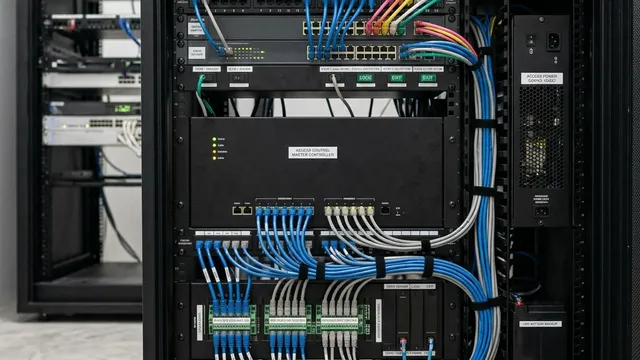
Most people notice the reader. I pay more attention to the controller. The reader is the visible face of the system; the device people interact with every day. The controller is what most people never see, typically installed in a comms room or cabinet, and it is the most consequential component in the entire system.
The controller decides who gets access and when, which events are recorded, which alarms are triggered, and how the system behaves under different conditions. More importantly, the controller platform determines what options the organisation will have in the future, which integrations are available, what the software upgrade path looks like, whether the licensing model scales affordably as the building grows, and what support structure exists when something goes wrong.
One mistake I see repeatedly is organisations comparing readers meticulously while giving little attention to the controller platform. The reader can often be changed or replaced relatively easily; the physical interface at the door is modular in most professional systems. The controller almost never changes once installed. The software ecosystem, the database of users and permissions, the audit logs, the integration connections; all of these are built on the controller platform and cannot be migrated without significant effort. Choosing the controller based on today's requirements rather than where the building needs to be in five years is a decision that organisations typically regret within three years of installation.
KEY POINT
Spend proportionally more time evaluating the controller platform than the reader. The reader is the part everyone can see. The controller is the part that determines what you can do, and what you cannot, for the lifetime of the installation.
Cards, Mobile Credentials, or Biometrics?
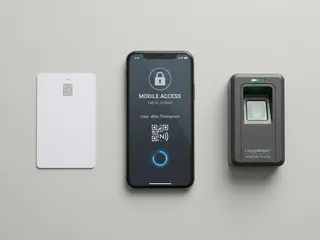
Cards remain the most widely used credential in Singapore commercial and industrial access control. They are familiar, reliable, and affordable at scale. The infrastructure to issue, manage, and revoke them is well-established. The limitation is that cards can be shared, lost, forgotten, or, with older card technologies; cloned. For many office environments these are acceptable risks managed through policy and periodic audits. For environments where card sharing is a genuine security concern, the card alone is insufficient.
Mobile credentials have grown significantly in adoption over the past few years and represent a meaningful shift in how access is managed. Most people carry their smartphone everywhere, which eliminates the lost-or-forgotten card problem. Issuing a credential to a new employee can be done remotely in minutes. Revoking access when someone leaves is immediate rather than dependent on the physical card being returned. For organisations with high staff turnover, frequent contractors, or regular temporary access requirements, the administrative advantages of mobile credentials are substantial. The dependency on smartphone battery and connectivity are the practical limitations to weigh against those advantages.
Biometrics; fingerprint and facial recognition; eliminate the sharing problem entirely because the credential is inseparable from the person. They are increasingly common in Singapore commercial environments for high-security zones, and face recognition in particular has become significantly more capable and more affordable over the past five years. The practical considerations are user acceptance, the time required to enrol a large user base, and the privacy implications in some regulatory contexts. In practice, many larger Singapore installations use a hybrid approach: cards or mobile credentials for general office access, biometrics for server rooms, finance areas, or other restricted zones where the higher assurance justifies the additional infrastructure.
PLANNING POINT
Credential choice should be matched to zone risk level, not applied uniformly across the building. High-traffic general areas suit cards or mobile credentials for convenience. High-security restricted areas benefit from biometric or multi-factor authentication where the additional friction is justified by the access risk.
Good Security Starts With Good Zoning
One of the most common design weaknesses I encounter is treating every door in a building identically. Not every door requires the same level of protection, and applying uniform access policy across an entire building either over-restricts low-risk areas or under-protects high-risk ones.
A well-designed access system divides the building into zones that reflect the actual risk profile of each area. Public areas; reception, waiting spaces, meeting rooms used by external visitors; may be accessible to anyone during business hours with minimal control. General staff areas such as open office floors, pantries, and staff facilities are accessible to all employees but not to visitors or contractors. Restricted areas; server rooms, finance departments, HR records storage, warehouse areas with high-value inventory; require specific role-based permissions and generate audit trail entries for every access event. Management areas such as boardrooms used for confidential discussions, executive offices, and any room with physical access to sensitive systems or records sit at the highest access tier.
The objective of zoning is not to make daily life difficult for staff; it is to ensure that a person's access permissions reflect their actual role and legitimate need. A finance clerk who can access every door in the building including the server room and the warehouse is not more convenient; they are a security liability. Good zoning means that losing a single access credential compromises only the zones that credential was permitted to access, not the entire building.
DESIGN RULE
Design access zones before assigning credentials. The zone structure should reflect the actual risk hierarchy of the building, not be reverse-engineered from the credential categories available in the software.
Access Control Is Better When It Works With CCTV
A standalone access control system creates a log of events. An integrated access control and CCTV system creates a picture of what actually happened. The difference is significant, and it becomes most apparent when something goes wrong.
An access event record showing that a specific credential entered the server room at 8.14pm on a Tuesday is useful. The associated CCTV footage showing what happened after entry, whether the person who entered matches the credential holder, and what they did while inside is significantly more useful. The access record establishes the fact of entry. The camera establishes the context. Together they create an evidence chain that neither system produces independently.
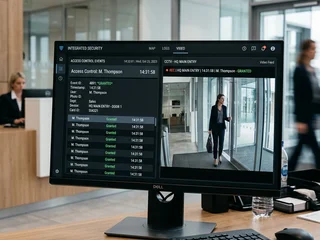
The same integration adds value across a range of everyday scenarios; a forced door alarm that triggers the associated camera to record and alert, a failed access attempt that pulls up the camera view to show who was trying to enter and whether they appeared to be testing the door, an after-hours access event that automatically generates a notification with the camera clip attached. For building managers and security personnel, this kind of integrated event visibility dramatically reduces the time required to investigate incidents and significantly increases the likelihood of identifying what actually happened rather than what was supposed to happen.
KEY POINT
When planning an access control installation, establish from the outset whether integration with the CCTV system is a requirement. Camera associations to access points, event-triggered recording, and unified management platforms all need to be specified at the design stage; they are significantly harder to add retrospectively.
The Administrative Problem Nobody Thinks About
Most access control systems work well on the day they are installed. The challenge typically begins two or three years later, when the gap between the system's user database and the organisation's actual personnel situation has grown considerably without anyone noticing.
A practical Singapore scenario: a commercial building installs access control for 80 staff across three floors. Over the following two years, 25 staff turn over; some leave the company, some move to different offices, some change roles. In a well-managed system, each departure triggers an immediate revocation of that person's access credentials. In practice, this process is often delayed, inconsistent, or simply forgotten during busy periods. Two years after installation, the system may have 30 or 40 active credentials belonging to people who no longer work at that location. Each of those credentials represents a potential access vulnerability; a former employee who retained their card, a contractor whose temporary access was never revoked, a visitor pass that was never returned and never disabled.
The question worth asking is not whether the system can control doors; almost any system can. The more important question is how easy the system makes day-to-day administration. Can access be revoked instantly when someone leaves, from any device, without needing to be physically present at the system? Can a manager review the full list of active credentials for their department without submitting a request to IT? Can temporary access for a contractor be set to expire automatically at a defined date and time? These administrative capabilities are what determine whether the system remains secure in practice over its operational lifetime, not just in the first week after installation.
KEY POINT
Administration failures create more security problems than hardware failures in access control systems. When evaluating platforms, test the administration workflow; revocation, audit reporting, temporary access management, as rigorously as the hardware specification.
The Question Worth Asking First
Most organisations begin an access control evaluation by asking which reader to buy or which card technology is current. Those are reasonable questions that will need to be answered. But they are not the questions that determine whether the system serves the organisation well five years from now.
The question worth asking first is how the system will be managed in five years, who will administer it, how access changes will be processed, how the system will accommodate building changes and staff turnover, and whether the controller platform chosen today can still be supported and extended at that point. The reader is the easy part. The long-term management is where the real value of a well-specified system becomes apparent, and where a poorly specified one becomes a recurring cost and a recurring liability.
Securevision Verdict
A multi-door access control system is not a collection of locks and readers. It is an operating system for the building, and the decisions made during design affect security, convenience, administration, and integration capability for many years. Readers can be replaced. Card technologies can be upgraded. Software can evolve. But a poorly designed access control architecture is something organisations typically spend years trying to work around.
The best time to get the architecture right is before the first reader is installed. That means choosing the controller platform for where the building needs to be in five years, designing the zone structure before assigning credentials, and ensuring that integration with CCTV and other security systems is part of the brief from the start, not an afterthought once the access control is already live.
In Short
We have specified multi-door access control systems across a wide range of Singapore commercial properties, from small offices with three doors to large estates with dozens of controlled entry points. The consistent lesson is that the controller platform and the zoning plan matter far more than the reader hardware. Get those two decisions right at the outset, and the system will serve the building well for a decade or more. Get them wrong, and the first expansion will require starting again.

Frequently asked questions
What is a multi-door access control system?
A multi-door access control system is a networked installation where a central controller manages multiple doors, each with its own reader and lock. Unlike standalone systems where each door operates independently, a multi-door system allows central management of users, access rights, and audit logs across all doors from a single software interface.
How many doors does a system need before it should be networked?
As a practical rule, any installation of three or more doors benefits significantly from a networked controller. With two doors, standalone systems can sometimes be managed manually without too much difficulty. With three or more, the administrative overhead of managing users across separate standalone readers becomes significant enough that a networked solution is almost always the more practical long-term choice.
What is access zoning and why does it matter?
Access zoning is the practice of grouping spaces within a building according to who should be permitted to enter them. A well-zoned system means that a receptionist can access the front office but not the server room, while an IT manager can access both. Zoning is designed at the beginning of the project and determines how access rights are assigned throughout the building's life.
Can I add more doors to the system later?
Yes, in most cases; provided the controller platform selected at installation has sufficient capacity and the cabling infrastructure allows for expansion. This is one of the most important questions to ask during specification. Some controllers support only a fixed number of doors and cannot be expanded. Others are modular and can grow with the building. Confirm the maximum door count and expansion method before committing to a platform.
What credentials can a multi-door system use in Singapore?
Most multi-door systems in Singapore support proximity cards (RFID), key fobs, PIN codes, and increasingly mobile credentials using Bluetooth or NFC on smartphones. Biometric readers; fingerprint or facial recognition; can be added at specific doors where higher security is required. The choice of credential affects the user experience, administration overhead, and cost per door.
How does access control integration with CCTV work?
Integration between access control and CCTV allows the system to automatically display camera footage at the relevant door whenever a card is presented or an access event occurs. This is useful for verification; confirming that the person who presented the card matches the cardholder, and for investigation, allowing security staff to quickly retrieve footage linked to a specific access event without manually searching through recordings.
What happens to access rights when a staff member leaves?
In a networked multi-door system, a staff member's card or credential can be deactivated from the central management software immediately upon departure, removing access to all doors simultaneously. This is one of the most significant practical advantages over standalone systems, where a leaver's card might retain access to individual doors until someone physically programmes each reader separately.
What is anti-passback and does my system need it?
Anti-passback is a security rule that prevents a card from being used to enter a door a second time without first having been used to exit. It prevents card sharing, where one person taps in and passes the card back through a barrier for another person to use. It is most relevant in high-security environments with physical barriers such as turnstiles or mantrap doors. For standard commercial office environments without barrier control, anti-passback is rarely required.
How long does access log data need to be retained in Singapore?
Singapore's Personal Data Protection Act does not specify a fixed retention period for access control logs specifically, but the general principle is that data should not be retained longer than necessary for the purpose it was collected. Many organisations retain access logs for three to twelve months. For regulated industries or premises with specific security requirements, longer retention may be appropriate.
What is the difference between Wiegand and OSDP?
Wiegand is an older communication protocol between the card reader and the controller. It is widely supported and reliable, but transmits data in an unencrypted format and does not support two-way communication. OSDP (Open Supervised Device Protocol) is a newer standard that supports encrypted communication, two-way data exchange, and remote reader management. For new installations where security is a priority, OSDP is the preferred protocol.
How much does a multi-door access control system cost in Singapore?
Cost varies significantly depending on the number of doors, the controller platform, the credential type, and whether integration with other systems is required. A basic three-door networked system with proximity card readers can start from around $3,000 to $5,000 installed. Accurate pricing requires a site assessment and specification; contact us for a proposal based on your specific requirements.
Who installs and maintains access control systems in Singapore?
Security system integrators licensed under the Singapore Police Force's Licensing Division handle the installation and maintenance of access control systems. Installers must hold the appropriate PLRD licence for the work they carry out. When selecting a contractor, ask to see their licence documentation and confirm that the system proposed is supported with local maintenance coverage and spare parts availability.