- When you tap an access card, the card does not decide whether the door opens; it only identifies itself. The decision is made by the controller, which checks permissions and sends the unlock signal.
- Fail-safe locks (unlocks when power is lost) are required for fire exit doors under Singapore's Fire Code. Fail-secure locks (stays locked when power is lost) are used for server rooms and high-security areas.
- Most Singapore access systems use Wiegand; a decades-old protocol that sends card data without encryption. OSDP is the modern encrypted alternative increasingly specified for commercial and government installations.
- Anti-passback prevents a card from being used to enter the same area twice without first exiting; it stops cardholders from passing their card back through a door to let an unauthorised person in.
- Networked access control systems log every entry by individual, door, and timestamp; this audit trail is increasingly relevant for WSHA compliance and cybersecurity requirements.
- Access control logs are personal data under Singapore's PDPA; organisations need a defined retention policy and restricted access to those records.
The Four Components That Make Up a Door Access System

Most people tap their access card without thinking about what happens in the fraction of a second between the tap and the click. Yet in that brief moment, four separate components are working together. Understanding each one is what lets you ask the right questions when specifying, reviewing, or troubleshooting a system.
The card or credential contains a unique identity number. The most common type in Singapore commercial premises is a 13.56 MHz MIFARE card; the white or branded card most office workers carry. What surprises many people is that the card does not store access permissions. It only stores an identity number. The decision about whether that identity is allowed through the door is made somewhere else entirely.
The reader is the device mounted on the wall beside the door. Its job is to read the card's identity and pass that information to the controller. Readers vary in what they can read; card only, PIN, biometrics, mobile credentials, and in how they communicate with the controller. The reader makes no access decision of its own.
The controller is the real decision-maker. It receives the card identity from the reader, looks it up in the access database, checks whether the cardholder has permission for that door at that time of day, and sends a signal to the lock. The controller is typically installed in a secured location such as a server room or electrical riser; away from the door it manages. One controller can manage multiple doors.
The lock is the physical device that actually secures the door. The controller does not open the door itself; it simply tells the lock what to do. The two most common types in Singapore are electromagnetic locks (EM locks) and electric strikes. The choice between them, and the critical question of how they behave during a power failure, is discussed in Section 2.
KEY POINT
The card does not grant access; the controller does, based on the card's identity. This distinction matters when diagnosing problems. When a card stops working, the fault is almost always in the database, the permissions, or the controller configuration, not in the card itself. We have attended sites where multiple users suddenly found their cards were rejected. The cards were working perfectly. The issue was a software configuration change that had reset permissions for an entire user group.
Fail-Safe vs Fail-Secure; The Most Important Design Decision
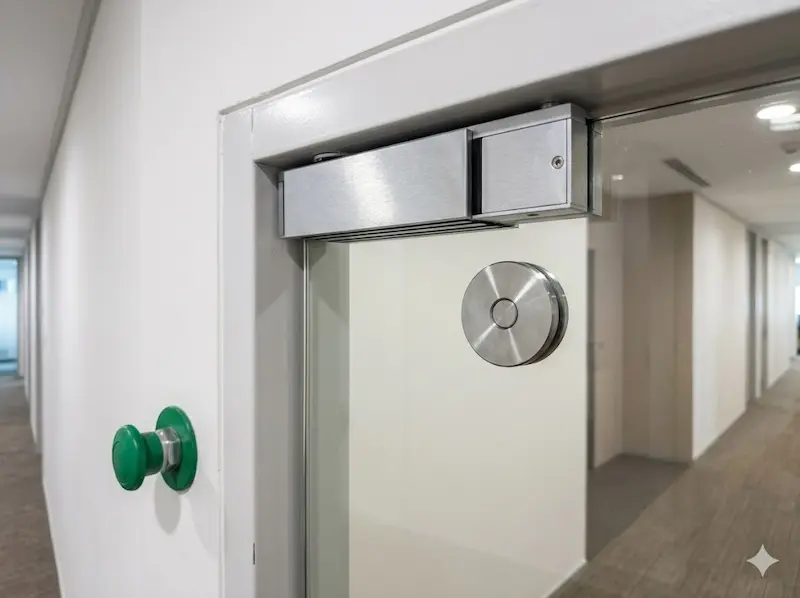
This is the most important design decision in any door access system, and the one most often made without proper consideration. When power fails, what should the door do? The answer determines both the security of the installation and its compliance with Singapore's fire safety requirements. The two options are fail-safe and fail-secure, and they are exact opposites.
Fail-safe (unlocks when power is lost) means the lock releases and the door opens when power is cut. Electromagnetic locks are inherently fail-safe; they hold the door shut by magnetic force, and that force disappears when power disappears. Fail-safe is the correct and legally required behaviour for any door that forms part of a fire exit or emergency escape route under Singapore's Fire Code. In a fire evacuation, every door on an escape route must open freely without requiring any action from the person trying to leave.
Fail-secure (stays locked when power is lost) means the lock remains locked when power is cut. Electric strikes and motorised bolts can be configured as fail-secure. This is appropriate for server rooms, high-security areas, or locations where maintaining the security perimeter during a power event is the priority, and where there is no fire exit requirement.
Every door in a system needs a conscious decision about its fail state. The wrong choice creates either a security gap during power failures or, more critically, a fire safety violation that could endanger lives. For any door on a fire escape route, fail-safe is not optional. For high-security internal doors with no egress function, fail-secure may be appropriate. Confirm this with your installer and, where required, with the Singapore Civil Defence Force (SCDF) before installation.
DESIGN RULE
Every door in your system needs a fail-state decision made before equipment is specified. The Singapore Fire Code has specific requirements for egress doors; getting this wrong after installation is expensive to correct and may require SCDF approval before the building can be occupied or recertified.
How the Card Talks to the Controller; Wiegand and OSDP
Once a reader has identified a card, it needs to send that identity to the controller. The protocol used for this communication has significant implications for the security of the system, and most people never think about it at all.
Wiegand has been the industry standard in access control for decades. It is simple, reliable, and compatible with virtually every access control panel on the market. It sends the card identity as a stream of electrical pulses down a cable. Its main limitations are that it transmits data without encryption and in one direction only; the reader sends to the controller, but the controller has no way to confirm the reader is legitimate or detect if it has been tampered with.
These limitations create two practical security issues. First, the card identity being transmitted can be intercepted by someone with access to the reader wiring. Second, a device that mimics a card reader can inject false card identities into the system without using any card at all. Neither attack is particularly sophisticated, and both require only brief access to the reader wiring, which in many buildings is accessible in common areas, lift lobbies, or car parks.
OSDP; the Open Supervised Device Protocol; was developed to address these limitations. It encrypts communication between reader and controller, operates bidirectionally so the controller can verify the reader is genuine, and detects tampering or disconnection. OSDP is increasingly specified for new commercial and government installations in Singapore where security is a genuine concern. For most standard office premises, Wiegand remains in use, but for government buildings, data centres, financial institutions, and any environment with heightened security requirements, OSDP is the correct specification.
Securevision's View
We have visited sites where the access control system was performing without fault; correct doors opening, accurate reports, no user complaints; while the underlying communication protocol left the system vulnerable to attacks that require no specialist knowledge. Functionality and security are not the same thing. If your system uses Wiegand-connected readers and the areas being protected are sensitive, it is worth asking your contractor whether the readers support OSDP and whether the existing controller can accept an OSDP connection.
Standalone vs Networked Systems
Not all access control systems are managed in the same way, and the difference between standalone and networked systems is more significant than it might appear; particularly as an installation grows beyond a handful of doors.
In a standalone system, each door operates independently. The controller is built into the reader at each door, and cards are programmed directly at each unit. These systems are simple and cost-effective for very small installations; a single door or two. The limitation becomes apparent quickly: adding a new card, removing a terminated employee, or changing access permissions means physically visiting and programming every reader separately. For three doors, this is manageable. For twenty, it is not.
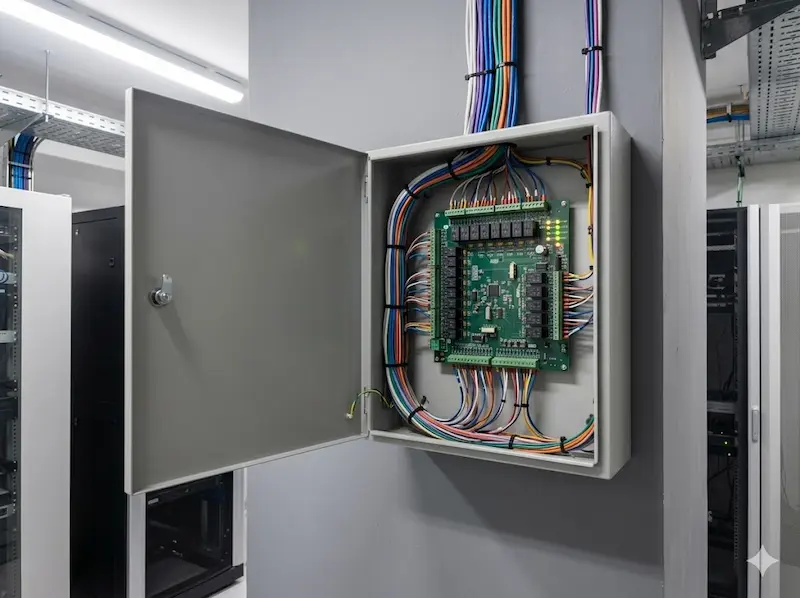
In a networked system, all door controllers connect back to a central platform; either a server on the premises or a cloud-based management system. All cards, permissions, and access schedules are managed from a single interface. Adding a new card or removing access for a terminated employee takes seconds and applies across all doors simultaneously. For any installation of more than five doors, a networked system is almost always the right specification; the additional upfront cost is recovered quickly in administration time alone.
Anti-Passback
Networked systems support a feature called anti-passback (a rule that prevents a card from being used to enter the same area twice without first exiting). Without anti-passback, a cardholder can tap into an area and then pass their card back through the door to allow another person to enter without credentials. Anti-passback prevents this by requiring that the system records an exit before it will accept another entry from the same card. It also produces a more accurate occupancy record, which is relevant for emergency evacuation and for WSHA compliance in workplaces where zone-level occupancy matters.
Integration With Other Systems
Networked access control systems can be integrated with CCTV, intercoms, building management systems, and visitor management platforms. The most common and immediately useful integration is with CCTV; so that every access event triggers a camera image capture at that door. This means the system records not just which card was used, but what the person using it actually looked like at that moment. For incident investigation and for demonstrating due diligence, this combination is significantly more valuable than either system operating independently.
Access Logs and PDPA
Every entry and exit recorded by a networked access control system; the card identity, the door, the timestamp; is personal data under Singapore's Personal Data Protection Act (PDPA). Most organisations have PDPA policies for HR records and customer data, but fewer have addressed access control logs explicitly. The PDPA requires a defined retention period, restricted access to the logs, and that employees be informed their access data is being collected. Retaining logs indefinitely with no retention policy and no access restriction is not a compliant position. A reasonable approach for most commercial organisations is 90 days as a minimum, one year for areas subject to WSHA or compliance requirements.
Securevision's View
We occasionally visit sites where staff spend significant time managing cards manually at individual doors. The system works, but it no longer scales with the organisation. What was practical for three doors becomes genuinely burdensome at fifteen. The decision to move to a networked system is almost always made later than it should be, and always after some incident; a termination that took too long to propagate across all doors, a lost card that remained active longer than anyone realised, or an access log request that could not be fulfilled because the records were incomplete. A networked system removes all of these problems and costs less to run over five years than the equivalent administration time for a standalone system.
Beyond Cards; Mobile Credentials, Face Recognition and QR Codes
Access cards have been the default credential in commercial buildings for decades, and they remain effective and widely used. But they are no longer the only option, and many organisations are now deploying alternative credentials alongside or instead of physical cards.
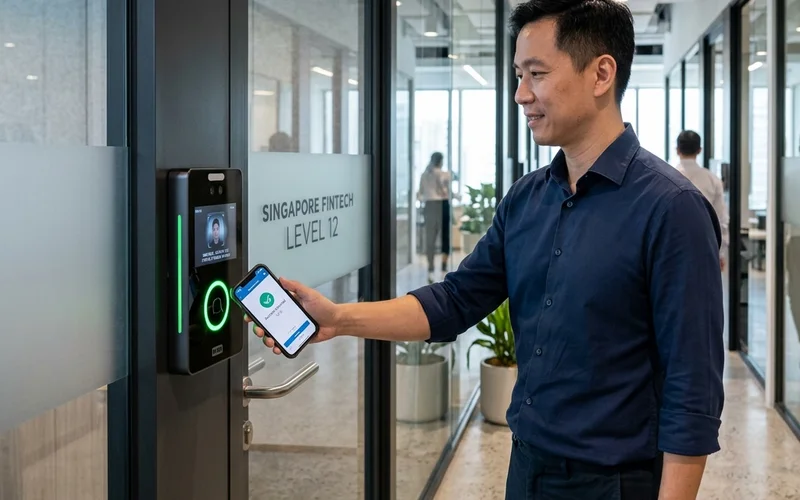
Mobile credentials use a smartphone; via Bluetooth Low Energy or NFC, as the credential. The phone broadcasts the same identity information as a card would, but with the credential stored securely in the phone's encrypted storage rather than on a plastic card. Mobile credentials eliminate the cost and administration of issuing physical cards, and they are harder to clone than most physical card technologies. The main limitation is that they require users to have a smartphone and to have the app active, which is not appropriate for all environments or user populations.
Face recognition readers use a camera and processing software to verify the identity of the person presenting themselves at a door. No card or phone is required; the person's face is the credential. Face recognition access control is increasingly deployed in Singapore commercial buildings for staff entrances, and in condominiums for resident access. Under Singapore's PDPA, biometric data, including face recognition templates; is treated with heightened sensitivity, and organisations deploying face recognition must obtain appropriate consent and store the biometric data with adequate protection.
QR code access is increasingly used for visitor management; a visitor pre-registers, receives a QR code on their phone, and presents it at the reader to gain temporary access. This eliminates the need to issue temporary cards, creates an automatic access record, and allows time-limited access to be granted remotely without any manual intervention at the door. Many modern access control platforms combine all three credential types at the same reader, allowing the building to use different credentials for different user populations; cards for permanent staff, face recognition for frequent visitors, and QR codes for one-time contractors.
KEY POINT
The important question is not whether you use a card, a phone, or a face. It is whether the credential technology provides an appropriate level of security for the areas being protected, and whether the system can support the operational needs of the people using it. A senior care facility and a data centre have very different requirements, even if both are deploying access control at the same door type.
Is Your Current System Still Good Enough?
For many organisations, an access control system that is still working is considered a system that does not need attention. Doors open, reports are generated, users are not complaining. That view is increasingly difficult to maintain, and three pressures in particular are prompting organisations across Singapore to review systems they had previously assumed were adequate.
The first is technology. Card credential technologies used in many older Singapore systems; proximity cards and Mifare Classic smart cards; have documented vulnerabilities that allow them to be cloned with equipment now readily available and inexpensive. Wiegand communication, used between most older readers and their controllers, transmits data without encryption. Systems that function perfectly may be providing a level of physical security that is materially lower than the organisation believes.
The second is regulation. Singapore's Workplace Safety and Health Act (WSHA), most recently amended in 2024, creates explicit obligations for workplace occupiers to be able to demonstrate who was on site and which areas they accessed; particularly for restricted or hazardous zones. The June 2024 mandate for video surveillance at construction worksites signals the regulatory direction clearly. Access control systems with zone-level logging that produces reliable audit trails are increasingly a compliance asset, not just a security tool.
The third is cybersecurity. Singapore's Cybersecurity Act, amended in 2024 with provisions in force from October 2025, means that physical access to server rooms, network equipment, and sensitive systems is now part of the cybersecurity compliance picture. An organisation that cannot produce an audit trail of who physically accessed its sensitive systems is exposed in ways that its cybersecurity policy may not yet have addressed.
A full treatment of these three drivers, with the specific regulatory requirements and practical implications for each, is in the companion article: Three Reasons Singapore Organisations Should Review Their Access Control System Now.
Securevision's View
Most people only think about access control when a card stops working. In reality, a card access system is doing far more than opening a door; it is managing identity, permissions, security, and increasingly, regulatory compliance. Understanding the basics helps building owners, facility managers, managing agents, and MCST councils ask better questions and make better decisions. And when it comes to security systems, asking the right questions is often more valuable than knowing every technical detail.
Frequently Asked Questions
When I tap my card and it does not work, what has gone wrong?
In most cases, the card itself is functioning correctly. The most common causes of a rejected card are that the card's identity has been removed or suspended in the access control database, that the access schedule for that card has expired or restricts access at that time of day, or that the door's permission group has been changed and the card is no longer included. A card that is physically damaged; cracked, demagnetised, or with a failed chip; is much less common than a database or configuration issue. The first step in troubleshooting is always to check the software, not the card.
What is anti-passback and why does it matter?
Anti-passback is a feature that prevents a card from being used to enter the same area twice without first recording an exit. Without it, a cardholder can tap into a building and then pass their card back through the door to allow a second person to enter without credentials. Anti-passback prevents this by requiring an exit event before the system will accept another entry from the same card. It also maintains a more accurate occupancy record, which is useful for emergency evacuation management and increasingly relevant for WSHA workplace safety compliance.
What is the difference between fail-safe and fail-secure?
Fail-safe means the lock unlocks when power is lost; the door opens. This is required for all doors on fire escape routes under Singapore's Fire Code. Fail-secure means the lock stays locked when power is lost. This is appropriate for server rooms or high-security areas with no egress function. Every door in a system needs a deliberate decision about which mode is correct; getting it wrong creates either a security gap or a fire safety violation.
What is the difference between Wiegand and OSDP?
Wiegand is the protocol used by most older card readers to send card data to the access control panel. It is simple and reliable but transmits data without encryption, meaning the data can be intercepted. OSDP is the modern alternative; it encrypts the communication, operates in both directions, and allows the controller to verify the reader is genuine and detect tampering. Most new installations in environments with meaningful security requirements now specify OSDP.
What is the difference between standalone and networked access control?
In a standalone system, each door controller operates independently and cards must be programmed at each door separately. In a networked system, all doors are connected to a central platform and managed from a single interface; adding a card, removing access, or pulling an audit log applies to all doors simultaneously. For any installation of more than five doors, a networked system is almost always the right specification. The administration time savings alone typically justify the additional cost within the first year.
Can I use my phone instead of an access card?
Yes; mobile credentials are increasingly available on modern access control readers. The phone communicates with the reader via Bluetooth Low Energy or NFC and presents the same identity information as a card would, but stored securely in the phone's encrypted storage. Mobile credentials are harder to clone than most physical cards and eliminate the cost and administration of issuing physical cards. They require users to have a compatible smartphone and the relevant app installed and active.
Are access control logs personal data under Singapore's PDPA?
Yes. Every access log entry records an individual's identity, the door they accessed, and the time; all of which constitute personal data. Organisations must have a defined retention period for these logs, must restrict access to authorised personnel, and must inform employees that their access data is being collected. Most organisations have not formally addressed access control logs in their PDPA framework. A reasonable minimum retention period is 90 days; areas subject to WSHA or compliance requirements may justify longer retention.
How long does an access control system last?
The hardware; readers, controllers, and locks, typically provides eight to twelve years of reliable operation when properly maintained. The software platform may need updating every five to seven years to remain supported and to maintain compatibility with current operating systems and integration platforms. The credential technology; the cards themselves; may become a security concern before the hardware fails. Mifare Classic cards, still widely used in Singapore, have known vulnerabilities that were publicly documented over a decade ago. Hardware longevity and security adequacy are different questions and should be assessed separately.
Can I upgrade part of the system without replacing everything?
In many cases, yes. The most common partial upgrade is replacing the card readers with OSDP-capable readers that support modern encrypted credentials, while retaining the existing access control panels and software. This addresses both the credential vulnerability and the Wiegand communication protocol issue without a full system replacement. Whether this is viable depends on the age and capability of the existing panels. A site assessment will confirm which upgrade path is most cost-effective for your specific installation.
Why is the card access system connected to cybersecurity compliance?
Physical access to servers, network equipment, and sensitive systems is increasingly considered part of the cybersecurity compliance picture, not just physical security. Under Singapore's Cybersecurity Act; amended in 2024 with provisions in force from October 2025; organisations handling sensitive systems face increasing requirements to demonstrate that access is controlled and auditable. An access control system with zone-level logging for the server room, network cabinet, and data storage areas produces exactly the audit trail that cybersecurity assessments and the Cyber Trust Mark framework require. See our companion article for a full discussion: Three Reasons Singapore Organisations Should Review Their Access Control System Now.
In Short
When you tap an access card, the card identifies itself; the controller decides whether the door opens. A card access system has four components working together: the credential, the reader, the controller, and the lock. The most important design decisions are how the lock behaves during a power failure, how the reader communicates with the controller, and whether the system logs access at a level of detail that supports both security management and compliance requirements. Understanding these basics is what separates an organisation that manages its access control system well from one that discovers its limitations at the worst possible moment.