- Installing a security system is the beginning of the relationship, not the end of it; what happens in the months and years afterwards determines how well the system actually protects the property.
- A proper handover covers three things: a walk test confirming every detector works, user training for everyone who uses the system, and documentation the homeowner can find when something goes wrong.
- Most support calls are not about break-ins; they are about beeping keypads. The system is usually trying to communicate a fault that nobody has been trained to recognise.
- Regular maintenance catches the gradual degradations; ageing batteries, dirty detectors, loose connections; before they become failures at the wrong moment.
- The long-term reliability of your installer matters as much as the equipment they install. The cheapest installer today may not be around in three years.
- Before buying a security system, ask: who will I call three years from now?
Everyone Talks About Installation. Few Talk About What Happens Next.
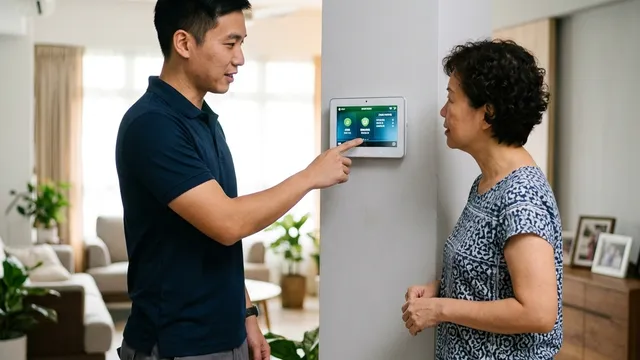
Most security companies spend considerable time talking about installation. The site survey, the cameras, the alarm system, the wiring, the mobile app. Then the installer leaves, and that is when many homeowners discover something they had not anticipated. They own a security system but are not entirely sure how to use it.
A few weeks later they have forgotten how to bypass a zone. Six months later the keypad starts beeping and nobody knows why. A year later the battery needs replacing and they are not sure which battery. And at some point they realise that buying a security system is only the beginning of the relationship with it. When something happens; a false alarm, a fault notification, a genuine incident; the question is simple: who are you going to call?
After more than 35 years in the security industry, I have learned that a security system is only as good as the support standing behind it. The equipment matters. But the competence and longevity of the company maintaining it matters just as much, and it is the thing most homeowners never think to ask about before signing.
KEY POINT
The installation is visible and easy to evaluate. The support that follows is invisible until you need it. By then, it is too late to choose a different provider.
The Day the Installer Leaves
Before my team leaves a site, I always ask one question: if the alarm goes off tonight, will the customer know what to do? That sounds obvious. But a surprisingly large number of installations are technically complete but operationally unfinished; the equipment is installed and configured, but the people who will use it have not been prepared to use it confidently.
A proper handover starts with a walk test. Every detector should be triggered in the presence of the customer before the team leaves. Doors opened, windows checked, motion detectors activated, panic buttons tested. The customer should see exactly how each zone responds on the keypad and in the app. The objective is simple: everyone present should have confidence that the system is working before the van pulls away. A system that has never been tested in front of the people who depend on it is a system those people will not trust when it matters.
User training comes next. The homeowner may understand the system, but what about the domestic helper who will be home during the day? The teenagers who come and go independently? The spouse who rarely thinks about the alarm until it starts beeping while the homeowner is away? A security system is only effective if every person who interacts with it knows how to arm it, disarm it, respond to an alarm, use the mobile app, and recognise what the warning messages mean. One undertrained user is enough to generate recurring false alarms or; worse, to leave the system disarmed because it felt too complicated.
Documentation is the third element that is routinely treated as an afterthought and consistently regretted later. The user manuals, the zone description sheet, the warranty information, and the emergency contact details for the installer should be physically present in the property and stored somewhere findable, not only in a folder that moved house three years ago or an email that cannot be located. These are the first things people search for when something goes wrong, and the first things they cannot find.
PLANNING POINT
Before the installer leaves, confirm that you can arm and disarm the system yourself, that you know how to check which zone triggered an alarm, and that you have a contact number for the installer that you can find in 30 seconds. If any of those three things is unclear, ask before the van leaves.
The First False Alarm
Sooner or later, almost every alarm system generates a false alarm. Someone forgets the system is armed. A domestic helper opens a protected door before disarming. A family member enters through an unusual route. A motion detector activates unexpectedly during a power restoration. The question is not whether a false alarm will happen; it will. The question is how quickly you can identify what caused it.
Modern alarm systems keep detailed records of every event, which zone activated, the exact time, and the sequence of events before and after. That information makes identifying a cause straightforward if someone knows how to read it. The worst response to a false alarm is to clear it, reset the panel, and hope it does not happen again without understanding why it occurred. A recurring false alarm that goes uninvestigated will eventually be ignored, and an alarm system that is ignored has stopped doing its job.
The system is usually trying to tell you something. A zone that activates repeatedly at the same time each day is not a random fault; it is a pattern. A particular door contact that generates occasional activations during the night may have a loose fit, a marginal magnet gap, or a wiring connection that is beginning to fail. Each of these is a cheap fix if caught early and a more significant problem if left until the zone stops reporting altogether.
KEY POINT
Never clear a false alarm without logging what triggered it and when. Patterns in false alarm data are how problems are identified before they become failures, or before a genuine alarm starts being treated as routine.
The Beeping Keypad That Drives Everyone Crazy
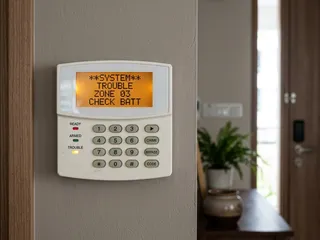
If there is one thing that generates more support calls than anything else in alarm maintenance, it is the beeping keypad. Not break-ins. Beeping keypads. Almost every alarm owner encounters this eventually; the panel starts making an intermittent sound, nobody in the household knows why, everyone wants it to stop, and the easiest short-term response is to call the installer and ask them to come and silence it.
In almost every case, the system is doing exactly what it was designed to do. It is alerting the household to a condition that requires attention. The most common causes are a backup battery that has dropped below adequate voltage, an AC power failure that the panel has detected and logged, a communication fault where the panel has lost contact with the monitoring centre, a detector reporting a tamper or fault condition, or a zone wiring issue that has moved into the panel's warning threshold.
A practical example: a customer calls to report that the keypad has been beeping every thirty seconds since the previous evening. On inspection, the backup battery, which has not been replaced in six years; has dropped to a voltage level that the panel considers inadequate for backup purposes. The panel has been reporting this condition for weeks through a low-priority indicator that nobody noticed. The beeping is the panel escalating from a passive indicator to an active one. Battery replaced, beeping stops, and the system returns to normal operation. The entire visit takes twenty minutes. The same issue left for another six months means a flat battery during the next power outage, which may coincide with an event that matters.
KEY POINT
A beeping keypad is not a malfunction; it is communication. Before calling for support, check the display for a fault code or indicator. In most modern systems, the display will tell you exactly what the panel is reporting. The most common cause is a battery that needs replacing, which is a straightforward task once the right battery type is identified.
Why Maintenance Matters
The most common objection to scheduled alarm maintenance is simple: if the system is working, why spend money on a visit? I have seen alarm systems running for ten years with very little attention, and some of them continue working reasonably well. The problem is that nobody can tell from the outside whether they will continue working when something actually happens.
Batteries degrade gradually. Detectors accumulate dust on their sensing elements, which can reduce sensitivity over time or in some cases cause intermittent false activations. Wiring connections in terminal blocks can work loose over years of temperature cycling. Communication modules can lose their configuration after a panel firmware update or a network change. Software on older panels may not support the current communication protocols used by the monitoring centre. Each of these problems develops slowly and invisibly, and each one becomes apparent at the worst possible moment without a maintenance programme that catches it first.
The objective of maintenance is not to repair a broken system. It is to prevent the system from reaching a failure state silently, without anyone knowing the protection has degraded. An annual visit that checks battery voltage under load, tests every detector, verifies communication to the monitoring centre, and reviews the event log for patterns costs far less than an emergency call-out, and far less than discovering after an incident that the system was not functioning the way everyone assumed it was.
PLANNING POINT
Schedule an annual maintenance visit for your alarm system. If your installer does not offer one proactively, ask. A system that has never been serviced is a system whose actual condition is unknown, and unknown is not the same as good.
What Happens If Your Installer Disappears?
This situation is more common than most homeowners expect. The security company that installed the system closes, is acquired, or simply stops serving residential customers. The technician who did the installation has moved on. The passwords for the alarm panel are not documented anywhere. Nobody knows the model number of the communicator. A system that was working perfectly suddenly has no one accountable for supporting it.
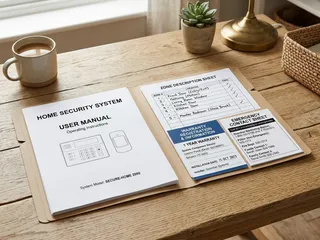
The first practical step when this happens is to identify the equipment. Photograph the alarm panel, the keypad, any communication modules, and the detector model labels. Look for a manufacturer name and model number on each component. This information is more valuable than it appears; a licensed security integrator can often take over support for an existing system from a recognised manufacturer, programme access to the panel, and re-establish the monitoring connection, without needing to replace any hardware. The equipment does not need to be replaced just because the original installer is no longer available.
The more complete the documentation the homeowner has retained, the easier and cheaper that takeover process is. Panel model and firmware version, zone descriptions, user code structure, monitoring centre account details; any of this that is on file reduces the diagnostic time significantly. A homeowner with a folder of system documentation is in a fundamentally better position than one who can only point at the keypad on the wall.
PLANNING POINT
Keep a physical record of your alarm panel model, keypad model, monitoring account number, and zone descriptions somewhere accessible in the property. Update it when anything changes. If your installer ever ceases to operate, this information is what enables another licensed company to take over support without requiring a full replacement.
The Question I Would Ask Before Buying
When most people evaluate a security system, they ask about price, camera count, and which alarm panel is better. Those are reasonable questions. But after decades of seeing how security installations age in practice, I would add one more question to that list, and I would ask it before signing anything.
Who will I call three years from now? The cheapest installer today may not be operating in three years. The technician who did the installation may have moved on in eighteen months. The company may have pivoted away from residential support or been absorbed by a larger organisation with different service priorities. A security system is not a one-time purchase. It is a ten to fifteen year relationship with the equipment and with the people responsible for maintaining it. The long-term reliability of the company behind the installation matters as much as the equipment itself, and it is a question that almost nobody thinks to ask until they need support and cannot find anyone to provide it.
Securevision Verdict
A security system should not become a mystery once the installer leaves. The best installations are completed with proper walk testing, user training for every member of the household, and clear documentation that remains findable years later. When something goes wrong; a false alarm, a beeping keypad, a battery fault, a communication issue; the homeowner should know exactly who to call and be confident that person will be there to answer.
Regular maintenance ensures the system continues to perform as intended rather than degrading silently into a state that looks operational but is not. And when selecting a security company, the question worth asking is not only what they will install, but whether they will still be there, and still be responsive, three years after the installation is complete. In security, the real test does not happen on the day the installer arrives. It begins the day they leave.
In Short
The test of a security installation is not how it performs on the day the installer hands over the system; it is how it performs three years later, when the battery has degraded, the first component has failed, and the person who programmed the system may no longer be with the installing company. The questions worth asking before choosing an installer are not about the equipment or the price. They are about what happens when something goes wrong after the van drives away. The answer to that question separates installers who are worth engaging from those who are not.

Frequently asked questions
What should happen on the day an alarm installation is completed?
At handover the installer should: test every detector and zone individually; confirm the monitoring centre connection is active and receiving signals; walk you through the arming and disarming procedure; demonstrate the mobile app if applicable; hand over a zone map showing every detector location; provide the panel user manual and your PIN codes; and confirm the service contact details. If any of these is skipped, request it before the installer leaves.
Why do false alarms often happen in the first few weeks after installation?
The most common causes of early false alarms are: entry and exit delays that are too short for the occupants' actual movement patterns; users who are unfamiliar with the arming and disarming sequence; detectors that were not properly tested for environmental factors during commissioning; and pets that were not accounted for in the detector specification. Most early false alarm issues resolve once the system is adjusted and users develop a routine.
What does a beeping alarm keypad usually mean?
A persistent or intermittent beep from an alarm keypad typically indicates a system fault; most commonly a low backup battery, a communication fault, a zone that is showing as tampered or open, or an AC power failure. The fault type is usually shown on the keypad display. Consult the panel manual for the meaning of the specific fault code, or contact your installer to diagnose and resolve it.
How soon should I arrange the first service visit after installation?
Annual servicing is the standard recommendation starting from the first year after installation. For a new installation, a 12-month service visit allows the installer to check backup battery condition, confirm all detectors are still performing correctly, and address any faults or user concerns that have arisen during the first year of use.
What should I do if my security installer goes out of business?
First, locate all documentation from the original installation; zone maps, panel manuals, monitoring centre details, and any programming passwords. Then find a licensed replacement installer who can take over service responsibility. A reputable installer will be able to service most major panel brands without needing the original installer's involvement, though some proprietary systems may have access restrictions that complicate transfer of service.
What questions should I ask a security installer before engaging them?
Ask: how long have you been operating? Are you PLRD licensed; can I see the licence? Who will service the system after installation and what is the response time for a fault call? Do you hold spare parts for the equipment you are installing? Can you provide references from similar properties installed more than two years ago? What is your handover process and what documentation will I receive?
Why does maintenance matter for a security system?
Security components degrade over time; backup batteries lose capacity, detector lenses accumulate contamination, wiring connections corrode, and communication modules develop faults. A system that has not been serviced in several years may appear to be working normally while having a flat backup battery, a detector that no longer triggers reliably, or a communication path that has failed silently. Annual servicing catches and resolves these issues before they matter.
What is the most important question to ask before buying a security system?
Ask what happens when something goes wrong after installation. Specifically: who do I call, what is the response time commitment, do you hold spare parts locally, and will you still be servicing this system in five years? A company that answers these questions confidently and in writing is more likely to provide reliable long-term support than one that deflects them. The equipment matters, but the service relationship is what determines whether the system performs over time.
How do I know if my security installer is still able to service my system?
Contact them and ask directly. Confirm they still hold a current PLRD licence (this can be verified independently). Ask whether they still stock spare parts for your specific panel model. If the company has been acquired, merged, or significantly changed its focus since installation, ask whether the same technical team is still available. A service relationship that worked well in year one may have changed by year five.
What documentation should I keep from my security installation?
Keep: the zone map showing detector locations and zone assignments; the panel user manual; your alarm PIN codes and any master codes; the monitoring centre account number and contact details; the installer's licence number and service contact; warranty certificates for equipment; and any service reports from past visits. Store these in a location accessible to other household members, not only the person who managed the installation.