- Modern security systems; cameras, access control, intercoms, alarm communicators; all run on IP networks. When the network fails, everything fails simultaneously.
- When cameras go offline or access control stops responding, the most common cause is not the security device; it is the network supporting it.
- Managed switches provide port-level visibility that makes fault diagnosis fast and accurate. Unmanaged switches provide almost no diagnostic information.
- Poor network design; loops, overloaded switches, undocumented addressing; creates failures that look like equipment faults but are actually design faults.
- Cloud management and remote diagnostics allow many network issues to be identified and often resolved without a site visit, significantly reducing downtime.
- The network is not supporting the security system. The network is the security system. Treating it as an afterthought is the most common infrastructure mistake we encounter.
The Call We Receive More Often Than You Think
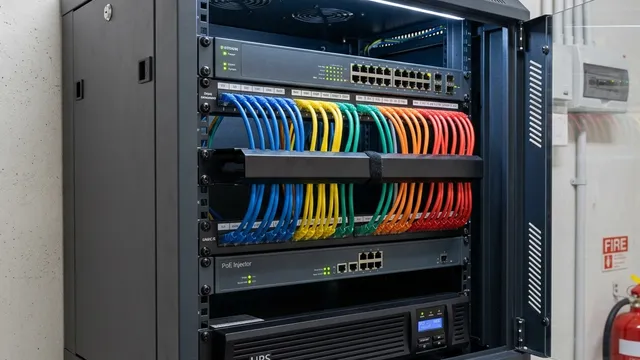
Every now and then a customer calls to report that all their cameras are offline, or that the access control system has stopped responding, or that the intercom has gone silent. The natural assumption is that the equipment has failed. The camera must be faulty. The access control panel must be faulty. The intercom must be faulty.
After many years in this industry, I have learned something that still surprises customers when I say it: very often, the cameras are fine. The access control readers are fine. The intercom is fine. The problem is the network. And the network is consistently the most neglected part of a security system.
People spend considerable time and money choosing cameras. They compare resolution, low-light performance, AI analytics capabilities, and brand reputations. Then they buy the cheapest network switch available and assume that everything will work. That is a little like buying a high-specification vehicle and fitting the cheapest tyres available. The weak link will eventually show itself, and when it does, it takes down everything connected to it simultaneously.
KEY POINT
When multiple security devices fail at the same time; cameras, access control, intercom; the cause is almost never multiple simultaneous hardware failures. It is a single network failure that has taken down everything dependent on it. That is the diagnostic starting point.
Security Systems Today Are Really Network Systems
When I first entered the security industry, the infrastructure was simple and largely separate. Alarm systems communicated via telephone lines. CCTV cameras used coaxial cables connected directly to dedicated recorders. Intercom systems ran on their own proprietary wiring. Each system operated largely in isolation from the others. A failure in one did not affect the others.
Today, everything runs on IP. CCTV cameras are IP devices. Access control readers connect to IP-based controllers. Video intercoms communicate over the network. Alarm communicators use IP as their primary path to monitoring centres, with cellular as backup. The integration that makes modern security systems so capable; cameras triggering alarm zones, access control linked to video verification, remote management through a single app; all of it depends on a single shared network infrastructure.
That convergence creates enormous capability. It also creates a single point of vulnerability that did not exist when each system ran on its own dedicated wiring. The network is not supporting the security system. The network is the security system. And that changes how it should be designed, specified, and maintained.
KEY POINT
The shift from dedicated cabling to IP networking is what enables integrated, manageable, remotely accessible security systems. The same shift means that network quality determines security system quality; the two are no longer separable.
The Most Expensive Camera in the World Is Useless Without a Reliable Network
One mistake I encounter repeatedly is treating network infrastructure as a cost to be minimised once the visible equipment decisions have been made. The camera specification gets discussed at length. The recorder capacity gets calculated. The AI analytics features get compared. Nobody asks about the switch; until something goes wrong.
A poorly designed or under-specified network produces a recognisable set of symptoms. Cameras go offline intermittently and come back without explanation. Video streams drop or become pixelated during peak recording periods. Access control readers respond slowly or fail to respond at all. Intercom calls do not connect reliably. None of these symptoms points directly at the network; they all look like equipment problems. And because the symptoms manifest in the cameras or the access control system, the wrong component gets blamed and often replaced, while the actual cause remains in place.
This is an expensive mistake in both time and money. A camera replacement that does not fix the problem because the problem was a failing switch port, an overloaded uplink, or a misconfigured VLAN wastes resources and delays the resolution. Getting the network right in the first place is significantly cheaper than diagnosing and correcting it after the rest of the system has been installed around it.
DESIGN RULE
Specify the network infrastructure before specifying the security devices. Camera count, resolution, and recording requirements all have direct implications for bandwidth, switch port count, and PoE power budgets. These should be calculated at the design stage, not discovered after installation.
Why We Use Managed Switches
A common question when reviewing a proposed installation is why managed switches are specified rather than the less expensive unmanaged alternatives. The answer comes down to one word: visibility.
An unmanaged switch connects devices and forwards traffic. That is all it does, and that is all it reports. When something goes wrong on a network built around unmanaged switches, the diagnostic process involves physical inspection; walking the site, disconnecting cables, testing ports one by one. On a site with thirty, fifty, or a hundred connected devices, that process is slow, disruptive, and expensive.
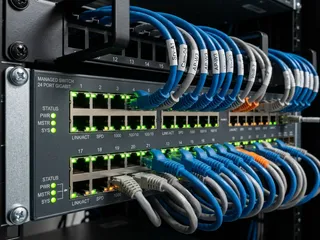
A managed switch provides port-level visibility into everything happening on the network. From a management interface; accessible remotely; I can see which ports are active, which devices are connected and at what link speed, how much bandwidth each port is consuming, whether any ports have generated errors or experienced link drops, and when those events occurred. A camera that went offline at 2.47am can be traced to a specific port that dropped its link at that exact time. A switch that is operating at 90% of its bandwidth capacity can be identified and upgraded before it starts affecting video quality. A port that is delivering less than the PoE budget a camera requires can be found and corrected.
That visibility is what turns a network fault from a multi-hour investigation into a five-minute diagnosis. For a customer whose security cameras are their only source of overnight footage, the difference between restoring the system in five minutes and restoring it after a two-hour site visit matters.
DESIGN RULE
Specify managed switches for any security network with more than a handful of devices. The cost difference over unmanaged switches is modest. The diagnostic and management capability they provide is not available at any price once an unmanaged switch is in place.
The Real Value of Remote Management
One of the most practical changes in security system support over recent years is cloud-based network management. A few years ago, a network fault on a customer site meant dispatching an engineer; sometimes urgently, particularly for commercial properties where access control failure can prevent staff from entering the building.
Today, for sites with properly managed network infrastructure, the diagnostic process often starts before anyone leaves the office. A customer reports that two cameras are offline. I log into the site's network management platform remotely and can see immediately that both cameras are on the same switch, that switch's uplink port shows a link error count that has been climbing since the previous evening, and that the port to the NVR recorder is showing packet loss. The picture is clear before a site visit has been arranged: the uplink cable between two switches has degraded and needs replacement.
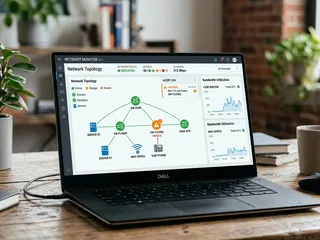
In some cases the resolution itself is remote; a switch reboot, a port configuration change, a VLAN adjustment. In others, a site visit is still required, but the engineer arrives knowing exactly where to go and what to bring. The alternative; arriving at a site with no diagnostic information and working through the system methodically; takes significantly longer and generates a support cost that is largely avoidable with the right infrastructure in place.
KEY POINT
Remote management capability is not a luxury; it is what determines how quickly support can be provided when something goes wrong. For commercial customers especially, fast fault isolation directly translates into reduced downtime and lower total support cost.
What Happens When Networks Are Poorly Designed
Over the years I have seen network design failures produce some of the most frustrating support scenarios in the industry; frustrating because they are almost entirely preventable.
Accidental network loops are one of the most common. A contractor connects a cable between two switch ports on the same switch, or between two switches that are already connected upstream, creating a broadcast loop. The loop generates an exponentially growing storm of traffic that overwhelms every device on the network within seconds. Every camera goes offline. Every access control reader stops responding. Every intercom call fails. The symptoms look like a catastrophic infrastructure failure, and in a sense they are, but the cause is a single incorrectly connected cable that takes minutes to fix once identified.
Overloaded switches are another recurring issue. A 24-port switch specified for a 20-camera system gets extended with additional cameras over time until it is running 35 devices, exceeding both its port count through daisy-chaining and its PoE power budget. Cameras start dropping off intermittently as the switch cycles power to stay within budget. The symptoms are intermittent and difficult to trace without port-level visibility.
IP address conflicts and undocumented network schemas create a different category of problem. A site where every device was assigned a static IP address during installation, with no documentation of which address belongs to which device, becomes extremely difficult to maintain when devices are replaced or added years later. A new camera assigned an address already in use by an access control panel produces erratic behaviour in both devices that takes hours to trace without proper documentation.
All of these are design failures, not equipment failures. They are the result of treating the network as a commodity rather than as a designed system, and they are entirely avoidable with proper planning, documentation, and the right infrastructure from the start.
DESIGN RULE
Document every IP address assignment, every switch port connection, and every VLAN configuration at the time of installation. This documentation is worth almost nothing the day it is created and invaluable two years later when a device needs to be replaced or troubleshot.
The Network Nobody Notices Is Usually the Best One
When a network is properly designed and maintained, nobody talks about it. The cameras record reliably. The intercom connects on the first press. The access control readers respond instantly. The alarm communicator maintains its connection to the monitoring centre. Everything simply does what it is supposed to do, without anyone giving the network a second thought.
That invisibility is the goal. A network that generates no support calls, no offline devices, no intermittent failures, and no diagnostic mysteries is a network that was designed correctly. The foundation of the building is sound, and because it is sound, everyone inside it can focus on the work the building is meant to support rather than on the building itself.
The cameras may attract all the attention during a security system specification. The access control features may generate the most discussion. But in my experience, some of the most consequential decisions in any security installation happen inside the switch cabinet, not in front of the camera. Getting those decisions right determines whether the visible, impressive equipment above them works consistently, year after year, without anyone having to think about why.
Securevision Verdict
Many people think they are buying cameras, intercoms, or access control systems. In reality, they are buying a network of connected devices, and the quality of that network determines how reliably the entire system performs. The cameras, the recorders, the access control panels, and the alarm communicators are all only as reliable as the infrastructure connecting them.
Treating network infrastructure as an afterthought, or specifying the cheapest switch available because "it's just a switch," is the most common infrastructure mistake we encounter, and the one that generates the most avoidable support calls. The network is not supporting the security system. The network is the security system. It deserves to be designed, specified, and maintained accordingly.
In Short
Security systems in Singapore are now network systems. The cameras, the alarm panels, the access control controllers, and the video intercoms all transmit data over IP networks, and the quality of the network determines the quality of the security system, regardless of what the cameras or detectors are rated at. The network is not an afterthought or a commodity; it is the infrastructure on which every other security function depends. Getting it right at the outset, with the right switches, the right configuration, and the right remote management capability, is what makes the difference between a system that works for ten years and one that generates call-outs from day one.

Frequently asked questions
Why does the network matter for security systems?
Modern CCTV cameras, access control systems, alarm panels, and video intercoms all communicate over IP networks. A poorly designed or inadequately specified network causes packet loss, video buffering, connectivity dropouts, and remote access failures; problems that affect security system performance regardless of the quality of the cameras or detectors. The network is the infrastructure that every other security function depends on.
What is a managed switch and why is it used in security systems?
A managed switch is a network switch that allows configuration, monitoring, and management of each individual port. In a security system, managed switches allow VLANs to be configured to separate security traffic from general office traffic, QoS settings to prioritise video streams, and port monitoring to identify faults. Unmanaged switches provide no visibility or control, when they fail or cause problems, diagnosis is difficult and remediation is slow.
What is a VLAN and why is it used in security installations?
A VLAN (Virtual Local Area Network) is a logical separation of network traffic that keeps devices on different VLANs from communicating directly even when they share the same physical switch. In security installations, VLANs are used to isolate security system devices; cameras, NVRs, access controllers, from the general IT network. This improves security, prevents security traffic from competing with business traffic for bandwidth, and makes the security network easier to manage and troubleshoot.
What is PoE and why does it matter for CCTV installations?
PoE (Power over Ethernet) delivers electrical power to network devices through the same Cat5e or Cat6 cable that carries data, eliminating the need for a separate power cable to each camera. A PoE switch with adequate power budget simplifies installation significantly and reduces the number of cables required. The PoE switch must be sized correctly; insufficient power budget causes cameras to operate erratically or not at all.
What is remote management in security systems?
Remote management allows the security system; cameras, NVR, access control, to be accessed and configured over the internet from a central location. This enables an integrator to diagnose faults, push firmware updates, review footage, and adjust settings without visiting the site. For multi-site organisations, remote management makes it practical to maintain consistent system performance across all locations. It also reduces the cost and response time of support calls.
What happens when the network fails in a building with IP security systems?
When the network fails, IP cameras stop transmitting to the NVR, remote access is lost, and access control systems that depend on network communication may revert to a fail-safe or fail-secure default. A well-designed security network uses redundant paths, managed switches with fault notification, and UPS backup for critical network equipment to minimise the impact of network failures. Monitoring centres that supervise network connectivity can alert property managers to network faults proactively.
Should security systems share the same network as office IT?
Sharing is possible but generally not recommended for professional installations. A dedicated security network; physically or logically separated through VLANs; prevents security traffic from competing with business data for bandwidth, reduces the risk of IT security vulnerabilities affecting the security system, and simplifies troubleshooting. For smaller installations where a dedicated network is impractical, VLANs on a managed switch provide an acceptable level of separation.
What network speed does a CCTV system require?
Bandwidth requirements depend on the number of cameras, their resolution and frame rate, and the compression codec used. A 2MP camera using H.265 compression at 15fps typically requires 1 to 2 Mbps. An eight-camera system would require 8 to 16 Mbps on the network between the cameras and the NVR. The switch bandwidth, PoE power budget, and NVR processing capacity must all be sized to handle the aggregate load of all cameras simultaneously.
Who should design the network for a security installation?
The network design should be part of the security system design, not an afterthought delegated to whoever installs the switches. A security integrator with network competence should specify the VLAN structure, switch configuration, bandwidth requirements, and remote access architecture as part of the system proposal. For complex installations, a network specialist working alongside the security integrator ensures the infrastructure meets both the security and IT requirements of the building.
How do I know if my existing network is adequate for a security system upgrade?
A network assessment before the security system upgrade should check: available bandwidth on the segments where security devices will connect; the age and specification of existing switches and whether they support managed features and PoE; the UPS coverage for network equipment; and the current VLAN configuration if any. An assessment prevents the common situation where a security upgrade is specified without considering the network, and the new cameras expose existing network deficiencies.