
Most people do not think about access control until they encounter a problem: an employee who still has the office key after resigning, a contractor who needs temporary access, a resident who lost their card, or someone asking "who entered the room last night?" This guide covers everything you need to know about access control systems in Singapore, from credentials and lock types to cloud management, PDPA obligations, and the difference between digital locks, intercoms, and access control.
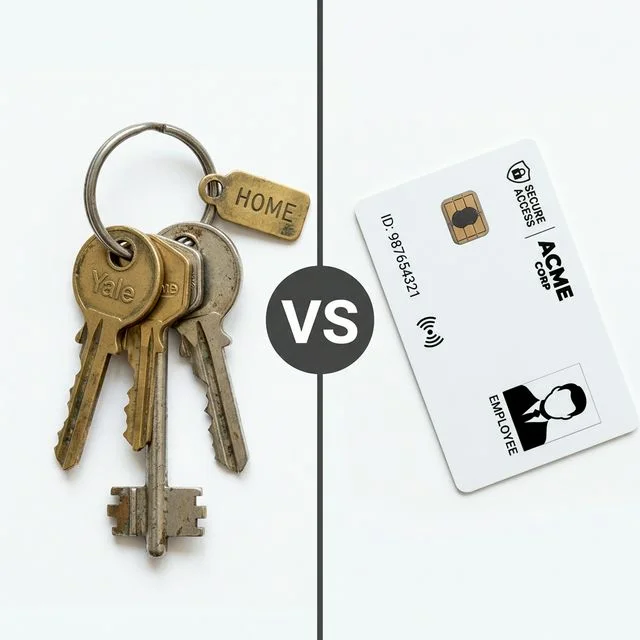
- Access control replaces physical keys with electronic credentials: and unlike a key, an electronic credential can be disabled instantly without changing any locks.
- The credential, reader, controller, lock, and software are the five core components of every access control system. Understanding how they work together makes it easier to evaluate options.
- Fail-safe locks unlock when power is removed: correct for fire escape routes. Fail-secure locks remain locked when power is removed: correct for restricted areas. Both terms must be understood before specifying any lock.
- Anti-passback prevents a credential from being used to enter twice without first exiting: a standard feature on professional systems that closes a common security gap.
- A request-to-exit button allows occupants to leave a secured area from the inside without presenting a credential. It is a standard component on every access-controlled door.
- Biometric credentials: fingerprints and facial recognition: involve personal data under Singapore's Personal Data Protection Act. The obligations this creates must be understood before deployment.
- Cloud access control continues to operate locally even when internet connectivity is unavailable. What stops working is remote management and notifications: not the doors themselves.
- The best time to install access control cabling is during renovation, before walls and ceilings are closed. Retrofitting is significantly more expensive and usually involves compromises.
1. What Is an Access Control System?
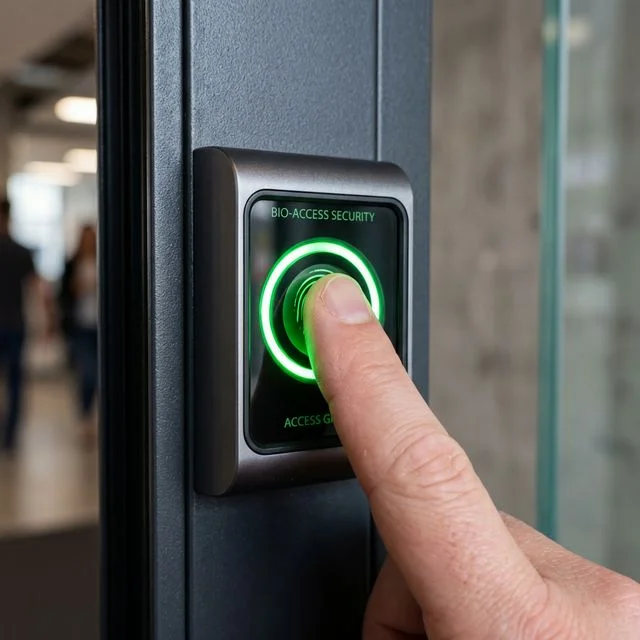
An access card reader beside an office door: the credential tap point connects to the controller which decides whether to release the lock.
An access control system is an electronic system that manages who can enter a door, gate, room, or building. Instead of using traditional keys, users present a credential: an access card, a fingerprint, a facial scan, a mobile phone, or a PIN code. The system checks whether the user is authorised. If they are, the door unlocks. The entire process usually takes less than a second.
Why Businesses Replace Traditional Keys
Lost keys. When a key is lost, there is often no way of knowing who may have found it or whether copies were made. In some cases, locks may need to be replaced at significant cost and disruption.
Staff turnover. When an employee leaves, collecting every key can be difficult. Even when keys are returned, there is no guarantee that copies were not made beforehand. With access control, a departing employee's credentials can be removed immediately. No locks need to be changed. Other users remain entirely unaffected. The process usually takes only a few seconds. For organisations with frequent staff turnover, this benefit alone can justify the investment.
No audit trail. Traditional keys cannot tell you who entered, when they entered, or which doors were used. Access control systems provide this information automatically: every access event is recorded with the user's name, the door, and the time.
No control over access times. A physical key works 24 hours a day, seven days a week. Access control allows access rights to be restricted by time and day. Office staff may enter between 7am and 10pm. Cleaning contractors may enter only between 6am and 8am. Visitors may receive temporary access for a single day. These restrictions are managed through software and can be changed at any time without issuing new keys.
2. How Access Control Works
Although access control systems come in many forms, most operate using the same basic process. The user presents a credential. The reader checks the credential. The controller verifies the user's permissions. The door unlocks if access is granted. The event is recorded.
The Five Core Components
The Credential
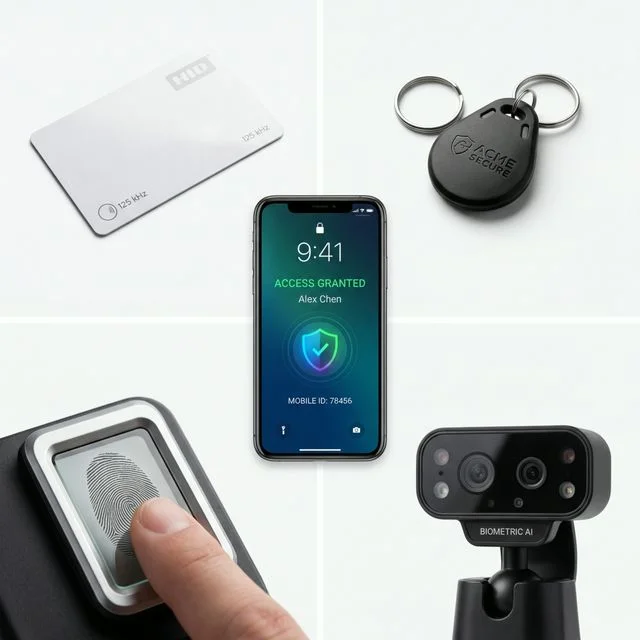
The credential is what identifies the user: the electronic equivalent of a key. Common credentials include access cards, mobile phones, fingerprints, facial recognition, and PIN codes. Different credentials have different strengths and limitations, covered in detail in Section 5.
The Reader
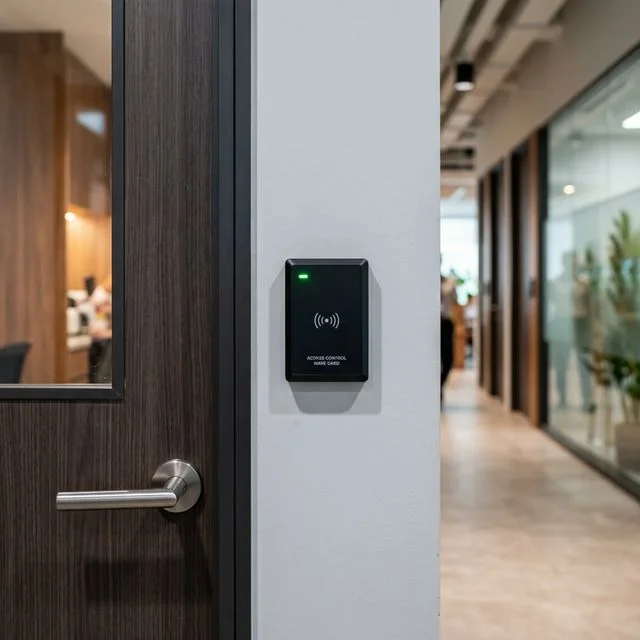
The reader is the device mounted beside the door. Its job is to read the credential presented by the user and send that information to the controller for verification. Examples include card readers, fingerprint readers, facial recognition terminals, and QR code readers.
The Controller
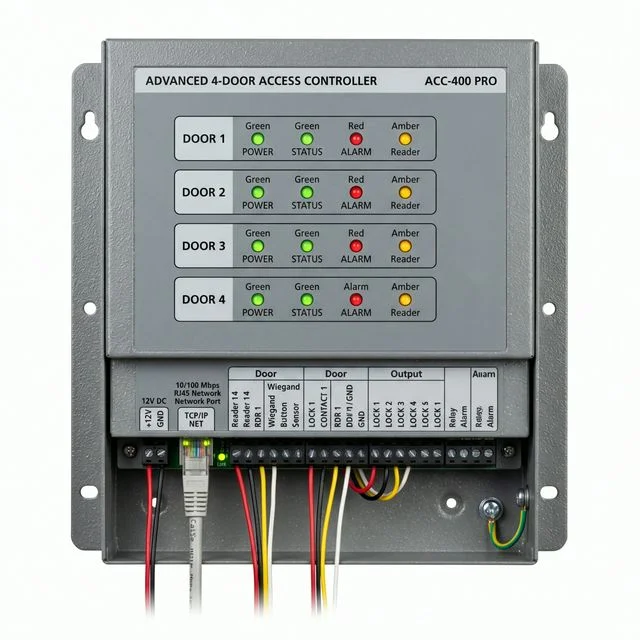
The controller is the decision-maker. When a credential is presented, the controller checks the user's permissions, the door's permissions, and the access schedule. If access should be granted, the controller instructs the lock to release. The controller stores access rules locally: this means the system continues to operate normally even when internet connectivity is unavailable.
The Lock
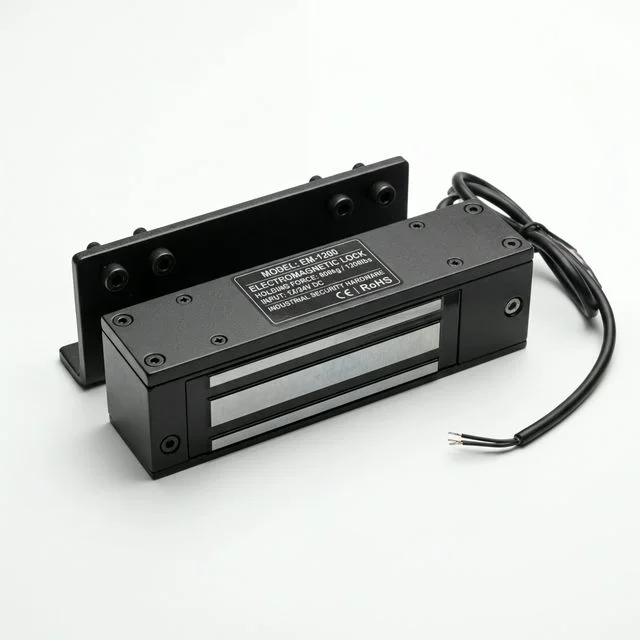
The lock physically secures the door. Different lock types are used depending on the door construction and security requirements. Lock types: including EM locks, electric strikes, drop bolts, and shear locks: are covered in detail in Section 6.
The Software
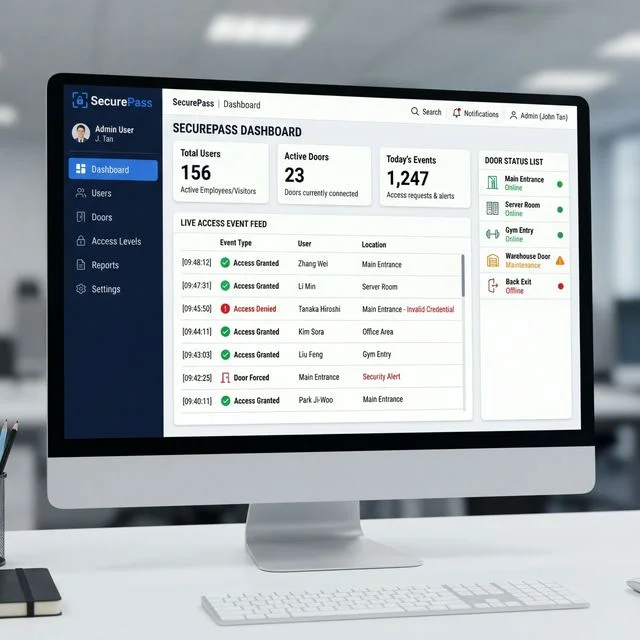
The software allows administrators to manage the system: adding and removing users, viewing access logs, creating time schedules, and managing permissions. Modern systems typically allow management from a web browser or mobile application, and many support cloud-based administration so that changes can be made from anywhere.
The Door Closer
A door closer is a mechanical device that returns the door to the closed position after each use. It is not an electronic component: but it is essential for the access control system to function correctly. An EM lock cannot re-engage if the door does not close fully after each opening. A faulty or incorrectly adjusted door closer is one of the most common causes of access control problems in practice, and it is always assessed during a site survey.
What Access Control Cannot Do
Access control is an effective security tool, but understanding its limitations is just as important as understanding what it can do.
Many people assume that once access control is installed, every access problem is solved. The door is controlled. The system is in place. The building is secure.
In practice, access control manages permissions. It does not manage people.
A card reader cannot prevent a staff member from holding the door open for the next person. It cannot stop a visitor from following closely behind an authorised user before the door closes. It cannot confirm that the person presenting a card is the person the card was issued to. And it cannot compensate for an organisation that does not take credential management seriously: issuing access without tracking it, or failing to remove credentials when staff leave.
These are not failures of the technology. They are the predictable limits of what any access control system was designed to do.
Technology works best when it supports good operational procedures. Access control should be viewed as one layer of a broader security approach: effective in the role it was designed for, and significantly more effective when that role is clearly understood.
3. Single Door vs Multi-Door Systems
Not every property requires a large access control system. The right solution depends on the number of doors and the level of control required. A single-door system is typically used for small offices, store rooms, private clinics, and residential applications. A central management platform for multi-door installations allows all doors to be administered from a single location, with different users given different access rights across different doors, and changes applied across the entire system instantly.
One of the most common questions we hear is "Do I need access control on every door?" The answer is usually no. Most organisations begin by protecting main entrances, server rooms, store rooms, restricted areas, and high-value locations. Additional doors can be added later as requirements evolve.
Managing Access Rights
One of the key benefits of access control is the ability to give different users different levels of access. Office staff may access only office areas. Managers may access additional rooms. Contractors may access specific areas only during approved hours. Cleaning staff may enter only during scheduled periods. This flexibility allows security policies to reflect how the building is actually used, and permissions are managed entirely through software rather than through the physical issue of different keys.
4. Can Access Control Be Used in Homes?
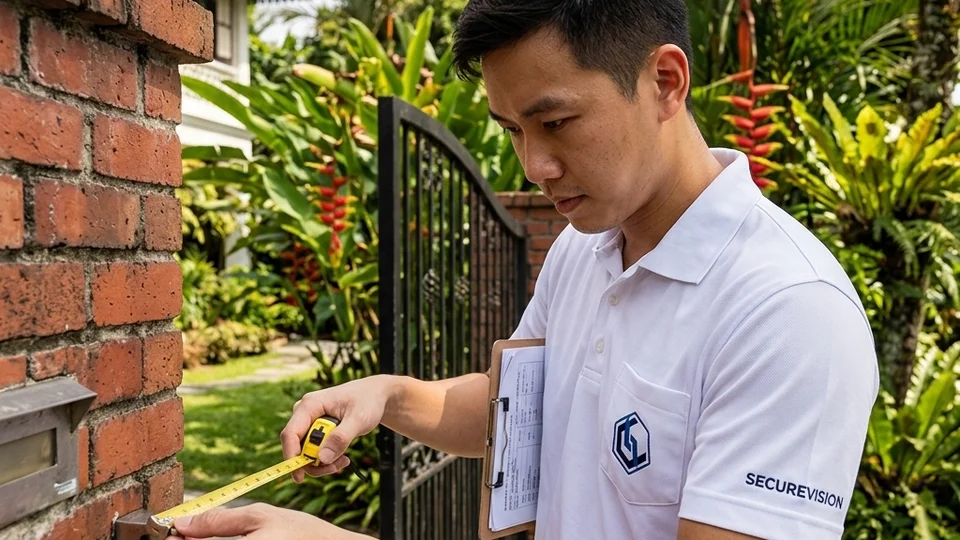
Access control on a landed home side gate: managing helper and contractor access with a full audit trail, without physical key management.
Many people associate access control with offices and commercial buildings. Modern access control systems are, however, increasingly used in residential environments: landed homes, side gates, helper entrances, and shared facilities.
Homeowners often value the convenience of mobile access, the ability to grant temporary visitor or contractor access without issuing physical keys, and the audit record of who has entered the property and when. For larger homes with multiple entry points and regular contractor or helper access, access control can provide both security and practical convenience that digital locks alone do not deliver.
5. Ways to Unlock a Door: Credential Types
One of the first decisions when selecting an access control system is choosing how users will identify themselves. There is no single solution that is best for every situation. Modern access control systems can support several different credential types, and many organisations use a combination of them.
Access Cards
MIFARE smart card tap: encrypted 13.56MHz, significantly more resistant to cloning than older EM cards.
Access cards remain one of the most widely used access control credentials. Users tap the card on the reader and the door unlocks. The process is fast, familiar, and easy to understand, making cards suitable for large numbers of users across a wide range of environments. If a card is lost, the administrator disables it immediately: no locks need to be changed and other users are unaffected. A replacement card can usually be issued within minutes.
A note on card technology: older 125kHz proximity cards: commonly called EM cards: are vulnerable to cloning. A device that can capture and replay the card signal is inexpensive and widely available. Modern 13.56MHz smart cards (MIFARE and similar) use encrypted communication that is significantly more resistant to cloning. Where security is a genuine concern, specifying a higher-frequency smart card system is worth the modest additional cost.
We regularly encounter commercial installations: offices, factories, condominiums: still using 125kHz EM card systems installed more than a decade ago. The cloning risk is real and the upgrade cost to MIFARE is modest relative to the security improvement. When reviewing an existing access control system, the first question we ask is what card frequency is in use.
Fingerprint Access
Fingerprint readers verify a user's identity using their fingerprint: no card to carry, no credential to lose or share. Fingerprint systems are particularly useful for attendance tracking because the credential is inherently tied to the individual. Performance can be affected by dirty fingers, worn fingerprints, injuries, and certain working environments. Construction workers, kitchen staff, and technicians who work with chemicals or abrasive materials may experience more difficulty than office staff. Re-enrolling the fingerprint often resolves rejection issues when they occur.
Facial Recognition
Facial recognition systems identify users based on their facial features: genuinely hands-free. Modern systems have become significantly faster and more accurate than earlier generations and are well suited to high-traffic entrances. Facial recognition is generally more expensive than card-based systems. More significantly, facial recognition involves biometric personal data under Singapore's PDPA. Organisations should understand the distinction between face detection (detecting that a face is present, without identifying who it belongs to) and face recognition (identifying a specific individual by matching against a database of enrolled faces). The latter involves biometric data obligations under the PDPA, covered further in Section 17.
Mobile Phone Access
Many modern access control systems allow smartphones to act as credentials via mobile applications, Bluetooth, QR codes, or NFC technology. Mobile credentials offer easy management: issuing or revoking access requires no physical card and can be done remotely. The considerations are that users must maintain battery charge and have the required application installed.
PIN Codes
PIN codes use a numeric keypad rather than a physical credential. They require nothing to carry and can be issued to temporary users quickly. The limitations are that PIN codes can be shared, observed by others, and forgotten. For these reasons, PIN codes are most often used in combination with another credential: card plus PIN: rather than as a standalone method for secured areas.
QR Code Access
QR codes have become increasingly popular for visitor and temporary access management. A visitor receives a QR code on their mobile phone and scans it at the entrance. The code can be configured to expire automatically, to work only once, or to operate only during specific time windows. One practical consideration: QR codes can be screenshotted and forwarded to another person. QR codes are therefore best suited to time-limited or single-use scenarios where the code's expiry mitigates the risk of sharing.
Multi-Factor Authentication
Multi-factor authentication (MFA) combines two or more credential types: for example, access card plus PIN, or access card plus fingerprint. Both credentials must be successfully presented before the door will unlock. MFA provides significantly stronger security than a single credential and is appropriate for server rooms, data centres, high-value storage areas, and any location where the consequence of unauthorised entry is significant.
Digital Locks vs Access Control Systems
A digital lock is typically designed for a single door, operating independently with no central log or remote administration. An access control system manages one or many doors centrally with user management, access logs, remote administration, time schedules, and the ability to add and remove users across all doors simultaneously.
| Digital Lock | Access Control System | |
|---|---|---|
| Number of doors | Single door | One to hundreds |
| Central management | No | Yes |
| Access logs | Limited or none | Full audit trail |
| Remote administration | Limited | Yes |
| User management | Per device | Central platform |
| Expansion capability | Limited | Yes |
| Best for | Home, small office, single door | Multiple users, multiple doors, commercial |
User Experience Matters
When selecting credentials, it is worth considering convenience alongside security: because a system that is difficult or inconvenient to use consistently creates its own security problems.
If staff forget PIN codes, struggle with readers that are slow or unreliable, frequently lose access cards, or simply find the daily process irritating, they will naturally look for ways around it. The door gets propped open so people do not have to badge in and out repeatedly. Cards get passed between colleagues. PIN codes get written on a note beside the reader. Someone holds the door open for a contractor they do not recognise because it feels rude not to.
None of these behaviours are malicious. They are normal human responses to inconvenience. But each one reduces the effectiveness of the system the organisation invested in.
A well-selected credential is one that users will adopt consistently: one that fits naturally into how people actually move through the building each day. The objective is not simply to secure a door. The objective is to secure a door in a way that works reliably every day, with real people under real conditions. That is a different question from the one most buyers ask when comparing reader specifications.
Before finalising credential selection, we ask a simple question: will the people who use this door every day actually use this credential consistently? If the honest answer is uncertain, the credential is probably wrong for the application: regardless of how well it performs in a demonstration.
6. How Does the Door Stay Locked?
Most people focus on the credential reader when evaluating access control. The lock is equally important: the access control system decides whether someone is allowed to enter, but the lock is what physically secures the door. Different door types and security requirements call for different locking methods.
Electromagnetic Locks (EM Locks)
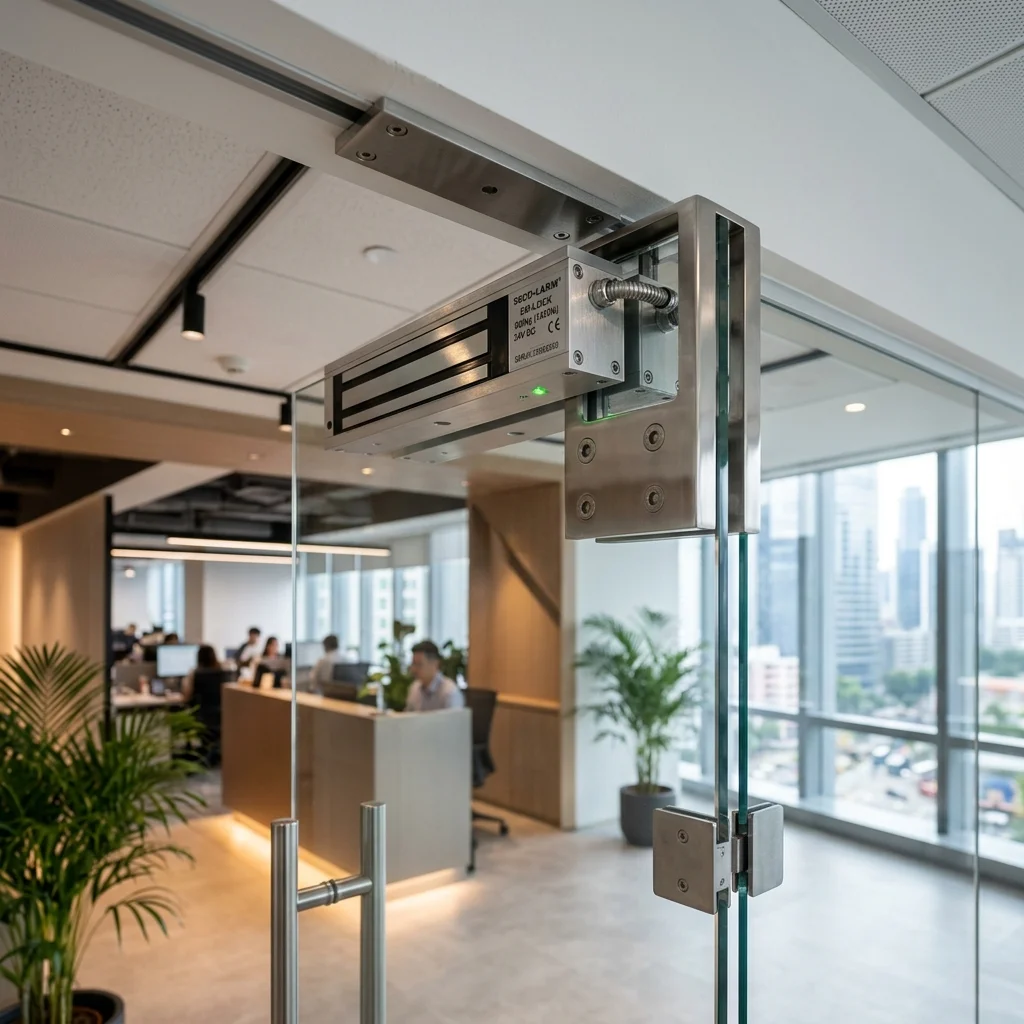
An EM lock on a glass door frame: the electromagnet holds the door closed with up to 600kg of force. When power is removed, the door releases immediately (fail-safe).
EM locks use a powerful electromagnet to hold the door closed. When access is granted, power is temporarily removed and the door can be opened. EM locks are available in different holding force ratings: typically 280kg, 300kg, or 600kg. The appropriate holding force depends on the security requirement and traffic volume of the door. A slight humming sound is normal: the electromagnet is continuously energised. Excessive buzzing may indicate incorrect installation, loose components, or a power supply issue.
EM locks are fail-safe: they unlock when power is removed. This makes them appropriate for fire escape routes and any door that must allow free exit during an emergency.
The most common lock specification mistake we encounter is an EM lock specified on a fire escape door when the design intent was actually to secure the adjacent restricted area door with a fail-secure lock. The two doors are often physically close to each other and the confusion happens at the specification stage. Getting fail-safe and fail-secure the wrong way around on a fire escape route creates a genuine life safety risk: it is the first thing we check when reviewing an existing installation.
Electric Strikes
An electric strike works in conjunction with a traditional door latch. When access is granted, the strike releases momentarily, allowing the latch to clear and the door to open. The door maintains a more traditional appearance because the electric release is concealed within the frame. Electric strikes are suitable for timber doors, aluminium-framed doors, and any installation where maintaining the appearance of a conventional door is important.
Drop Bolt Locks
A drop bolt extends a metal bolt downward into the floor or door frame to secure the door. These are commonly used for frameless glass doors, double-leaf doors, and other specialised installations where neither an EM lock nor an electric strike is practical.
Shear Locks
A shear lock is designed for glass door installations where the locking force is applied horizontally rather than vertically. The lock is recessed into the top of the door frame and engages with a plate on the top edge of the glass door. Shear locks are commonly used in Singapore office environments where frameless glass partitions and sliding glass doors are standard.
Door Position Sensor
A door position sensor is a magnetic contact that tells the controller whether the door is physically closed or open. Without one, the system cannot distinguish between a door that was opened and re-closed normally versus a door that was propped open. The door position sensor enables door held open alerts: a notification when a door has been open for longer than a defined period: and is a standard component in professional access control installations.
7. Power Failure, Fail-Safe and Fail-Secure
One of the most common questions we receive is what happens to an access control system during a power failure. Many people assume that when power fails, access control stops working entirely. The reality depends on how the system is designed.
Backup Power
Most professional access control systems include battery backup: either a UPS at the controller level or backup batteries within the system. A properly specified UPS for an access control installation typically provides 2 to 4 hours of backup operation depending on the number of doors and system configuration. Controllers remain operational, readers continue functioning, and doors continue operating normally for the duration of the backup power.
Fail-Safe Locks
A fail-safe lock is defined as a lock that unlocks when power is removed. This is the correct specification for any door on a fire escape route or emergency exit: if power fails for any reason, the door must be passable so that people can leave safely. EM locks are inherently fail-safe because the electromagnet requires continuous power to hold the door closed.
Fail-Secure Locks
A fail-secure lock is defined as a lock that remains locked when power is removed. This is the correct specification for areas where security must be maintained even during a power failure: equipment rooms, server rooms, and restricted storage areas. Electric strikes are typically fail-secure: the mechanical latch remains engaged regardless of whether power is present. The distinction between fail-safe and fail-secure is fundamental to correct access control design. Every door must be specified as one or the other based on its function and the fire safety requirements of the building. A fail-secure lock on a fire escape route creates a genuine life safety risk.
Request-to-Exit (REX)
A request-to-exit button: commonly called a REX: is a push button or motion sensor mounted on the interior side of an access-controlled door. It allows an occupant to open the door from the inside to leave a secured area without presenting a credential. REX devices are a standard component on every access-controlled door. Without a REX, occupants could be trapped inside a secured area if their credential is unavailable or the system develops a fault. REX devices can be a simple push button, a touch bar across the door, or a passive infrared motion sensor that detects approach and releases the door automatically.
Fire Safety Always Comes First
Regardless of the locking method used, emergency exit requirements must always take precedence. People must always be able to leave a building safely during an emergency. Access control systems are integrated with fire alarm systems: when the fire alarm activates, access-controlled doors automatically unlock according to the building's fire strategy, ensuring evacuation routes remain clear. This integration is a design requirement, not an optional feature.
8. Cloud Access Control
Traditionally, access control systems were managed from a local computer or dedicated server on site. Today, many systems are managed through the cloud: and this has changed how access control is designed, deployed, and maintained.
What Is Cloud Access Control?
Cloud access control allows authorised administrators to manage doors from anywhere through an internet connection: via a web browser, a mobile application, or a cloud management platform. Adding a user, removing a user, reviewing access logs, or changing permissions can all be done without visiting the site. For businesses with multiple locations, cloud management means all sites can be administered from a single platform. Software updates are delivered automatically rather than requiring on-site IT intervention.
Can Access Control Work Without Internet?
Yes: and this is one of the most important misconceptions about cloud-based systems to correct. The controller stores access rules locally. When a user presents a credential, the controller checks its local database without requiring an internet connection. Doors continue to function normally even when internet connectivity is unavailable. What stops working without internet is remote management, cloud synchronisation, and remote notifications. But the doors continue to open for authorised users and remain locked for unauthorised ones.
Anti-Passback
Anti-passback is a standard access control feature that prevents a credential from being used to enter a door twice without first being used to exit. Without anti-passback, a credential holder could tap in and then pass their card back through the door to an unauthorised person to use. Anti-passback closes this gap by tracking whether a credential is inside or outside and refusing duplicate entry. It requires entry and exit readers on both sides of the door rather than a single entry reader. For any secured area where credential sharing is a genuine concern, anti-passback is worth specifying.
On-Premise vs Cloud: Cost Comparison
On-premise systems require a local server or controller and typically have a higher upfront cost but minimal ongoing software fees. Cloud systems generally have a lower upfront cost: no local server is required: but involve an ongoing monthly or annual subscription. For smaller installations of one to five doors, cloud systems are typically more cost-effective when total cost of ownership is considered over three to five years. For larger installations or organisations with IT infrastructure already in place, on-premise systems may provide a better long-term cost profile. Both approaches can deliver excellent access control outcomes.
9. Visitor Management
Managing visitors is often just as important as managing regular users. Traditional visitor books are increasingly being replaced by digital visitor management systems that make the process faster, more consistent, and more auditable.
How Visitor Management Works
A visitor registers before arriving: either through a self-registration link sent by the host or through a receptionist completing registration on arrival. Once registered, the visitor receives a QR code on their mobile phone. When they arrive at the entrance, they scan the QR code and gain temporary access. The access automatically expires at the end of the approved time window. The entire process can occur without manual intervention if pre-registration is used.
Managing Different Visitor Types
Regular visitors and delivery personnel who visit frequently can be pre-registered with recurring access windows. Contractors requiring multi-day access can be issued credentials valid for the project duration and automatically expiring when the project ends. One-time visitors receive a single-use QR code that becomes invalid after use. Managing these different visitor types through a central platform means the organisation always has an accurate record of who is on the premises and when.
Why Visitor Management Matters
Beyond convenience, visitor management creates a complete audit trail of all non-regular access: important for organisations with compliance requirements, for MCSTs managing condominium common areas, and for any property where knowing who is present at any given time is operationally or legally significant. In the event of an incident, the visitor log provides an accurate record of who was on site.
10. Lift Access Control
A lift lobby access reader: when the resident taps their card, the system enables only the floors they are permitted to access in the lift car.
Lift access control is becoming increasingly common in Singapore condominiums and commercial buildings. Rather than allowing unrestricted access to all floors, the system determines which floors a user may access based on their credential and permissions.
In practice, lift access control works by integrating the access control system with the lift controller via a relay module. When a resident or authorised user presents their credential at the lift lobby reader, the system enables only the destination floor button in the lift car. Unregistered visitors cannot select a residential floor: they can only reach the lobby or ground floor until their access is authorised.
For condominiums, residents have access to their own residential floor and approved common facility floors. Visitors are granted temporary access to the floor they are visiting for the duration of their approved visit. For commercial buildings with multiple tenants, companies can restrict access to their own floors and approved common areas. Lift access control also supports privacy between residential floors: a significant consideration in Singapore's high-rise residential environment.
11. CCTV Integration
Access control and CCTV work together to create a significantly more complete security solution than either system provides independently.
Without video, an access log shows: "Card 1034 entered Door 3 at 8:01am." With CCTV integration, you can immediately view who actually entered at that moment, whether they were alone, and whether anyone else followed them through the door without presenting a credential: a practice known as tailgating.
Tailgating is one of the most common security gaps in access-controlled buildings. A person follows an authorised user closely through a door as it closes, entering without ever presenting a credential. The access log records only the authorised entry and has no way of detecting the unauthorised follower. CCTV integration allows tailgating events to be identified and investigated, and some advanced systems can automatically alert security when the camera detects more people entering than credentials were presented.
Common CCTV integration functions include video verification: viewing footage directly associated with a specific access event; event bookmarking: jumping instantly to the footage timestamp linked to a particular door event; and combined incident investigation: using access logs and video footage together to build a complete picture of an event. For more on CCTV systems, see our Complete Guide to CCTV Systems.
12. Planning Your Access Control System
Before selecting hardware, focus on the objectives of the system rather than the technology. The planning questions matter more than the technical specifications.
Who needs access: staff, residents, visitors, contractors, cleaning personnel? Which doors need to be controlled and why: main entrances, server rooms, restricted areas, facilities? Are visitors involved and how should visitor access be managed? Is remote management required? Will the system need to expand: additional doors, lift control, visitor management, CCTV integration, attendance tracking?
A site assessment with your installer is the correct starting point. The answers to these questions cannot be reliably determined from a floor plan or a telephone conversation. Gate and door types, frame conditions, power availability, cable routing, and fire safety requirements all need to be assessed on site before a system can be correctly specified.
Cabling During Renovation
The best time to install access control cabling is during a renovation, before walls and ceilings are closed. Network cables, power cables, and lock wiring can be run cleanly inside conduits at this stage, reader and lock positions can be chosen without compromise, and additional cable runs for future expansion can be installed at minimal additional cost. Retrofitting cabling into a completed space is significantly more expensive, more disruptive, and almost always involves visible trunking or compromises in positioning. If a renovation is planned, access control cabling should be included in the scope from the beginning.
Planning for Future Expansion
Selecting a platform that supports expansion: additional doors, lift control, visitor management integration, CCTV integration, and attendance tracking: is more important than optimising only for the initial installation. A system that needs to be replaced when the organisation grows costs significantly more than one specified with expansion in mind from the outset.
Why Access Control Projects Fail
Most access control problems we are called to resolve were not caused by faulty equipment. They were caused by decisions made months earlier, during planning or installation, that were not revisited before the project went ahead.
The most common are these. A lock type was selected without considering the door's actual construction or usage volume: a high-cycle door fitted with a lock specified for light use will develop problems within the year. The door condition was not assessed properly: a warped frame, a stiff closer, or a door that does not seat cleanly against the strike will cause daily frustration regardless of how good the access control system is. Fire alarm coordination was left too late: access control, fire alarm, and door hardware often involve different contractors, and poor coordination between them creates rework that is expensive to resolve after the walls are closed. Cable routes were not confirmed before renovation completed: missing a conduit run at the renovation stage almost always means visible trunking, additional cost, and compromises in where the reader or lock can actually be positioned.
And perhaps the most common of all: visitor management was an afterthought. Every project spends significant time designing staff access. Fewer than half give the same attention to how visitors, contractors, delivery personnel and cleaning crews will be handled. In practice, visitor workflow is where the greatest operational friction occurs after handover: and it is far easier to design correctly at the start than to fix after the system is live.
The best access control system is not necessarily the most advanced. It is the system that solves your operational requirements while remaining easy for users to adopt. Focus first on how people move through the building and how access should be managed. The technology should support those objectives: not dictate them.
13. Real Installation Examples
No two access control projects are identical. The best solution depends on the people using the system, the building layout, and the operational requirements.
Landed Home
A landed home typically has a main entrance, a side gate, and a helper or service entrance. The homeowner wants to eliminate physical keys for the helper, provide temporary contractor access without issuing permanent credentials, and have a record of who has entered and when. Access cards or mobile credentials are issued to family members and the helper. Temporary QR codes are used for deliveries and contractors, expiring automatically at the end of the approved window. The homeowner can review the access log remotely and revoke any credential immediately if required: without changing any physical lock.
Small Office
A typical small office has a main entrance door, a server room, and a store room. Staff use access cards or mobile credentials to enter. The server room and store room require a separate, higher-level permission restricted to IT and management staff. When a staff member leaves, their access across all three doors is removed in seconds. Managers can review who entered the server room and when: useful for both security and compliance purposes: without needing to be physically present.
Factory and Warehouse
A factory environment requires different levels of access for different roles. General staff access common areas and the production floor. Warehouse staff access the warehouse but not the production equipment room. Managers and engineers access all areas. Contractors have time-limited access to specific areas only during approved working hours. Fingerprint or card credentials are practical for a larger workforce. The access log supports both security monitoring and attendance tracking.
Condominium
A condominium uses access control for the main entrance, side gates, lift access, and common facilities such as the gym, pool, and function rooms. Residents have access to their residential floor via lift control and to common facilities during approved hours. Visitors are pre-registered by residents and receive temporary QR code access. Deliveries are managed through a digital visitor registration system. The MCST management team can review access logs, add or remove residents through a central platform, and identify any access anomalies without needing physical key management.
Co-Living Development
Co-living properties experience frequent tenant turnover: sometimes weekly. New tenants are onboarded digitally and issued credentials immediately. Departing tenants have their access removed at the end of their lease automatically. Common facilities are accessible only during approved hours. The management team can monitor access across all doors and all tenants from a single platform without the complexity and cost of physical key management.
14. Common Access Control Problems
Like any electronic system, access control occasionally experiences issues. Understanding the symptoms helps identify the cause.
| Problem | Most Common Cause | First Check |
|---|---|---|
| Card reader beeps but door does not open | Lock fault, wiring issue, door alignment, or permission settings | Check whether the credential is valid in the system. If valid, inspect the lock and power supply |
| Reader shows green but door stays locked | Lock has not released: power supply or mechanical fault | Check power supply to the lock. Inspect lock alignment with the door frame |
| Fingerprint reader rejects user | Dirty sensor, dirty fingers, worn fingerprints, or incorrect enrolment | Clean sensor. Ask user to clean finger. If repeated, re-enrol the fingerprint |
| Mobile app cannot open door | Internet connectivity issue, mobile credential problem, or permission change | Check site internet connection. Verify user permissions in the management platform |
| Door does not close properly | Faulty door closer, misaligned lock, or obstruction | Inspect door closer adjustment. Check for physical obstructions. The issue is usually mechanical |
| EM lock buzzing excessively | Incorrect installation, loose components, or power supply issue | Check mounting bracket alignment and power supply voltage |
| Some users can enter, others cannot | Access permissions, expired credentials, schedule restrictions, or user configuration | Review the affected user's permissions and schedule in the management platform |
| Suspected credential sharing | Card being passed between users | Review access logs for the credential. If the same card shows entry when the authorised user is known to be absent, credential sharing is likely. Consider adding fingerprint as a second factor |
15. Maintenance and Best Practices

Annual professional maintenance: lock testing, battery checks, firmware updates and user database review.
Access control systems are generally reliable, but periodic maintenance helps ensure long-term performance.
Simple Checks Users Can Perform
Between professional service visits, users can periodically test their own access credentials to confirm they are functioning correctly, verify that doors are locking properly after use, observe any unusual sounds from locks or readers, and check that the mobile application is functioning and notifications are being received. These simple checks often reveal developing issues before they become failures.
Annual Professional Maintenance
An annual professional maintenance visit should include testing all locks for correct operation, inspecting controller and power supply condition, testing backup battery capacity, checking door closer adjustment and door frame alignment, verifying the fire alarm interface is functioning correctly, updating controller and reader firmware to the current release, and reviewing the user database to confirm that inactive or former user credentials have been removed. Reviewing the user database is one of the most commonly overlooked maintenance tasks: credentials belonging to former staff, expired contractors, and past visitors should be permanently deactivated at least quarterly.
16. Fire Safety and Emergency Requirements
Access control must never prevent people from exiting safely during an emergency. This is not a design preference: it is a legal and life safety requirement. In Singapore, fire safety requirements for electronically locked doors are governed by the Singapore Civil Defence Force (SCDF). Access-controlled doors on fire escape routes must comply with SCDF requirements for emergency egress: they must be passable without the use of a credential during a fire or emergency condition. Access control systems installed on fire escape routes must therefore be integrated with the fire alarm system so that doors unlock automatically when the alarm activates.
Emergency Exit Devices
Many access-controlled doors include emergency exit devices that allow occupants to leave safely without presenting a credential. A request-to-exit button provides egress from the inside at any time. A break-glass unit is a wall-mounted device containing a small glass element: when the glass is broken, the door lock is immediately released. Break-glass units are typically installed on doors where the REX button alone is considered insufficient, such as main emergency exits and stairwell doors. Emergency exit bars: push-to-open bars across the full width of the door: are used on high-traffic emergency exits where fast, uninstructed egress is required.
Why Professional Design Matters
Fire safety requirements vary depending on building type, door location, occupancy classification, and the building's approved fire strategy. Access control should always be designed with these requirements understood from the outset: retrofitting fire compliance onto an existing access control installation is significantly more complex and costly than designing correctly from the start. A licensed installer will ensure that the system design is compatible with the building's SCDF fire safety approval.
17. Privacy and PDPA Considerations
Access control systems collect personal data. Understanding what data is collected, how it should be managed, and what obligations apply under Singapore's Personal Data Protection Act (PDPA) is important for any organisation operating an access control system.
What Data Is Collected
Every access event generates a record containing the user's identity, the door accessed, and the time of access. For biometric systems, the enrolment process involves capturing and storing a biometric template: a mathematical representation derived from the user's fingerprint or facial features. Biometric data carries a particular obligation that card or password data does not. If a password is compromised, you change it. If an access card is cloned, you cancel it and issue a new one. You cannot do either of those things with a fingerprint or a face. That is why biometric data deserves additional protection, and why it should only be collected when there is a genuine operational need: not simply because biometric readers are available or because they appear more sophisticated than a card system.
The most common PDPA gap we encounter in biometric access control deployments is the absence of any user notification: staff were enrolled in a fingerprint or facial recognition system without being informed that biometric data was being collected or for what purpose. Discovering this during a staff complaint or an audit is significantly more difficult to resolve than addressing it correctly at the outset. A brief written notice at enrolment and a documented purpose statement in the system policy takes minutes to put in place.
PDPA Obligations for Access Control Operators
If your access control system stores user information, access logs, fingerprints, or facial data, PDPA obligations apply from the moment data collection begins: not after an incident or an audit. The practical questions to answer are straightforward: why is this data being collected, who in the organisation can access it, how long should it be retained, and what happens to it when a user leaves. Understanding those answers before the system goes live is significantly easier than reconstructing them after the fact. Legitimate purposes for collection include security monitoring, incident investigation, and attendance management. Access logs should not be retained longer than necessary for the purpose for which they were collected. Access to the management platform and log data should be restricted to individuals with a genuine operational need. When a user leaves the organisation, their credential should be deactivated and their data managed in accordance with the organisation's data retention policy.
Biometric Data: Additional Obligations
For organisations using fingerprint or facial recognition systems, the biometric templates stored in the system constitute personal data of a sensitive nature. Before deploying a biometric access control system, organisations should confirm that there is a legitimate purpose for collecting biometric rather than card-based credentials: biometric systems are not automatically more secure than card systems in all environments, and the additional data obligations should be weighed against the operational benefit. Users should be informed that biometric data is being collected and for what purpose. The biometric database should be protected with appropriate access controls and the data retained only for as long as the individual remains an active user of the system.
Access Logs as Evidence
Access logs are valuable during investigations and audits: providing a record of who was present in a specific area at a specific time. For this reason, access logs should be retained for a period reflecting the realistic timeframe within which an investigation might be initiated: typically 30 to 90 days for most commercial environments, longer for higher-security or compliance-sensitive sites.
18. Choosing an Access Control Brand
Many customers begin by asking which brand they should choose. The better question is which solution best fits the operational requirements. System design quality and installation quality are often more important than the brand name.
Akuvox
Akuvox is widely known for combining access control, intercom, and cloud management capabilities in an integrated platform. It is commonly used in condominiums, co-living developments, offices, and mixed-use properties where visitor management and resident communication are as important as door access control. Akuvox's cloud-native architecture makes it well suited to properties requiring remote management and a modern user experience.
ZKTeco
ZKTeco offers a broad range of access control and biometric solutions covering everything from standalone digital locks to enterprise multi-door systems with integrated time and attendance management. It is commonly used in offices, factories, attendance systems, and commercial buildings. ZKTeco's strength is the breadth of its product range and the availability of biometric terminals for environments where fingerprint or facial recognition is the preferred credential.
Suprema
Suprema is often specified for projects requiring advanced biometric authentication and enterprise-level management. Its biometric matching algorithms are among the most accurate available and its BioStar 2 platform supports complex multi-site deployments with granular permission management. Suprema is commonly used in corporate environments, high-security facilities, financial institutions, and critical infrastructure.
EntryPass
EntryPass is a Singapore-developed access control platform with a strong track record in commercial buildings, government facilities, and multi-site deployments. It supports high door counts and is known for its reliability in demanding environments. EntryPass is commonly specified for commercial buildings, government and institutional facilities, and any deployment requiring a proven platform with strong local support and the ability to scale to large door counts.
What to Look For Beyond the Brand
Beyond brand recognition, the factors that most affect long-term satisfaction include local distributor support and spare parts availability; the platform's ability to expand as requirements grow; the installer's familiarity with the specific platform; and whether the system can integrate with CCTV, visitor management, and other systems already in place or planned. A well-designed, correctly installed system on a mid-range platform will almost always outperform a poorly designed system on a premium platform.
Verify Your Installer's PLRD Licence
In Singapore, companies installing access control systems are required by law to hold a licence issued by the Police Licensing and Regulatory Department (PLRD) under the Private Security Industry Act (PSIA). This requirement applies to access control installation in the same way it applies to burglar alarm and CCTV installation: it is a legal requirement, not a voluntary accreditation.
The licensing regime was introduced because before it existed, anyone could install a security system regardless of competence or training. The result was a market where poorly designed and poorly installed systems were common, and property owners had no reliable way to distinguish qualified installers from unqualified ones. Before engaging any access control installer, ask to see their PLRD licence and confirm that it is current. An unlicensed installer is operating outside the law, and a system installed without proper licensing may not be recognised by your insurer or comply with the requirements of your building management.
Securevision holds Police Licence and has maintained its licence since the licensing regime began. A PLRD licence is the minimum legal standard: it confirms that the company is eligible to install security systems. It does not, by itself, guarantee quality of design, quality of installation, or quality of after-sales support. The licence is the starting point for your evaluation, not the end of it.
Access control is not simply about replacing keys. It is about managing who can enter, where they can go, and how that access is controlled and recorded. The four questions worth asking before committing to any access control system are: is the system designed for the doors that actually need protection, based on how the building is genuinely used rather than on what is easiest to install? Is the credential appropriate for the users who will use it: one they will adopt consistently rather than work around? Is fire safety correctly integrated so that no access-controlled door ever prevents emergency egress? And will the installer still be available to support and maintain the system in five years' time? A properly designed access control system improves security, convenience, accountability, and operational efficiency simultaneously. Take the time to get the design right, verify your installer's PLRD licence, and choose a platform that can grow with the organisation.
Digital Locks, Intercoms and Access Control: What's the Difference?
Many homeowners and business owners use the terms digital lock, intercom, and access control interchangeably. While these systems may appear similar, they serve different purposes. Understanding the difference helps in choosing the right solution for the specific requirement.
Digital Locks
A digital lock is typically designed for a single door. Instead of a traditional key, users unlock the door using a PIN code, fingerprint, access card, or mobile phone. Digital locks are commonly used in HDB flats, condominium units, landed homes, and small offices. They are simple to install, require no central controller, are suitable for single-door applications, and are relatively affordable. Their limitation is that they typically manage only one door independently: there is no central management platform, no cross-door access log, and no ability to administer multiple doors from a single interface. For most homeowners, a digital lock is often the simplest and most practical way to replace a traditional key.
Intercom Systems
An intercom system is primarily designed for communication and visitor management. It allows a visitor to call a resident or staff member, speak with them, and request access. Modern intercom systems may also support mobile app communication, video verification, remote door unlocking, and visitor QR codes. The primary function of an intercom is visitor interaction: helping the occupant decide whether a visitor should be allowed to enter: rather than managing ongoing access rights for regular users. For more detail, see our Complete Guide to Intercom Systems.
Access Control Systems
Access control systems are designed to manage authorised users: staff, residents, contractors, and approved individuals. The system determines who can enter, which doors they can access, when access is permitted, and what records are maintained. The primary function is managing ongoing access rights and providing accountability through access records and permission management.
Can These Systems Work Together?
Yes: and in many modern properties, all three systems operate together as complementary layers of a complete entry management solution. In a landed home, a digital lock at the main entrance handles day-to-day entry, an intercom at the gate manages visitor communication, and access control on the side gate or helper entrance manages helper and contractor access with a full audit trail. In a condominium, an intercom manages visitor entry at the guardhouse or lobby, access control manages resident entry through card or mobile credentials, and lift access control restricts floor access to authorised users. In an office, an intercom manages visitors, access control manages staff entry across all secured doors, and digital locks on individual offices or meeting rooms provide a simple single-door solution where central management is not required.
Which Solution Is Right for You?
If the primary objective is replacing a key on a single door, a digital lock is often sufficient. If the need is to communicate with visitors before granting access, an intercom system is usually the better choice. If the requirement is to manage multiple users, multiple doors, and access permissions with a full audit trail, an access control system provides the greatest flexibility. In many modern buildings, the best solution is not choosing one system over another but combining all three to create a secure, convenient, and well-managed entry experience.
Frequently Asked Questions
What is an access control system?
An access control system is an electronic system that manages who can enter a door, gate, room, or building. Instead of physical keys, users present a credential: an access card, fingerprint, facial scan, mobile phone, or PIN code. The system verifies whether the user is authorised and unlocks the door if they are. Every access event is recorded automatically.
What is the difference between a digital lock and an access control system?
A digital lock manages a single door independently: no central controller, no cross-door logs, no remote administration. An access control system manages one or many doors from a central platform, with user management, access logs, time schedules, and the ability to add or remove users across all doors simultaneously. Choose a digital lock for a single door with a small number of users. Choose an access control system when multiple doors, multiple users, audit records, or future expansion are involved.
Can access control work without internet?
Yes. The controller stores access rules locally and continues to operate normally when internet connectivity is unavailable. Doors open for authorised users and remain locked for unauthorised ones regardless of internet status. What stops working without internet is remote management, cloud synchronisation, and remote notifications: not the doors themselves.
What happens during a power failure?
Battery backup allows the system to continue operating for typically 2 to 4 hours. Lock behaviour depends on whether fail-safe or fail-secure hardware is specified. Fail-safe locks: such as EM locks: unlock when power is removed, ensuring fire escape routes remain passable. Fail-secure locks: such as electric strikes: remain locked when power is removed, maintaining security on restricted areas.
What is the difference between fail-safe and fail-secure?
A fail-safe lock unlocks when power is removed: the correct specification for fire escape routes and emergency exits where people must always be able to leave. A fail-secure lock remains locked when power is removed: the correct specification for restricted areas such as server rooms where security must be maintained even during a power failure. Every access-controlled door must be specified as one or the other based on its function and the building's fire safety requirements.
What is a request-to-exit button?
A request-to-exit button: commonly called a REX: is mounted on the interior side of an access-controlled door. It allows occupants to exit a secured area from the inside without presenting a credential. A REX device is a standard component on every access-controlled door. Without one, occupants could be trapped inside a secured area if their credential is unavailable or the system develops a fault.
What is anti-passback?
Anti-passback prevents a credential from being used to enter a door twice without first being used to exit. Without it, a credential holder could tap in and pass their card back to an unauthorised person to use. Anti-passback closes this gap by tracking whether a credential is recorded as inside or outside and refusing duplicate entry. It requires entry and exit readers on both sides of the door.
What is tailgating in access control?
Tailgating: sometimes called piggybacking: is when an unauthorised person follows an authorised user closely through an access-controlled door as it closes, entering without ever presenting a credential. The access log records only the authorised entry and cannot detect the unauthorised follower. CCTV integration allows tailgating events to be identified. Some advanced systems can automatically alert security when the camera detects more people entering than credentials were presented.
What is the difference between an access card and a smart card?
An access card is a general term for any card-based credential. Older 125kHz proximity cards: commonly called EM cards: transmit a fixed unencrypted signal that can be captured and replayed by a cloning device. Modern 13.56MHz smart cards (MIFARE and similar) use encrypted communication that is significantly more resistant to cloning. For any installation where security is a genuine concern, specifying smart card technology is worth the modest additional cost.
What is card cloning and how do I prevent it?
Card cloning is the process of using a device to capture the signal from a proximity access card and copy it to a blank card. Older 125kHz EM cards are particularly vulnerable because their signal is unencrypted. The most effective prevention is specifying 13.56MHz smart card technology: MIFARE or similar: which uses encrypted communication that standard cloning devices cannot replicate. If your current system uses 125kHz cards and security is a concern, upgrading to a smart card platform is worth evaluating.
What is multi-factor authentication in access control?
Multi-factor authentication (MFA) requires a user to present two or more credentials before a door will unlock: for example, an access card plus a PIN, or an access card plus a fingerprint. Both must be successfully verified before access is granted. MFA provides significantly stronger access control than a single credential and is appropriate for server rooms, data centres, high-value storage areas, and any location where the consequence of unauthorised entry is significant.
Can I use my phone instead of an access card?
Yes. Many modern systems support mobile credentials via Bluetooth, NFC, or mobile applications. Mobile credentials are convenient and easy to manage remotely without printing or distributing physical cards. Users must maintain battery charge and have the required application installed.
Are fingerprints safe to use?
Modern systems store encrypted mathematical templates derived from the fingerprint: not images of the fingerprint itself. The template cannot be used to reconstruct the original fingerprint. However, fingerprint templates are biometric personal data under Singapore's PDPA and must be managed accordingly: with a documented purpose, appropriate access controls, and a defined retention period.
Is facial recognition better than access cards?
Not necessarily. Facial recognition is genuinely hands-free and fast, but it involves biometric personal data with additional PDPA obligations and is generally more expensive than card-based systems. The best credential depends on the environment, the users, and the operational requirements: not on which technology is newest.
Can I remove access immediately when someone leaves?
Yes. Access rights can typically be revoked within seconds from the management platform, across all doors simultaneously. No locks need to be changed. Other users remain unaffected. This is one of the most significant practical advantages of access control over physical key management.
How long should access control logs be retained?
For most commercial environments, 30 to 90 days is appropriate. Under Singapore's PDPA, access logs should not be retained longer than necessary for the purpose for which they were collected. The retention period should be a deliberate policy decision documented in the organisation's data management policy: not simply whatever the system stores before overwriting.
Do I need a PLRD-licensed installer for access control in Singapore?
Yes. Companies installing access control systems in Singapore are required by law to hold a PLRD licence under the Private Security Industry Act. An unlicensed installer is operating outside the law, and a system installed without proper licensing may not be recognised by your insurer. Before engaging any installer, ask to see their PLRD licence and confirm it is current. Securevision holds Police Licence .
Can access control work with CCTV?
Yes. Access events can be linked to video footage, allowing administrators to view the footage associated with a specific access event and to investigate tailgating or other incidents. CCTV integration provides visibility that the access log alone cannot deliver: the log records that a credential was used, but only the footage shows who actually entered and whether anyone else followed them through the door.
Can I control lift access?
Yes. Many systems support lift access control by integrating with the lift controller via a relay module. When a user presents their credential at the lift lobby reader, the system enables only the destination floors they are permitted to access. Unregistered visitors cannot select a residential or restricted floor without authorisation.
Do I need cloud access control?
Not always. Cloud management is particularly useful when remote administration, multi-site management, or reduced on-site IT infrastructure is required. On-premise systems remain appropriate for organisations with existing IT infrastructure and a preference for local control. Both approaches deliver the same door-level access control outcomes: the difference is in how the system is managed and what the cost structure looks like over time.
How often should access control systems be serviced?
Most systems benefit from annual professional maintenance covering lock testing, battery condition, firmware updates, door closer adjustment, and fire alarm interface verification. The user database should be reviewed at least quarterly to deactivate credentials belonging to former staff, expired contractors, and past visitors.