- CCTV is a system of interdependent components; cameras, network switches, PoE power, NVR recorder, hard disks, cabling, and layout design all contribute to whether it works reliably.
- When a CCTV system fails, the camera is often not the problem. The network, the storage, or the power supply is more commonly at fault.
- PoE (Power over Ethernet) allows one cable to carry both data and power to the camera; cleaner installation, easier remote management, but requires a switch with adequate power budget.
- The NVR is the memory of the system; a camera that records to an incorrectly specified NVR may produce footage that is missing, degraded, or retained for too few days to be useful.
- Surveillance-grade hard disks are designed for the continuous write workload of 24/7 recording, standard desktop drives are not, and will fail faster in this application.
- A CCTV system should be designed on paper before installation begins; camera positions, cable routes, switch locations, and blind spots should all be resolved at the planning stage.
It Is Just Cameras, Right?
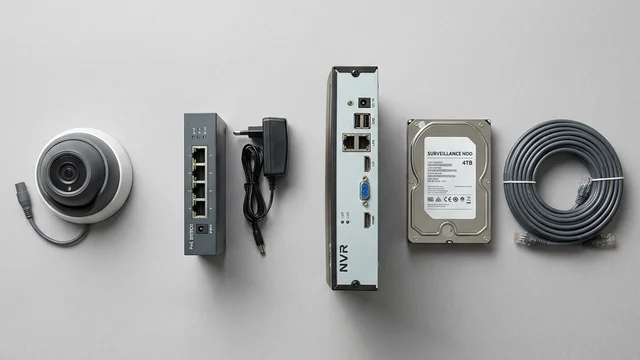
One of the most common things I hear during site surveys is some version of "it is just cameras, right?" On the surface, that impression is understandable. You see a camera on the wall. You see the image on a monitor or your phone. It looks straightforward.
But between the camera and the footage you eventually need to review, several components are working together, and very often, when a CCTV system fails to deliver, the camera is the last thing that is actually at fault. After designing CCTV systems for homes, factories, condominiums, and commercial buildings across Singapore for many years, I have found that understanding these components helps property owners ask better questions before installation and avoid the expensive lessons that come from discovering gaps after something has happened.
KEY POINT
A camera without power does nothing. A camera without a functioning network cannot send video to the recorder. A camera without adequate storage remembers nothing. CCTV should always be treated as a system, not as a collection of cameras.
The Camera Gets All the Attention
Naturally, everyone focuses on the camera first. Resolution, low-light performance, AI analytics, colour night vision, facial detection, licence plate recognition; these are the features that get discussed, compared, and marketed. The camera matters. These questions are fair. But the camera is not the whole story, and treating it as such is where many CCTV specifications go wrong.
A camera is a capture device. It captures light and converts it into a video stream. Everything that happens to that video stream after it leaves the camera; how it travels across the network, how it is processed and recorded, where it is stored, how long it is retained, and how it is retrieved when something happens; depends on the other components in the system. Understanding each of those components is what separates a system that performs reliably over five years from one that looks identical on the day of installation but generates problems six months later.
KEY POINT
Camera specifications tell you what the system can potentially see. System design determines whether it actually captures, records, and retains that footage in a form that is useful when you need it.
The Network; the Part Most People Forget
Modern IP CCTV cameras are network devices. They connect via network cable, transmit their video stream through switches, and depend on the network to reach the recorder and the remote viewing app. When the network fails or underperforms, cameras disappear from the system. The cameras themselves may be working perfectly; powered, operational, capturing video, but the recorder cannot reach them, the app cannot display them, and the system appears to have failed.
In practice, many CCTV problems that are reported as camera failures are actually network problems; a failing switch port, an overloaded uplink, a misconfigured VLAN, or simply a consumer-grade switch that was not designed to handle continuous high-bandwidth video traffic from multiple cameras simultaneously. The earlier article on network infrastructure covers this in more detail; the relevant point here is that a CCTV specification that does not include properly sized, managed network infrastructure is an incomplete specification regardless of how good the cameras are.
For a typical Singapore landed home with six to twelve cameras, this means a PoE switch with managed capability and adequate bandwidth, not the cheapest unmanaged switch available. For a larger commercial or condominium installation with thirty or more cameras, network design becomes a significant part of the project in its own right.
KEY POINT
The network is not supporting the CCTV system; it is part of the CCTV system. Specify it with the same care as the cameras and recorder.
Why PoE Makes Installation Cleaner
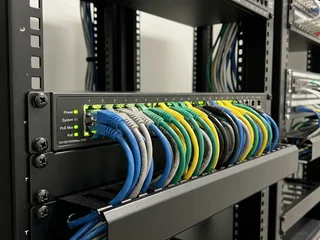
PoE stands for Power over Ethernet. In practical terms, it means a single network cable carries both the data; the video stream from the camera, and the electrical power the camera needs to operate. This is one of the reasons that modern IP CCTV installations are significantly cleaner and more manageable than older analogue systems that required separate power cables at every camera location.
With PoE, each camera position needs only one cable run back to the switch. There is no need for a power point near each camera, no separate power supply to mount and maintain at the camera location, and no additional failure point at each end. If a camera needs to be restarted after a firmware update or a fault, it can be power-cycled remotely from the switch management interface; no need to physically disconnect and reconnect anything at the camera itself. For systems with cameras mounted at height, under eaves, or in difficult-to-access locations, this remote restart capability is genuinely useful.
PoE must be specified carefully, however. Not all PoE switches are equal in their power delivery, and not all cameras draw the same amount of power. A standard fixed camera may draw 12 to 15 watts. A PTZ camera that pans, tilts, and zooms under motor power may draw 25 watts or more. A camera with powerful built-in IR illumination for long-range night vision may draw similarly. A switch that has sufficient ports but an insufficient total power budget will throttle or drop cameras as the aggregate load exceeds its capacity. This is why PoE specification involves calculating the total power budget of all cameras connected to the switch, not simply counting the number of ports.
DESIGN RULE
When specifying a PoE switch, calculate the total wattage of all cameras that will connect to it and ensure the switch's total PoE budget exceeds that figure with headroom. A switch running at 95% of its power budget has no capacity for additional cameras and may behave unpredictably under load.
The NVR; the Memory of the System
The Network Video Recorder is where video is processed and stored. The camera sees. The NVR remembers. If something happens and the footage is not on the NVR in a usable form, the camera has not delivered on its purpose regardless of how good the image quality was.
NVR specification involves four key variables: the number of camera channels it supports, the maximum recording resolution and frame rate on each channel, the total storage capacity of the hard disks installed, and the retention period; how many days of footage the system keeps before overwriting. These four variables interact. A system recording eight cameras at 4MP resolution with a 30-day retention requirement needs substantially more storage than one recording at 1080P with a 7-day retention. Specifying the NVR without calculating the actual storage requirement against the retention requirement is how systems end up with footage that is only retained for three days when the owner assumed it was thirty.
For Singapore residential properties, a minimum of 30 days retention is a sensible baseline; incidents are not always discovered immediately, and insurance or police investigations may require footage from further back than the previous week. For commercial properties with higher incident frequency or regulatory requirements, the retention period may need to be longer. This is a specification decision that should be made explicitly at the design stage, not discovered after installation when reviewing the recorder settings.
DESIGN RULE
Calculate storage requirements before specifying the NVR; camera count multiplied by resolution multiplied by frame rate multiplied by retention days. Verify that the specified NVR and disk configuration actually delivers the retention period the property needs.
Nobody Gets Excited About Hard Disks
Nobody gets excited about hard disks. Until the day they need footage and it is not there.
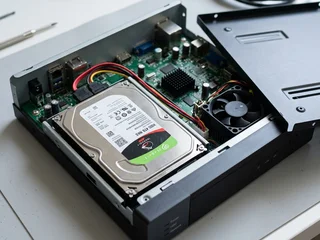
The hard disk inside a CCTV recorder works harder than almost any other hard disk in common use. It records continuously; every hour of every day, week after week, month after month. Writing video data from multiple cameras simultaneously, without pause, is a fundamentally different workload from what a standard desktop or laptop hard disk was designed for. Standard desktop drives are typically rated for eight to ten hours of operation per day. A CCTV recorder runs twenty-four hours a day.
This is why CCTV systems should use surveillance-grade hard disks; drives specifically designed and rated for continuous 24/7 recording workloads. They use different firmware, different caching behaviour, and different internal management to handle the sustained sequential write patterns that CCTV recording generates. Running a standard desktop drive in a CCTV recorder is not dangerous, but it is likely to shorten the drive's useful life significantly and increase the probability of an early failure.
Hard disks should also be treated as a service item with a planned replacement cycle. They do not last indefinitely. A drive that has been recording continuously for four or five years is operating beyond the point where its reliability can be assumed. A maintenance programme that includes periodic disk health checking, and proactive replacement before failure rather than after; is the difference between having footage when you need it and discovering the drive failed three weeks ago when you try to retrieve it.
PLANNING POINT
Specify surveillance-grade hard disks for any CCTV recorder. Plan a replacement cycle, typically every three to four years for drives in continuous recording use. A failed hard disk means no footage from any camera connected to that recorder, regardless of how well the cameras themselves were performing.
Good Cabling Often Outlasts the Equipment
This is something many property owners discover only when they consider upgrading. The cameras may have been superseded by better technology. The recorder may be outdated. The management software may no longer be supported. But the cables running through the walls and ceilings, if they were installed correctly in the first place; may still be in excellent condition and perfectly capable of supporting a modern IP system.
This has a direct implication for upgrade decisions. Before recommending any CCTV upgrade, the first step is always to assess the existing cabling. A cable that tests clean for continuity and signal integrity is a cable that can carry the video data from a new IP camera to a new NVR, eliminating the most disruptive and expensive part of a full replacement. In Singapore's completed properties, where running new cables means hacking into concrete, the value of reusable cabling infrastructure is substantial.
Understanding what still has value, and what does not; is what makes the difference between an upgrade that costs what it should and one that costs significantly more than necessary. Good cabling is an investment that pays back across multiple equipment generations.
KEY POINT
Never replace cabling without testing it first. Cable that passes continuity and signal tests can often support upgraded cameras and recorders without any physical disruption to the property.
The System Should Be Designed Before It Is Installed
One thing I have never been comfortable with is designing systems while standing on a ladder. A CCTV system should be planned before installation begins, not improvised as installation progresses. The layout should answer specific questions before a single cable is pulled: what areas must be covered and from where, where each camera needs to be positioned to achieve that coverage without blind spots, where the cable runs will travel from each camera position to the switch and recorder, and where those central components will be located and how they will be accessed for maintenance.
For Singapore residential properties; particularly larger landed homes with multiple elevations, a carpark, gate area, and garden; this planning process identifies the camera positions needed to achieve complete coverage without relying on the installer's judgement during installation. For commercial properties and condominiums, it becomes even more critical: a documented layout plan records which camera covers which area, making maintenance, fault diagnosis, and future expansion significantly easier. The question "which camera covers the loading bay?" should have a documented answer, not depend on whoever remembers the original installation.
A properly designed layout also surfaces problems before they are expensive to fix. A camera position that looks logical on a plan but would require drilling through a structural beam, or a cable route that conflicts with existing electrical conduit, is much easier to resolve at the design stage than after installation has begun.
Securevision Verdict
Most people think they are buying cameras. In reality, they are buying a complete system, and the reliability of that system over five or ten years depends on every component being correctly specified and properly integrated. The camera captures the image. The network delivers it. The NVR records it. The hard disk stores it. The cabling connects everything. The layout design determines whether the right things are covered in the first place.
The camera gets all the attention because it is the only part anyone can see. But the components behind the camera are what determine whether footage is available when you actually need it; after an incident, during an insurance claim, in support of a police investigation. A CCTV system is not built by choosing cameras alone. It is built by designing everything that allows those cameras to work reliably.
In Short
A CCTV system is not cameras. It is cameras, a network, a recorder, hard disks, cabling, and power infrastructure; all of which must be correctly specified, correctly installed, and correctly maintained for the system to deliver reliable footage when it is needed. The components that are most often under-specified are the ones nobody gets excited about: the network switch, the hard disks, and the cable quality. Getting these right does not require a larger budget; it requires a designer who understands that the camera is only as useful as the infrastructure behind it.

Frequently asked questions
What are the main components of a CCTV system?
A complete CCTV system consists of: cameras (which capture video); a network (which transmits video from the cameras to the recorder); a PoE switch (which powers IP cameras over the network cable); a network video recorder or NVR (which stores the footage); hard disks inside the NVR (which hold the recorded footage); and the cabling infrastructure that connects everything. Each component must be correctly specified for the system to work reliably.
What is a network video recorder (NVR)?
An NVR is the storage device for an IP CCTV system. It receives video streams from IP cameras over the network, compresses them using a codec such as H.265, and writes them to internal hard disks. The NVR also provides the interface for live viewing and footage playback. NVR capacity; measured in the number of camera channels and the total storage available; must be sized for the specific installation.
What is the difference between an NVR and a DVR?
An NVR (Network Video Recorder) connects to IP cameras over a network and is the standard for modern CCTV systems. A DVR (Digital Video Recorder) connects to analogue cameras via coaxial cable. DVRs were the standard for older analogue CCTV systems. Most new installations use NVRs with IP cameras. Hybrid recorders accept both analogue and IP inputs and are used when upgrading from an analogue system in stages.
What is PoE in a CCTV system?
PoE stands for Power over Ethernet. A PoE switch delivers both data and power to IP cameras through a single Cat5e or Cat6 network cable, eliminating the need for a separate power cable to each camera. This simplifies installation and reduces the number of cables required. PoE switches are available in different power budgets; the switch must be rated to supply adequate power for all the cameras connected to it.
How much hard disk storage do I need for my CCTV system?
The required storage depends on the number of cameras, the recording resolution and frame rate, the compression codec used, and the retention period required. A typical 8-camera system recording at 2MP at 15 frames per second using H.265 compression requires approximately 1 to 2 terabytes of storage per week. For a 30-day retention period, this equates to around 4 to 8 terabytes. Your installer should calculate the exact storage requirement based on your specific configuration.
What type of hard disk should be used in a CCTV recorder?
CCTV recorders require surveillance-grade hard disks, not standard desktop drives. Surveillance drives are designed for continuous 24/7 operation and are optimised for the write-heavy workload of constant video recording. Standard desktop drives are not rated for this duty cycle and will fail prematurely in a CCTV application. Surveillance-grade drives from reputable manufacturers typically carry a three-year warranty for this application.
What is H.265 compression and why does it matter?
H.265 (also called HEVC) is a video compression codec that delivers the same image quality as H.264 at approximately half the file size. Using H.265 compression approximately doubles the storage capacity and the number of cameras that can be recorded on a given NVR and hard disk configuration. Modern cameras and NVRs should support H.265 as standard; this is worth confirming when specifying a new system.
Why is the network switch important in a CCTV system?
The network switch is the hub that connects all IP cameras to the NVR. An undersized or poor-quality switch can cause packet loss, video lag, or dropped frames; problems that may not be obvious during installation but will affect footage quality and reliability. The switch must have sufficient bandwidth capacity for all cameras simultaneously, adequate PoE power budget, and should be a managed switch for commercial installations where network configuration and monitoring are important.
How long does CCTV footage need to be kept in Singapore?
There is no single statutory retention period for CCTV footage in Singapore applicable to all situations. Under the PDPA, footage should not be retained longer than necessary for the purpose for which it was collected. For most commercial and residential security applications, a retention period of 14 to 30 days is standard and generally considered proportionate. Regulated industries or specific security requirements may justify longer retention.
Why does the cabling quality matter in a CCTV system?
Poor quality or incorrectly installed cabling causes signal degradation, video artefacts, and intermittent faults that are difficult to diagnose after installation. Cat5e or Cat6 cable should be used for IP camera connections; cheaper unbranded cable often does not meet the rated specification and causes problems at the full rated distance. Cabling infrastructure has a much longer service life than the cameras and recorder; investing in quality cable at installation avoids problems for the lifetime of the system.
What should I check when a CCTV system is handed over?
Before accepting handover: test live viewing from all cameras and confirm the image quality is as specified; play back footage from each camera to confirm recording is working; check the retention period is correctly configured and the storage will not fill before the expected interval; confirm remote access is working correctly; verify the camera positions cover the intended areas; and request a written system document showing camera locations, NVR configuration, and user access details.