- The NVR is the most critical component in a CCTV system, not the cameras. When a camera fails, one location loses coverage. When the NVR fails, all footage from every camera is lost.
- For any commercial installation where footage has operational or legal value, a rack-mounted NVR in a lockable cabinet is the correct standard, not a premium option.
- Singapore's climate makes thermal management critical. Ambient temperatures in non-air-conditioned storerooms can reach 35°C or above. Every 10°C increase in operating temperature roughly halves expected hard disk lifespan.
- Rack mounting consolidates the NVR, PoE switches, and UPS in one locked, cabled, and ventilated enclosure; reducing tampering risk, cable chaos, and power management inconsistency simultaneously.
- For a residential property with four to eight cameras, a desktop NVR in a secure indoor location is usually sufficient. The rack cabinet becomes essential as site size, footage value, and access complexity increase.
- Silent NVR failures; hard disk corruption, overheating, power interruptions; are the most common cause of missing footage when it is needed. Most go undetected because the system continues displaying live images.
Why the NVR's physical location matters more than most people realise
When a CCTV system is commissioned, most of the attention goes to the cameras; their positions, their resolution, their coverage arcs. The NVR gets placed wherever is convenient: on a desk in the back office, on a shelf in the storeroom, tucked into a corner of the server room, pushed above a ceiling tile to keep it out of sight, or installed inside an electrical riser because the cable route was already there. That placement decision has a larger impact on system reliability and security than most people realise, and it is rarely revisited after installation.
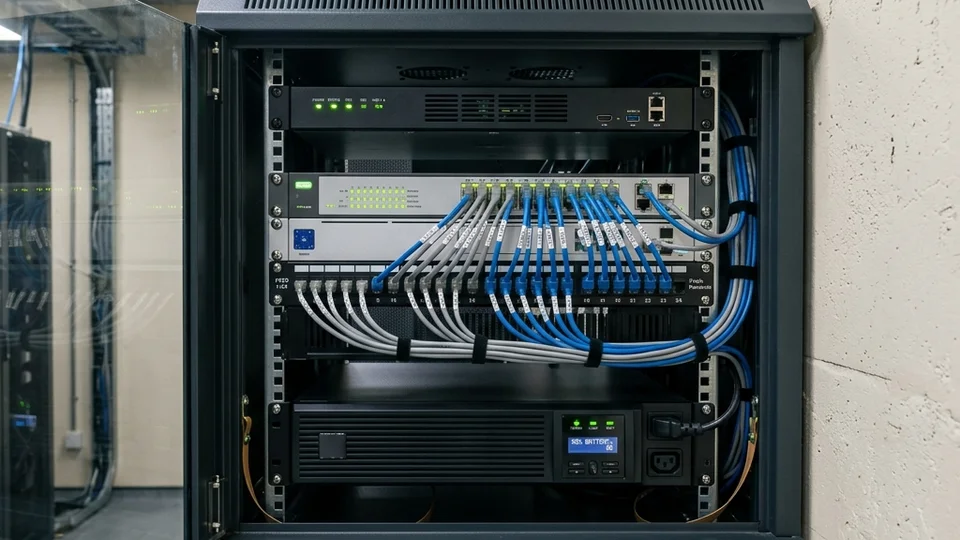
The NVR is the component that holds the footage. The cameras capture images; the NVR is where those images are written to disk, stored, and retrieved when an incident requires evidence. If the NVR is tampered with, overheats, suffers a power interruption, or accumulates enough dust to cause component failure, all the investment in cameras, cabling, and installation produces no usable evidence at the moment it is actually needed. When a camera fails, one location loses coverage. When the NVR fails, every camera on the system becomes retrospectively useless for the period of the failure.
One of the most common situations we encounter is a site where the CCTV cameras appear to be functioning perfectly, yet no footage is available when an incident occurs. The live view works. The cameras are online. Everything appears normal. Only when someone attempts to retrieve footage does the problem emerge; a failed hard disk, an overheating NVR that corrupted its recording index, a power interruption that the NVR was not protected against. In most of these cases, the cameras were never the problem. The recorder was. And the failure had been developing silently for weeks or months because the system continued displaying live images throughout. For a practical guide to checking whether a CCTV system is actually recording, not just displaying live images; see Is Your Security System Still Working?
KEY POINT
A CCTV system is not judged by how well it displays live video today. It is judged by whether it can provide usable evidence when an incident occurs. The recorder is the component responsible for that function, and it deserves at least as much attention during design as the cameras that feed into it.
Protection from tampering and theft
An NVR sitting on a desk is an NVR that anyone with physical access to that room can unplug, remove, or delete footage from. In retail, hospitality, and commercial office environments in Singapore, this is not a theoretical risk. The most common scenario is a staff incident; a theft, a workplace altercation, a dispute about what happened at a particular time, where the person involved knows exactly where the recorder is located. Removing the NVR or deleting the relevant footage before the incident is discovered is straightforward if the recorder is accessible. In some cases we have attended, the NVR had been removed entirely. In others, someone had reformatted the drive. In both cases, there was no footage when the investigation needed it.
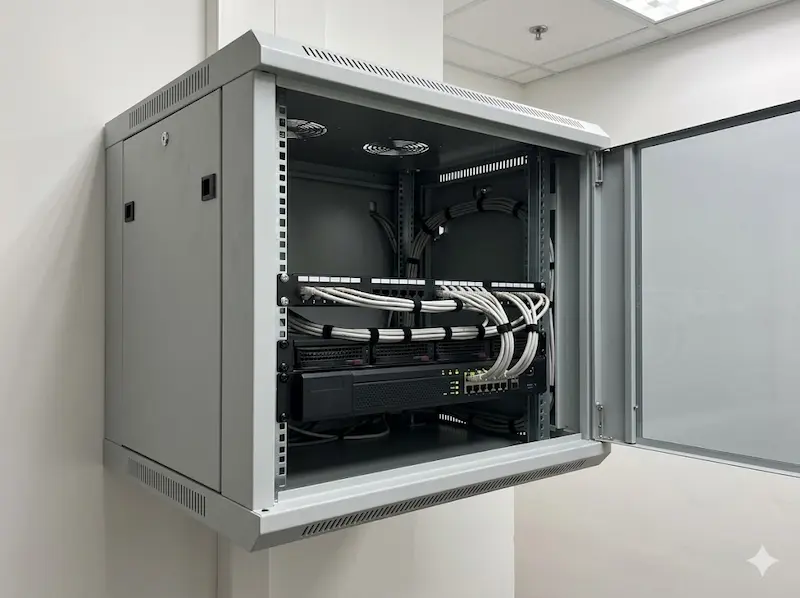
A rack cabinet with a lockable door changes this. The NVR is mounted behind a locked panel at height, with cables secured inside the enclosure. Removing it requires a key, tools, and time; none of which a person acting impulsively in the moments after an incident is likely to have. The cabinet does not make tampering impossible, but it makes it significantly harder and significantly more conspicuous. For any installation where footage might ever be needed as evidence, which describes every commercial installation; physical security of the NVR should be part of the design from the outset, not an afterthought.
KEY POINT
Consider also where the rack cabinet is located within the premises. A cabinet in a room accessible to all staff provides less protection than one in a dedicated IT or security room with access restricted to management. The cabinet and the room it is in together define the level of physical security the NVR actually receives.
Proper cooling and hard disk lifespan
An NVR runs continuously; twenty-four hours a day, seven days a week, every day of the year. Its internal fans are sized to cool the unit in open air at normal operating temperatures. They are not sized to cope with the unit pushed against a wall with cables blocking the rear exhaust vents, sitting inside an enclosed cupboard, or operating in a non-air-conditioned storeroom in Singapore where ambient temperatures can reach 35°C or above during the day. Electrical risers present a similar problem: they are typically unventilated, share space with heat-generating switchgear and cabling, and may be inaccessible for weeks between service visits. Ceiling voids are worse still; heat accumulates at ceiling level with no airflow, access requires ladders or ceiling panel removal, and any water ingress from pipes above reaches the NVR directly.
Sustained overheating does not usually cause immediate, obvious failure. It degrades components progressively, and the hard disk suffers most. A hard disk running consistently at elevated temperatures will reach end-of-life significantly ahead of schedule. The practical implication in Singapore's climate is material: a disk that might last four years in a temperature-controlled environment may last under two years in a poorly ventilated storeroom. The system will appear to be working until the day the disk fails, at which point the footage required is no longer there.
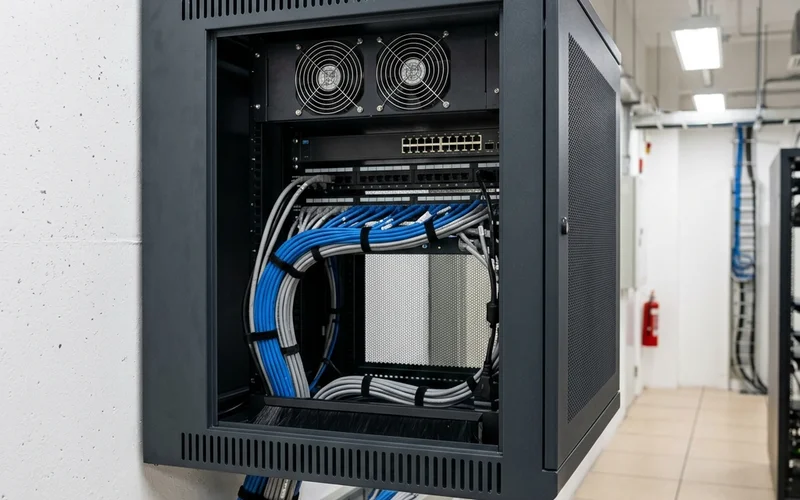
Rack cabinets are designed with thermal management in mind. Equipment mounts horizontally with clear space above and below for airflow. Many rack cabinets include built-in fans that draw cool air in from the front or bottom and exhaust warm air from the rear or top, creating a defined airflow path rather than allowing heat to pool around equipment. The NVR operates in a predictable thermal environment rather than fighting against its own blocked vents or competing with the ambient heat of an enclosed space.
KEY POINT
Every 10°C increase in operating temperature roughly halves the expected lifespan of a hard disk; a well-documented relationship derived from manufacturer thermal testing. In a Singapore storeroom without air-conditioning, a poorly ventilated NVR can shorten disk life from four years to under two. The cost of a rack cabinet with adequate ventilation is a fraction of the cost of a disk failure and the missing footage that accompanies it.
Cable management and maintainability
An NVR installed on a desk in a back office accumulates cable chaos over time. Camera cables, power cables, network cables, and patch cords become tangled. They get stepped on. They get pulled accidentally when something nearby is moved. A loose network cable means a camera drops off the system, and in a busy commercial environment, this often goes unnoticed until someone needs the footage from that camera for a specific date and time. By then, the gap in the recording is weeks old and the cause is no longer apparent.
Inside a rack cabinet, cables are managed deliberately. Camera cables enter through designated cable entry points and route to a patch panel. Patch cables run from the panel to a managed switch. Power cables connect to a power distribution unit mounted in the same cabinet. Everything has a documented path. When a camera stops recording, the cable route between the camera and the NVR can be traced in seconds rather than minutes. When the system needs to be expanded, a new camera means adding a cable to the patch panel, not threading it through a pile of existing cables on a desk while trying not to disturb anything else.
This also produces a significantly better environment for the technician attending a service visit. A neat, documented installation takes less time to inspect, less time to fault-find, and less time to work on safely. Technician time at commercial hourly rates compounds quickly when the alternative is a poorly organised installation where every change requires understanding what was done before.
Power management and UPS integration
A CCTV system is not just the NVR. It includes PoE switches that power the cameras, a network router or switch for remote access, and potentially fibre converters or wireless bridges depending on the site topology. All of these components need power, and all of them need to remain powered simultaneously during a mains outage if the system is to continue recording through a power interruption.
When equipment is scattered across a room on different power points, UPS integration becomes complicated and inconsistent. Each device needs its own UPS, or an extension lead from a central unit running across the floor. Devices added to the system later often end up on unprotected circuits because the UPS was not planned with expansion in mind. The result is a system where some components continue running during a power outage and others do not; producing gaps in coverage at exactly the moment when power interruptions and security incidents are most likely to coincide.
A rack cabinet consolidates this. A single rack-mounted UPS inside the cabinet covers every device in that cabinet; NVR, switches, converters; simultaneously and consistently. When mains power is interrupted, every device continues operating together. The cameras keep recording. The NVR keeps writing. Nothing is lost, and nothing is left on an unprotected circuit because someone forgot to include it when the UPS was specified.
PLANNING POINT
When specifying the UPS for a rack installation, calculate the total power draw of every device in the cabinet and size the UPS to provide at least 20 minutes of runtime at full load. In Singapore, most power outages are resolved within minutes, but a UPS that is undersized will not bridge even a brief interruption cleanly, and a UPS that has never been tested may not perform to its rated capacity when it is actually needed.
Dust; the slow failure mode
Dust is one of the most overlooked threats to electronics in Singapore. Over time, dust accumulates inside equipment through ventilation openings, coating circuit boards and heat sinks. It acts as an insulating layer on components that are designed to dissipate heat; raising operating temperatures progressively without any visible indication that anything is wrong. In environments with higher static charge; lower humidity spaces, workshops, areas near certain types of machinery; dust can carry enough charge to damage sensitive electronics directly.
The environments where CCTV systems are most needed are often the environments where dust is most problematic. Workshops, warehouses, loading bays, construction-adjacent sites, food processing facilities; all of these generate dust or particulate matter at levels that are challenging for open or poorly protected electronic equipment. Chemical exposure is an additional risk in the same environments: cleaning chemical fumes, solvent vapours, and airborne contaminants from certain industrial processes accelerate corrosion on circuit board traces and connector contacts; a failure mode that develops invisibly over years and produces intermittent faults that are difficult to diagnose. An NVR on a shelf in a workshop storeroom, near cleaning supplies or chemical storage, will accumulate both dust and chemical residue at a rate that an NVR in a sealed rack cabinet with filtered air intake will not.
A rack cabinet does not eliminate dust entirely; it requires periodic cleaning like any other enclosure. But it provides a physical barrier between the NVR and the surrounding environment, reduces the rate of accumulation, and in the case of cabinets with filtered intake fans, actively filters particulate matter from the air entering the enclosure. For installations in challenging environments, this barrier is meaningful and extends the interval between cleaning visits.
Does every site need a rack cabinet?
Not necessarily, and the honest answer depends on the site's risk profile, the footage's operational value, and the physical environment the NVR will operate in.
For a landed property with four to eight cameras, where the NVR is installed inside a locked room with limited access, adequate ventilation, and stable power supply, a desktop NVR in a sensible location is usually sufficient. The risk of tampering is lower, the footage is less likely to be needed as formal evidence in a workplace investigation, and the environmental conditions are typically more controlled than a commercial storeroom.
For commercial premises; offices, retail outlets, factories, warehouses, schools, condominiums; the calculation changes. Multiple people may have access to the equipment area. The footage may have operational value for incident investigation, disciplinary matters, insurance claims, or legal proceedings. The environment may include dust, heat, or humidity levels that accelerate component degradation. In these situations, a rack-mounted NVR in a lockable cabinet is the correct standard for the installation, not a premium option that only large enterprises can justify.
The additional cost of a wall-mounted rack cabinet is modest relative to the overall CCTV investment, typically a small fraction of the total project cost. The cost of missing footage when an incident requires it, in terms of investigation outcomes, insurance claims, or legal proceedings; is not modest. The decision to rack-mount is ultimately a decision about how seriously the organisation takes the footage the system is designed to produce. For wider guidance on choosing the right CCTV system for a commercial or residential site in Singapore, see How to Choose the Right CCTV System.
| Factor | Desktop NVR on shelf or desk | Rack-mount NVR in locked cabinet |
|---|---|---|
| Physical security | Accessible to anyone in the room; can be unplugged, removed, or reformatted | Locked behind cabinet door; requires key and tools to access |
| Thermal management | Dependent on ambient room temperature; poor in Singapore storerooms (32–38°C) | Managed airflow with cabinet fans; predictable operating temperature |
| Cable management | Cables accumulate loosely; prone to accidental disconnection | Structured via patch panel and PDU; traceable and secure |
| UPS integration | Inconsistent; devices on different circuits may not all be protected | Single rack-mount UPS covers all cabinet devices simultaneously |
| Dust protection | Open to environment; accumulates dust directly | Cabinet provides physical barrier; filtered units reduce accumulation |
| Recommended for | Residential properties, 4–8 cameras, secure indoor location | All commercial installations; offices, retail, industrial, condominiums |
Securevision's View
We specify rack-mounted NVRs for every commercial installation we do, without exception. The additional cost is small and the reliability improvement over the life of the system is significant. The failure mode we want to avoid; a site discovers that its NVR has been failing silently for weeks and has no footage available for an incident that just occurred; is far more expensive than a rack cabinet in every meaningful sense. For homeowners with a simple residential system in a secure indoor location, a desktop NVR is fine. For any commercial premises where the footage has operational or legal value, rack mounting is the right answer.
In Short
The NVR is where the evidence lives. Placing it on a desk or a shelf exposes it to tampering, thermal degradation, cable disruption, power inconsistency, and dust accumulation; all of which cause silent failures that only become visible when footage is needed and is not there. A lockable rack cabinet addresses all five failure modes simultaneously at a cost that is modest relative to the total CCTV investment. For residential properties with small systems in secure locations, a desktop NVR is adequate. For any commercial site where footage has operational or legal value, rack mounting is the correct standard from the outset.

Frequently asked questions
What is the difference between a rack-mount NVR and a desktop NVR?
A rack-mount NVR is designed to be installed in a standard 19-inch equipment rack or cabinet; it is wider and shallower than a desktop unit and mounts horizontally on rack rails. A desktop NVR is a standalone unit designed to sit on a flat surface, similar in form to a desktop computer or set-top box. Both perform the same core function of recording footage from IP cameras, but the rack-mount form factor is designed for installation environments where physical security, cable management, and thermal management are managed at the cabinet level rather than at the device level.
Does a small office or retail outlet need a rack-mounted NVR?
In most cases, yes. The size of the site is less relevant than the value of the footage. A small retail outlet where staff theft is a risk, or a small office where workplace incidents may require footage as evidence, has the same need for a physically secured and reliably operating NVR as a larger installation. A wall-mounted mini rack cabinet, as small as 6U; provides the lockable enclosure, basic cable management, and ventilation improvement that the NVR needs at a cost that is proportionate even for small commercial installations.
Can a locked cupboard serve the same purpose as a rack cabinet?
Partially, but not fully. A locked cupboard addresses the physical security concern if it cannot be easily opened without a key. However, it typically does not address thermal management; a cupboard with a closed door and no active ventilation may actually be worse than an open shelf for cooling. It also does not provide structured cable management or a mounting point for a UPS, switch, and other related equipment. A rack cabinet is designed specifically for electronics; it provides ventilation, cable management, and mounting for all associated equipment in one enclosure.
How hot can a storeroom in Singapore get?
Non-air-conditioned storerooms and service areas in Singapore regularly reach 32°C to 38°C during the day, particularly in west-facing rooms or rooms adjacent to heat-generating equipment. NVR manufacturers typically rate their equipment for operation up to 40°C to 45°C, but sustained operation near the upper limit of that range significantly accelerates hard disk degradation. The problem is not a single hot day; it is years of continuous operation at elevated temperatures that progressively shortens component life.
What is a UPS and does the NVR need one?
A UPS (Uninterruptible Power Supply) provides battery backup that maintains power to connected equipment during a mains outage. For an NVR, a power interruption without a UPS means the recording stops immediately, and an uncontrolled shutdown can corrupt the recording index; meaning footage recorded before the outage may also be partially unrecoverable. A UPS gives the NVR clean, continuous power through brief outages and allows a controlled shutdown during extended ones. For any commercial installation, a UPS is not optional; it is a fundamental component of a reliable recording system.
How often does a rack-mounted NVR need maintenance compared to a desktop unit?
The recording function requires the same maintenance regardless of form factor; hard disk health checks, firmware updates, and recording verification should be done at least annually. The rack enclosure itself typically requires less frequent cleaning than an open desktop unit because the cabinet reduces dust accumulation on the NVR. However, the cabinet's filters and fans should be inspected at each maintenance visit and cleaned or replaced as needed; a blocked filter defeats the purpose of the enclosure.
What size rack cabinet is needed for a typical commercial CCTV installation?
A 9U to 12U wall-mounted cabinet is sufficient for most small to medium commercial CCTV installations; it accommodates the NVR (typically 1U to 2U), a managed PoE switch (1U), a patch panel (1U), a power distribution unit (1U), and a UPS (1U to 2U) with space for cable management. Larger installations with multiple NVRs, higher camera counts, or additional network equipment may require a floor-standing 18U to 24U cabinet. The cabinet should be sized at commissioning to allow for the expected system growth over the next three to five years rather than exactly matching the current equipment count.
Where should the rack cabinet be located within the premises?
The cabinet should be in a room with restricted access; ideally a dedicated IT or security room, or a locked storeroom accessible only to management and authorised technicians. The room should be reasonably cool, with either air-conditioning or adequate natural ventilation. Avoid locations adjacent to heat-generating machinery, areas with water pipes overhead, or rooms that double as general storage where the cabinet may be obscured or accessed by unauthorised personnel.
Can footage still be lost from a rack-mounted NVR?
Yes; a rack cabinet reduces risk, it does not eliminate it. Hard disks still fail eventually; footage can still be overwritten if retention settings are not correctly configured; remote access credentials can still be compromised. The rack cabinet addresses physical tampering, thermal management, cable disruption, and power inconsistency; the four most common causes of avoidable NVR failure. The remaining risk is managed through regular maintenance, correct system configuration, and periodic recording verification.
Is it necessary to verify that the NVR is actually recording?
Yes, and this is the check most often skipped. An NVR can display live camera images while simultaneously failing to write footage to disk; a failed hard disk, a full disk with overwrite disabled, or a recording configuration error can all produce this result. The only way to confirm the system is recording is to check playback; search for footage from a specific date and time in the past and confirm it can be retrieved. We recommend doing this at least monthly on any commercial installation and after any change to the system configuration.
What should be included in a rack cabinet for a CCTV installation?
At minimum: the NVR, a managed PoE switch sized for the camera count with room to grow, a patch panel for structured cabling from cameras, a power distribution unit, and a UPS. For installations with remote access requirements, a router or network switch with appropriate firewall configuration should also be rack-mounted. All cables should be labelled at both ends. A physical record of what is connected where; a simple diagram; should be kept inside the cabinet door for reference during service visits.
Why should an NVR not be installed above the ceiling?
Ceiling voids are one of the worst environments for an NVR, despite being a common choice when an integrator wants to keep the equipment out of sight. Heat accumulates at ceiling level; hot air rises and has nowhere to go in a sealed void; producing sustained temperatures significantly higher than the room below. Access for servicing or fault-finding requires removing ceiling panels and working at height, which means faults that should take minutes to diagnose take significantly longer and cost more. Cable management is impossible in a ceiling void; cables run loosely and are difficult to trace. And any water ingress from plumbing, air-conditioning condensate lines, or roof drainage above the ceiling reaches the NVR directly. The NVR is out of sight, but it is also out of reach, out of airflow, and exposed to every risk that the ceiling void contains.