- A standalone door access system; controller, database, and reader in one unit, no network required; is often the right choice for one or two doors with a stable user base. The limitation is administration, not security.
- The real cost of a standalone system is not the purchase price. It is the time spent managing cards, removing leavers, and reprogramming a unit that nobody fully understands three years after installation.
- A reader with a display screen or software interface costs more upfront but saves significant time over the life of the system. Prioritise ease of administration over purchase price.
- For higher-security areas; server rooms, records rooms, restricted offices; card plus PIN provides a meaningful additional layer. Card-only systems are suitable when the credential itself (not the knowledge of a PIN) is sufficient protection.
- If a second door is likely within two to three years, choose a reader that can be connected to a central management platform later without replacing the hardware. Several manufacturers offer this upgrade path.
- Any door on a fire egress route in Singapore requires a fail-safe lock; one that releases when power is lost. This is not optional. The lock and reader must be specified together, not separately.
When a standalone system is the right choice
A standalone door access system has the controller, the credential database, and the reader built into a single unit mounted on or beside the door. There is no separate server, no central management software running on a computer somewhere, and no network connection to a wider access control platform. The unit manages itself, which is precisely what makes it attractive for straightforward applications.
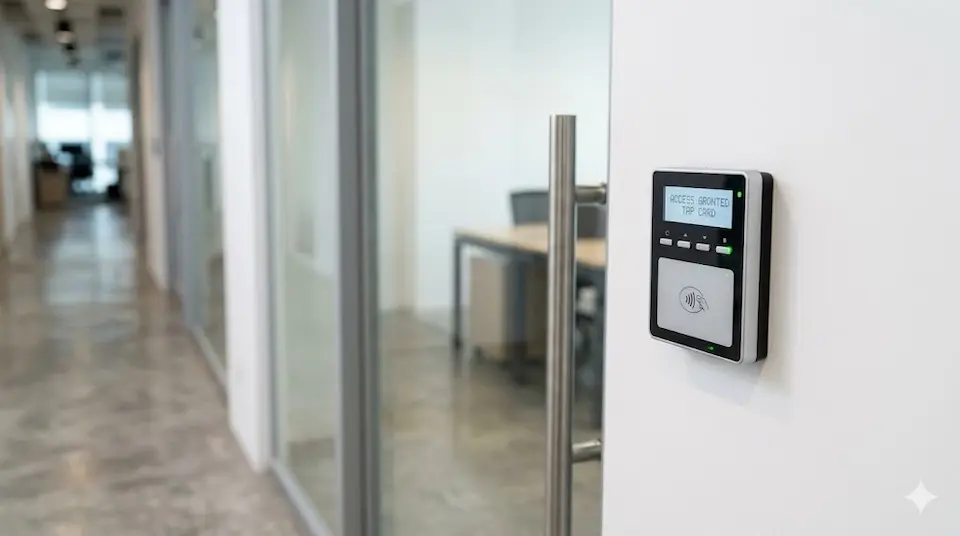
For a single door; a server room, a storeroom, a private office, a utility room, a small warehouse; standalone is often the correct specification. It is economical, self-contained, and requires no IT infrastructure to operate. The installation is straightforward, the cost is modest relative to a networked system, and for genuinely simple requirements it works well. Not every door needs an enterprise access control platform. The question is whether the requirement is genuinely simple; now, and for the foreseeable future.
The point at which standalone becomes the wrong choice is usually not obvious on installation day. It becomes obvious later, when staff turnover has changed the access list multiple times, when cards have been reported lost and nobody is certain they were removed, when a new person is responsible for the system and cannot find the programming manual, or when a second door needs to be added and the existing unit cannot be part of a joined-up solution. The question is not whether a standalone system works. The question is whether it will still be manageable when the business changes, and businesses almost always change. For a broader overview of how card access systems work and what credentials are available, see How Card Access Control Works.
KEY POINT
The quality of a standalone access control decision is rarely visible on installation day. It becomes visible three years later, when the business has grown, staff have come and gone, and the system either supports the current situation or has become an obstacle to managing it.
The real cost is administration, not hardware
Most buyers focus on the purchase price of the reader. In practice, the larger cost over the life of a standalone system is often the time spent administering it. A reader that is inexpensive to buy but difficult to manage will cost more in practice than a reader that costs more upfront but takes minutes rather than hours to administer.

The cheapest standalone readers use a keypad as the only interface; no display screen, no management software. Programming is done by entering sequences of codes from the manual. This is functional when the system is new and the person who programmed it is still in the building. It becomes significantly less functional when a staff member loses their card eighteen months later, the original programmer has left, and the manual is somewhere in a filing cabinet that has been moved twice. Removing the lost card requires someone to either find the manual, remember the code sequence from memory, or call the installer for assistance; all of which have a cost.
A reader with a display screen shows what it is doing when you programme it; the menu structure is visible, the steps are logical, and the process does not require memorising code sequences or consulting a manual for basic tasks. A reader with a software interface is better still: user management becomes as straightforward as using any other business application, access logs are visible on screen, and adding or removing a user takes under a minute. The cost premium for a display screen or software-capable reader is usually modest. The time saved over the life of the system is not.
KEY POINT
Think about what you will need to do when the first staff member leaves. If revoking that person's access requires a procedure you cannot confidently describe right now, the reader is too complex to administer. Choose differently.
How will you manage it when staff change?
Staff turnover is the most common trigger for standalone access control problems. The system works perfectly when the original installer set it up. Then a staff member leaves, a card is reported lost, a new employee needs access, and the person now responsible for the system discovers that nobody left clear instructions for any of these scenarios.
We visit sites regularly where a standalone reader is functioning exactly as it should; the door opens when a valid card is presented, the lock holds when it should, but the business cannot tell us with confidence which cards are currently active, whether the former employee's card has been removed, or how to add the new receptionist. The hardware is working. The administration has broken down. These are very different problems, and the second one is the more common of the two.
Before selecting a standalone reader, the decision-maker should be able to answer three practical questions. First: how do you remove a card when a staff member leaves or loses their card? Second: how do you add a new user? Third: if the person currently responsible for the system leaves, how will the next person take over? If any of these answers is "I am not sure" or "I would need to call the installer", the reader being considered is either too complex for the organisation to manage or has not been evaluated on the right criteria.
A good standalone system makes all three processes straightforward enough that a competent person who was not involved in the original installation can carry them out without specialist assistance. This is the correct standard for any system that will be in service for five or more years with changing staff. It is also worth noting that standalone systems do not support anti-passback; the rule that prevents a card from being used to re-enter an area without first having exited it. Anti-passback is a networked system feature. If your security requirement includes preventing tailgate entry on that basis, a networked system is the appropriate specification.
PLANNING POINT
Ask the supplier to demonstrate; during the sales process, not after purchase; how a card is removed, how a new user is added, and how the access log is reviewed. If the demonstration requires consulting the manual or takes more than a few minutes for each task, factor that time into the total cost of the system over its expected life.
Credential choice and security level
The credential; the thing a person presents to the reader to gain access; is a decision that is often made by default rather than by design. Most standalone readers ship with support for proximity cards as the standard credential, and most buyers accept this without considering whether it is the right choice for the application.
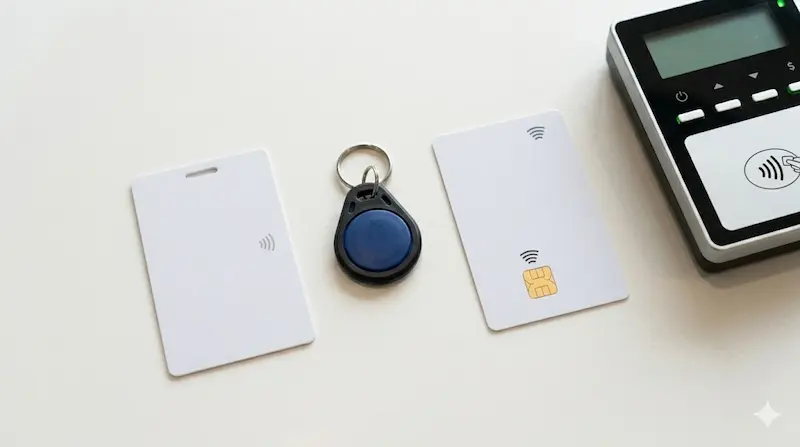
For many applications, a card is sufficient. A server room in a managed office, a storeroom in a retail environment, a private office in a building where entry to the floor is already controlled, in these cases the card provides adequate protection, lost cards can be removed promptly, and the risk profile does not require anything more. Card plus PIN is the next level: the reader requires both the card and a PIN before granting access, which means a lost or stolen card alone cannot be used to enter the area. For higher-risk areas; IT equipment rooms, records rooms containing sensitive data, areas where unauthorised entry would have serious consequences; card plus PIN is worth the small additional cost and operational adjustment.
One technical note worth making for organisations specifying access control in Singapore: readers that use Mifare Classic credentials; an older card technology that was widely deployed in the 2000s and early 2010s; have well-documented security vulnerabilities. Mifare Classic cards can be cloned with equipment that is readily available. For any application where card cloning is a meaningful risk, specify readers that use more recent card technologies such as Mifare DESFire or equivalent. The cost difference is small. The security difference is significant for areas where the consequence of unauthorised entry is material.
Planning for a second door
Many organisations start with one secured door and add a second within two years. A server room gets a storeroom. A private office gets a records room. A small warehouse adds a loading bay. This is one of the most predictable patterns in commercial access control, and it is one of the least prepared-for at the point of initial purchase.
When a second door is added to a site that has a standalone reader on the first door, there are two options. The first is to install another standalone reader; simple, low cost, but now the organisation has two independent systems with separate databases, separate administration processes, and no way to see who has access to what across both doors from a single view. Adding a third door makes this worse. The second option is to replace the standalone reader with a networked system, which means hardware replacement cost in addition to the new door cost, and disruption to a door that was already working.
The better approach, if expansion is at all foreseeable, is to choose a standalone reader at the outset that can be connected to a central management platform later without replacing the hardware. Several manufacturers, including brands available in Singapore's commercial market; offer readers that operate as standalone units initially and can be networked into a wider system when the need arises. The reader itself does not change. The management layer is added on top. This does not mean spending significantly more at the outset; it means choosing from the right product range from the beginning, so that growth does not require replacement.
PLANNING POINT
Before purchasing, ask the supplier directly: if we need to add a second door in two years, can this reader be integrated into a management platform without replacing it? If the answer is no, factor in the replacement cost when comparing the initial price against alternatives that do support this upgrade path.
The lock; fail-safe, fire egress, and what to specify
The reader controls who is allowed through the door. The lock is what physically secures it. Both must be specified together, and in practice the lock is the component that is most often underspecified or chosen by default rather than by design.
The first decision is the lock type. Electromagnetic locks; EM locks; hold the door shut by magnetic force when energised. Electric strike locks work differently: they release the strike plate to allow the latch to pass when access is granted, and the door is otherwise held by the mechanical latch. Both are appropriate for different door configurations, and the choice depends on the door frame, the door swing, the security level required, and the fire safety implications of the installation.
The most important specification for any door on a fire egress route is that the lock must be fail-safe; meaning it releases when power is lost. A fail-safe lock (one that unlocks when the power supply is cut) is the required behaviour on evacuation routes: if a fire causes a power failure, the door must be openable by occupants attempting to exit. This is not a recommendation, for any door on a designated fire egress route in Singapore, it is a requirement under the SCDF Fire Code. A fail-secure lock (one that remains locked when power is lost) may be appropriate for a server room or records room interior door that is not on an egress route, but must never be installed on a path that occupants need to use to exit the building in an emergency.
The fire alarm integration requirement follows from this: electronic locks on fire egress routes should be connected to the building's fire alarm panel so that they release automatically when the fire alarm activates, independent of the access control system. This is the correct specification and it must be confirmed as part of the system design, not assumed to exist or left to be arranged after installation.
KEY POINT
Always confirm with the building management or fire safety consultant whether a door is on a designated fire egress route before specifying the lock type. Installing a fail-secure lock on a fire egress route is a life safety error as well as a regulatory breach. If in doubt, specify fail-safe and confirm the exception separately.
What to check before you buy
Most buyers evaluate standalone readers on price and appearance. Both matter less than the four questions that determine whether the system will still be working well for the business in five years.
The first is administration: how are users added, how are cards removed, and how is the access log reviewed? Ask the supplier to demonstrate each of these during the sales process. If the demonstration is slow, requires consulting documentation, or produces any answer involving "you would call us for that", factor the ongoing support cost into the total price comparison.
The second is capacity: how many users does the system support, and is that number sufficient for the expected user base plus reasonable growth? Most commercial readers support at least 500 to 1,000 users, which is adequate for most standalone applications, but verify the specific figure for the model being considered and confirm that the access log storage is sufficient for the number of transactions the door will generate.
The third is upgrade path: can this reader be integrated into a networked management platform later if the need arises? The answer to this question at the point of purchase determines how much the next growth decision will cost.
The fourth is the lock and fire safety compliance: is the proposed lock type appropriate for the door's location, and if the door is on a fire egress route, is fail-safe operation confirmed and fire alarm integration included in the specification? This question must be answered before installation, not after.
Securevision's View
Most businesses think they are buying a reader. In reality, they are buying a process for managing access to a part of their premises over the next five to ten years. The reader that costs eighty dollars more but has a display screen and software interface will save multiples of that difference in management time. The reader that costs less but cannot be integrated when a second door is added will cost its own replacement price to correct. We do not recommend selecting a standalone reader on purchase price alone; we recommend selecting it on the basis of how easy it is to manage, and whether it will still serve the business well when the business has grown and changed.
In Short
A standalone door access system is often the right choice for one or two doors with a straightforward, reasonably stable requirement. The decision that matters most is not which reader to buy; it is how the system will be administered when staff change, and whether the reader chosen will still be manageable years after installation. Specify a reader with a display screen or software interface, choose credentials appropriate to the security level of the area, confirm the upgrade path if expansion is foreseeable, and specify the lock and fire safety integration correctly from the outset. The total cost of the right system is almost always lower than the total cost of the wrong one.

Frequently asked questions
What is a standalone door access system?
A standalone door access system combines the credential reader, the access controller, and the user database into a single unit mounted at the door. There is no separate server, no central software running on a networked computer, and no connection to other doors. The unit manages itself independently. This makes it economical and simple to install for one or two doors, but it also means that management of the system; adding users, removing leavers, reviewing access logs; is done directly at the reader or through software connected to that reader alone.
When should I use a standalone system instead of a networked one?
A standalone system is usually the right choice when the requirement is genuinely limited to one or two doors, the user base is relatively stable, and there is no need to manage access across multiple doors from a single interface. When three or more doors need to be controlled, when users need different access rights to different areas, or when anti-passback control is required, a networked system is the more appropriate specification. The upgrade path question; can this standalone reader be connected to a management platform later; is worth asking even for a single-door installation if growth is foreseeable.
What does fail-safe mean for a door lock?
A fail-safe lock releases; unlocks, when the power supply is cut. This is the required behaviour for any lock installed on a fire egress route: if a fire causes a power failure, the door must be openable so that occupants can exit safely. A fail-secure lock does the opposite; it remains locked when power is lost, which is appropriate for a server room or records room interior door that is not on an evacuation route. The distinction matters significantly: installing a fail-secure lock on a fire egress route is both a life safety risk and a breach of the SCDF Fire Code in Singapore.
How many users can a standalone reader support?
Most commercial standalone readers support between 500 and 2,000 users, with higher-capacity models available for larger installations. Always verify the specific capacity of the model being considered, and compare it not only to the current user count but to the expected user count over the system's life, including any staff growth and the overlap period where old and new cards coexist during transitions.
Can a standalone reader be upgraded to a networked system later?
Some standalone readers can be connected to a central management platform later without hardware replacement; this depends on the manufacturer and the specific model. Several manufacturers offer product ranges where the same reader hardware operates as standalone initially and can be networked when the requirement grows. This upgrade path should be confirmed with the supplier before purchase, not assumed. If the reader cannot be networked later, the cost of adding a second door includes the cost of replacing the first reader as well.
What is the difference between a proximity card and a Mifare DESFire card?
Proximity cards (125kHz) transmit a fixed, unencrypted ID number when presented to a reader. They are inexpensive and widely used but can be cloned with equipment that is readily available. Mifare Classic cards are a step up in terms of technology but have documented security vulnerabilities; the encryption used has been compromised and these cards can also be cloned. Mifare DESFire cards use stronger encryption and are significantly harder to clone. For high-security areas where the consequence of unauthorised entry is material, specifying a reader that uses DESFire or an equivalent modern credential is worth the small cost premium over older card technologies.
Do I need card plus PIN, or is a card alone sufficient?
For most standalone applications; a storeroom, a general office area; a card alone is sufficient. Card plus PIN is worth considering for higher-risk areas where a lost or stolen card alone should not be sufficient to gain entry: server rooms, records rooms, cash handling areas, or any area where the contents or data stored carry significant value. The operational trade-off is that staff must remember a PIN and enter it each time; a minor inconvenience that is usually worthwhile for genuinely sensitive areas.
What happens if the person who manages the system leaves?
This is one of the most common access control problems we encounter in Singapore small businesses and offices. The answer should ideally be: the next person takes over using the same software or display interface, following documentation that was kept alongside the system. In practice, for readers without a software interface, the answer is often: the next person calls the installer or searches for the manual. Before buying any standalone reader, confirm that the administration process is documented, that the master credentials are recorded securely somewhere other than the installer's records, and that the reader's interface is intuitive enough that a non-specialist can carry out basic tasks without specialist help.
What is anti-passback and why is it not available on standalone systems?
Anti-passback is a rule that prevents a card from being used to enter an area a second time without first having been used to exit. It stops one person from passing their card back through a door to allow a second person in behind them. Anti-passback requires the access control system to track both entry and exit events and enforce the rule in real time, which requires a networked controller that manages both sides of the door simultaneously. A standalone reader manages only one side and has no awareness of exit events, so anti-passback cannot be enforced. If tailgate prevention through anti-passback is a security requirement, a networked system is the correct specification.
How do I know if a door is on a fire egress route?
Fire egress routes in Singapore commercial and residential buildings are defined by the SCDF Fire Code and are typically shown on the building's fire safety drawings. Any door on a designated evacuation route; stairwell doors, final exit doors, corridors that form part of the means of escape; requires a fail-safe lock. Building management or the fire safety consultant for the premises can confirm which doors are on designated egress routes. When in doubt, specify fail-safe and confirm exceptions separately rather than assuming a door is not on an egress route without verification.
What should I ask a supplier before buying a standalone reader?
Ask the supplier to demonstrate; during the sales process; how a card is added, how a card is removed, and how the access log is reviewed. Ask whether the reader can be connected to a management platform later without hardware replacement. Ask what the user capacity is. Ask whether the lock being proposed is fail-safe or fail-secure and confirm this is appropriate for the door's location. Ask what happens to the credential database if the reader unit fails and needs to be replaced. These questions take five minutes to ask and will determine whether the system serves the business well for the next five years.