Office Security Systems Designed for Access, Audit, and Operational Control
Control staff access, manage visitors, and maintain clear audit trails with integrated systems designed for modern office environments.
Deployed across offices and commercial workplaces in Singapore since .
In Short
What Office Security Actually Needs to Do
Office security is about managing people movement while protecting assets, information, and business operations. Most offices require access control, visitor management, CCTV, and communications systems working together. The objective is not restricting staff unnecessarily. The objective is allowing authorised people to move efficiently while maintaining accountability and visibility.
Most office clients spend far more time discussing card technologies than visitor workflows. In practice, visitor handling usually creates more operational friction than employee access: because visitors are unscheduled, unverified, and moving through areas that staff take for granted. The challenge is rarely opening the door. The challenge is knowing who should still have access six months later: and making sure they are the only ones who do.
Office Security Is About People, Movement, and Accountability
Modern offices are dynamic environments where staff, visitors, vendors, and delivery personnel move through the same spaces with different access rights. The challenge is managing that movement without slowing down daily operations or creating friction for people who belong there.
Whether you manage a single-floor SME office or a multi-location corporate environment, the requirement is the same: a clear record of who entered, where they went, and who approved it: available when you need it without requiring manual effort to produce.
Common Office Security Problems We See
Lost or Shared Access Cards
Physical keycards are lost, forgotten, and shared far more often than most office managers realise. A card that has been lent to a colleague, kept by a departed contractor, or copied at a reader with no audit trail is a credential that the system treats as valid: because it has no way to know it has been compromised.
No Reliable Visitor Record
Paper logbooks and manual sign-ins produce a record that is incomplete, difficult to search, and impossible to correlate with camera footage. When an incident requires reviewing who was on-site on a specific date, a paper register is rarely adequate: and the time spent finding it is time taken away from the investigation itself.
Stale Access Rights
Many offices discover after a security review that staff who left months ago still have active credentials, contractors who completed a project still have server room access, and temporary staff from a previous project still appear in the credential database. Access rights accumulate and are rarely audited until an incident forces the review.
No After-Hours Visibility
Without integrated access logs and surveillance, responding to an after-hours incident: a server room entry, an equipment movement, a visitor who stayed too long: becomes a matter of reviewing footage manually across disconnected systems. The investigation takes hours. The information needed to conduct it was always there; it just could not be retrieved quickly.
Common Mistakes We See in Office Security Projects
After working with offices across Singapore: from SME headquarters to multi-location corporate environments: several issues appear repeatedly.
Treating Security as an IT Project
Security systems affect how people move through the office every day: which means operations and facilities teams need to be involved in the design from the start, not briefed at handover. A system specified entirely by IT may be technically sound but creates friction for the people it is supposed to support. The access control logic that makes sense on a configuration screen does not always make sense at the door at 8am when the first shift arrives.
Focusing on Employees and Ignoring Everyone Else
Visitors, contractors, cleaners, vendors, and temporary staff often account for a significant proportion of daily movement through an office: and they are almost always the population whose access is least well managed. Many offices have detailed access rules for permanent staff and essentially no process for everyone else. The visitor logbook and the contractor escort policy are where most office security gaps actually exist.
Managing Access Control, CCTV, and Visitor Management Separately
Three systems maintained by three different teams with three different dashboards means that correlating an access event with the corresponding camera footage is a manual exercise rather than a two-click search. The same information exists in all three systems: but disconnected, it requires a human to connect it. Integrated systems where access events and camera footage are linked by timestamp and location make incident investigation genuinely fast.
Designing for Today's Headcount
Most offices eventually grow, reorganise, or relocate. A system designed around the current headcount and current floor plan with no capacity headroom becomes a constraint rather than an asset when the office expands or adds a floor. Controller capacity, reader count, camera positions, and platform licences should support the office's anticipated size over the next three to five years: not just the current state.
A Practitioner Observation
The most common discovery during an office security assessment is that the access control database has not been audited since the system was installed. Credentials for staff who left years ago are still active. Contractors from completed projects still have server room access. The credential list reflects the office as it was on installation day: not as it is now. A credential audit is almost always the first practical recommendation before any hardware discussion begins.
Control Staff Access and Manage Visitor Movement
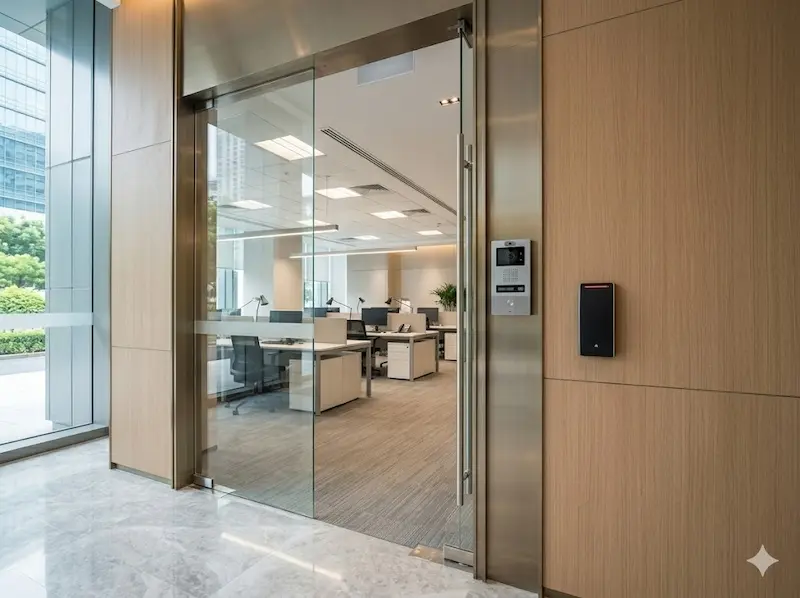
Access control, visitor management, and attendance tracking work from a single platform. Staff credentials: card, mobile, or biometric: are configured by role and zone. Visitors are pre-registered by their host before arrival, receive a time-limited credential on check-in, and their movement is logged automatically from entry to departure.
Mobile credentials allow staff to use their smartphones as their access credential: eliminating the card replacement cycle for lost cards and removing the shared-card risk that physical cards introduce. For offices requiring higher security at specific zones, biometric readers at the server room or finance area provide a credential that cannot be shared, lost, or forgotten.
See What Happens and Keep Reliable Records
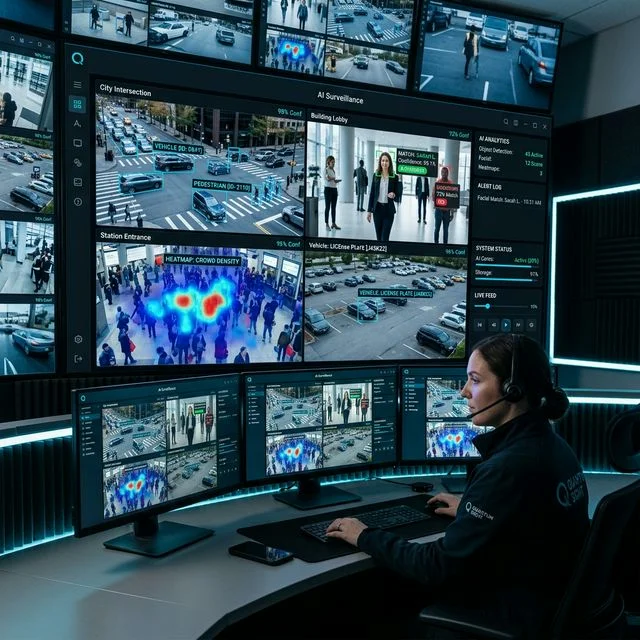
CCTV in an office is not primarily about watching: it is about being able to answer questions quickly when something happens. A camera system integrated with the access control platform means that a door event and the corresponding camera footage are linked by timestamp and location. Investigating an after-hours server room entry, a disputed visitor record, or a missing asset becomes a two-step search rather than a manual trawl through hours of unlinked recordings.
Server Room Monitoring
A door contact and temperature sensor on the server room wired to the office alarm panel costs a fraction of a dedicated infrastructure monitoring platform: and for most offices, it is entirely sufficient. When the server room door opens outside permitted hours or rack temperature exceeds threshold, the alarm panel sends an alert to the IT manager's phone. Simple, reliable, and integrated into the security system already in place.
Managing Access Across Multiple Office Locations
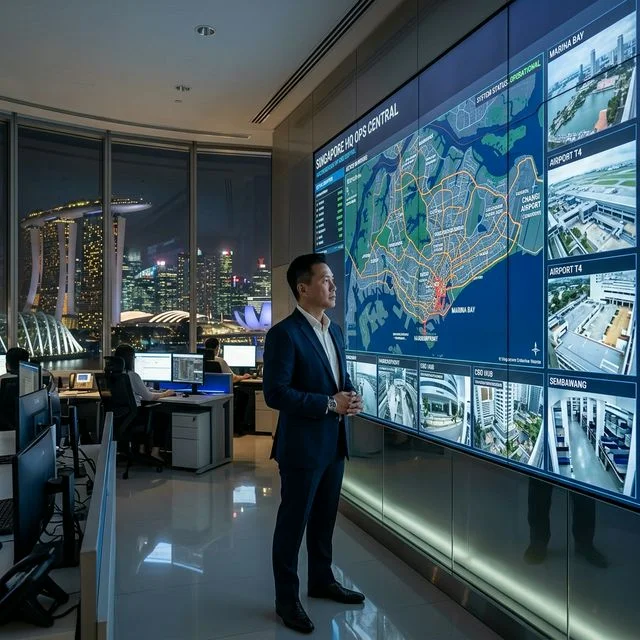
For organisations with more than one office, managing separate access control systems at each location creates unnecessary administration and inconsistency. A centralised platform covers all locations from one dashboard: staff credentials work across all sites with site-specific access rules, the audit log is consolidated, and access policy changes apply everywhere simultaneously.
One credential database covering every location. One dashboard for the facilities team. One audit log for compliance review.
How We Approach an Office Security Project
Office security design requires understanding the specific movement patterns, access requirements, and compliance obligations of the organisation before specifying any hardware.
Mapping the movement patterns of staff, visitors, contractors, and cleaners to design role-based access logic that reflects how the office actually operates: not a generic template applied to every floor.
Specifying the right credential type for each user group: card, mobile, biometric, or temporary PIN: and configuring the access rules, time windows, and zone restrictions that reflect the organisation's security requirements.
Connecting access control, CCTV, and visitor management so that events across all three systems are linked in a single searchable record: and handing over a platform that the facilities team can operate without depending on us for routine tasks.
Office Security Across Singapore
Securevision has deployed integrated office security systems across Singapore: from SME headquarters and professional services firms to financial sector offices and multi-floor corporate tenancies. Every project starts with a site assessment, not a product specification.
Suitable for Different Office Sizes and Configurations
Small Offices
Access control at the main door, video intercom for visitor identification, and CCTV covering the lobby and key operational areas. For SMEs and boutique practices where simplicity and reliability matter more than complexity.
Medium and Large Offices
Multi-zone access control separating general staff areas from the server room, finance department, and restricted zones. Visitor management replacing the paper logbook. CCTV integrated with access logs for incident investigation. Server room monitoring tied to the alarm panel.
Multi-Location Organisations
Centralised platform managing credentials and access rules across all sites. Staff credentials valid at all locations with site-specific restrictions. Consolidated audit log covering all offices for compliance reporting and incident investigation. Single dashboard for the facilities team regardless of how many sites are in scope.
What Affects the Cost of an Office Security System?
Two offices of similar size may require very different systems depending on the number of controlled zones, visitor volume, and existing infrastructure.
Number of Controlled Entry Points and Zones
Each door with access control requires its own reader, controller, and associated cabling. An office with one main entrance and no internal zone restrictions is a very different scope from one with a separate server room, finance area, and multi-floor configuration: even at the same headcount.
Visitor Volume and Management Requirements
Offices with high daily visitor volumes: professional services firms, financial institutions, co-working spaces: require more robust visitor management workflows than offices where visitors are infrequent and pre-scheduled. The system scope scales with the daily visitor count and the complexity of the approval and access logic.
Credential Type and Biometric Requirements
Standard card readers are the most cost-effective credential option. Mobile credential support adds a small platform cost but eliminates card replacement overhead. Biometric readers at high-security zones: server rooms, financial areas, executive floors: cost more per door and require enrolment time. The credential mix is determined by the security requirement at each door, not applied uniformly across the office.
Existing Infrastructure
Offices with structured cabling, existing conduit, and managed network switches can be upgraded at significantly lower cost than those where all infrastructure needs to be installed from scratch. We assess existing infrastructure reuse potential during the site survey before any scope is finalised: and present the honest case for retention or replacement based on what we find.
A Practitioner Observation
The most consistent cost-saving in office security projects comes from identifying which existing components can be retained before the scope is written. Many offices have compatible cabling, serviceable cameras, or access readers that can be enrolled into a new system without replacement. The site survey determines this clearly: and a project that retains what is working costs significantly less than one that replaces everything by default.
Frequently Asked Questions
Questions we hear from office managers, facilities teams, and business owners evaluating office security systems.
Can office staff use smartphones instead of keycards?
Yes. Access readers that support BLE or NFC allow staff to use their smartphones for door entry. This eliminates the cost of card replacement for lost cards and removes the risk of card sharing: a smartphone is personal and cannot be handed to someone else the way a card can. Card and mobile credentials can run in parallel on the same system where not all staff have compatible phones.
How quickly can staff access be revoked when someone leaves?
Immediately. A credential can be deactivated from the management dashboard and the change takes effect at all readers across all locations in seconds. For offices where the access control system is integrated with the HR platform, offboarding can trigger automatic credential deactivation without a manual step. This is one of the most common improvements we implement: many offices discover that departed staff credentials remain active for weeks after their last day.
Can visitor management integrate with the office access control system?
Yes. An integrated visitor management and access control system means that a visitor's temporary credential is issued by the same platform that manages staff access. The visitor record is linked to the host, the permitted zones, and the duration of the visit. All visitor interactions are logged automatically and searchable by date, individual, or entry point. Pre-registered visitors receive a QR code or temporary PIN that allows them through the door without requiring the host to come to reception.
Can multiple office locations be managed from one platform?
Yes. A centralised access control platform allows the facilities or IT team to manage credentials, access rules, and audit logs across all locations from a single dashboard. Staff who need access at multiple sites carry one credential that works everywhere, with site-specific access rules configured per person. The consolidated audit log covers all locations: useful for compliance reporting and incident investigation across a multi-site organisation.
What security systems does an office typically need?
Most Singapore offices require access control at the main entrance and any restricted internal zones; visitor management replacing the paper logbook; CCTV covering the lobby, corridors, and key operational areas; and burglar alarm protection for after-hours security. Server room monitoring is worth adding for any office with a communications rack. IP telephony completes the picture for offices replacing legacy phone systems.
Can existing access cards be retained when upgrading the system?
It depends on the card technology. Many existing cards use MIFARE or HID formats that are compatible with modern readers: in which case the cards can be retained and only the readers and controllers need to be replaced. Where the existing cards use an older or proprietary format, the credential migration is straightforward and typically completed during a single re-enrolment session. We assess card compatibility during the site survey before scope is agreed.
How long does an office security upgrade take?
For a single-floor office with one main access point and basic CCTV, installation typically takes one to two days. Offices with multiple controlled zones, a visitor management kiosk, and server room monitoring take two to four days depending on cabling requirements. We plan the installation schedule around office hours: noisy cabling work is done outside business hours where required, and systems are commissioned and tested before we leave.
What happens to office access during a network failure?
Access control hardware is configured with local storage and offline mode: controlled doors continue to function during network interruptions. The access decision is made at the reader level using locally cached credentials, so a network outage does not lock staff out. Events during the offline period are synced back to the central platform when the network is restored. For offices with critical access points, we specify UPS backup for the controllers so that a power outage does not create a security gap.
Also Relevant To
Office security needs often overlap with other commercial property types: and with the people who manage them.
Hotel & Hospitality
Hotels face similar multi-zone access and visitor management challenges to commercial offices: with the added complexity of 24/7 public-facing operations and guest credential management.
Retail
Retail outlets within commercial buildings share the office building's access infrastructure but have distinct loss-prevention requirements during trading hours.
Commercial: All Solutions
See the full range of security solutions for commercial properties: from boutique offices to mixed-use buildings with retail, F&B, and hospitality components.
Ready to Secure Your Office?
Tell us about your workplace. We will design an access control and surveillance system that gives you full visibility, reduces administrative burden, and keeps your staff and data protected.
Licensed by the Police Force: Licence · Serving Singapore since 2006