Commercial Security Is Not One Brief. It Is Five.
A retail shop, office, hotel, shopping mall, and commercial building each present a different security brief. We address all of them.
Serving Singapore commercial properties since .
In Short
Commercial Security Is Not a Single Solution
A retail outlet, office, hotel, shopping mall, and commercial building each have different operational requirements, risk profiles, and user groups. The best security systems are designed around how the property operates rather than around individual products. CCTV, access control, visitor management, communications, and vehicle access all play different roles depending on the environment.
One of the most common mistakes we see is treating every commercial property the same. A system designed for a corporate office is not a scaled-down version of the right system for a retail shop. They are different briefs entirely: and the system that works for one will create gaps and friction in the other. Most security problems in commercial properties are blamed on equipment. Often the real issue is that the wrong system was specified for the environment in the first place.
Which Best Describes Your Property?
Jump to the environment that matches your brief.
Retail Shops & Outlets
Loss prevention, POS analytics, and after-hours alarm protection: two separate briefs that most operators address as one.
Offices & Corporate Workplaces
Access control, visitor management, and CCTV for staff, visitors, and assets: without slowing down daily operations.
Hotels & Hospitality
Multiple credential populations, guest zone control, and AI surveillance for properties where security must be invisible to guests.
Shopping Malls & Retail Complexes
Estate-wide visibility, crowd analytics, and multi-tenant infrastructure: security at the scale of a property management brief.
Commercial Buildings & Multi-Tenancy
Lobby turnstiles, lift floor control, visitor management, and per-tenancy access: the security architecture of a Grade A address.
Retail Shops & Outlets
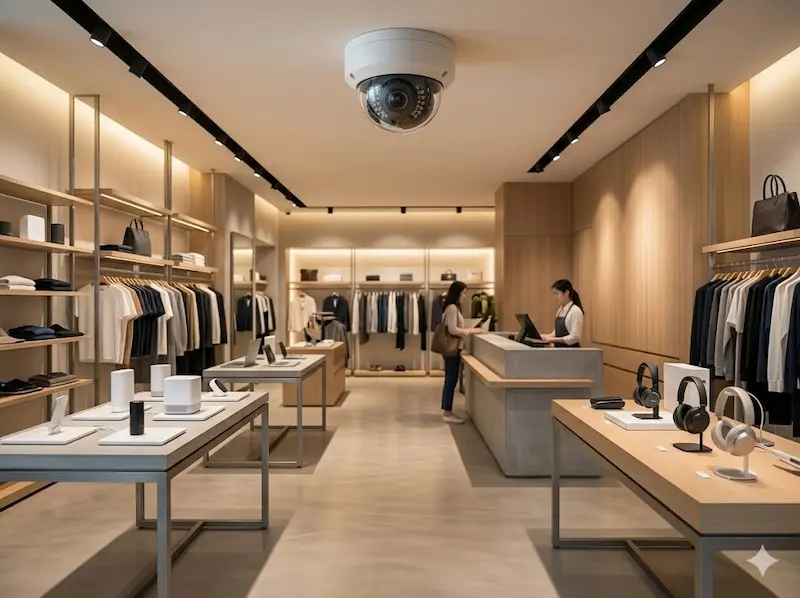
For most retail shops, the security brief has two parts: protecting the business after hours, and protecting it during trading hours. These are different problems that require different tools: and the mistake many operators make is specifying only the first.
After-hours protection is straightforward: a burglar alarm with PIR detectors, door and window contacts, glass break sensors, and an external siren. We specify alarm systems for retail installations: available wired or wireless depending on fit-out constraints, with a monitoring centre option that dispatches a response when the alarm triggers overnight. This is the baseline for any retail premises, from a single-unit shop lot to a chain of outlets.
During trading hours, the risk is different: and often larger in financial terms. Shoplifting, internal stock manipulation at the point of sale, stockroom losses, and the operational blind spots that create opportunity for both external and internal theft. CCTV with analytics addresses this directly. AI-capable cameras at the POS zone can be integrated with the point-of-sale system to overlay transaction data on the recorded footage: every void, discount, and cash tender is timestamped against the camera view of that terminal. A stockroom camera with motion logging creates a record of every entry event without requiring a guard or a manual log. For chain operators with multiple outlets, cloud-managed CCTV allows a central operations manager to review any store feed from headquarters without visiting the site.
Network-managed PoE switches power the cameras and maintain the connection to the cloud NVR: for multi-outlet operators, this also enables IT to push system updates and retrieve footage centrally without dispatching a technician to each site.
Analytics Beyond Loss Prevention: People counting and zone heat-mapping are standard capabilities on modern retail AI cameras. For a shop operator, knowing which display areas generate the longest customer dwell time, and when the peak footfall windows occur, is operationally useful beyond its security function. The same camera network that protects the stock also provides the data that informs layout and staffing decisions.
Offices & Corporate Workplaces
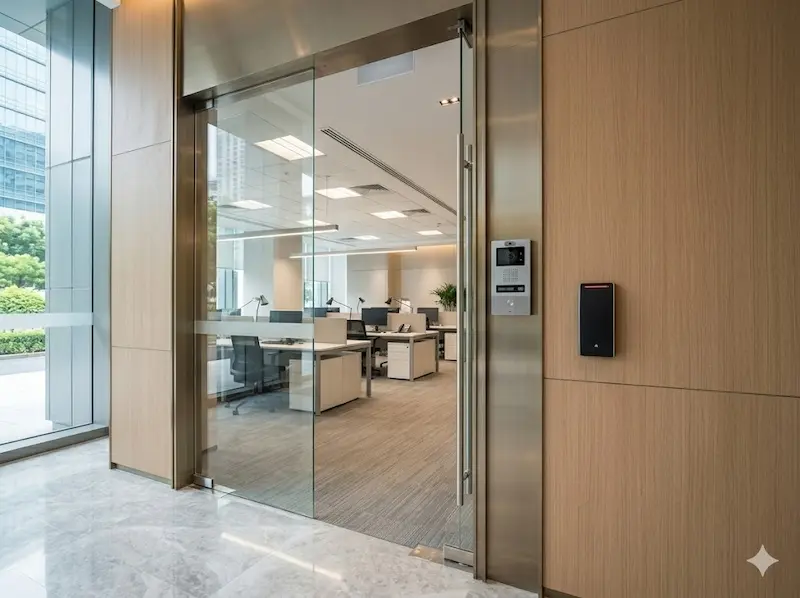
An office security system serves three distinct populations: the staff who need frictionless access to do their jobs, the visitors who need managed access to specific areas, and the organisation's assets and data which need protection from both external intrusion and internal exposure. Serving all three simultaneously, without the system becoming an obstacle to daily operations, is the engineering brief.
Access control at the main door is the starting point. Most Singapore offices use card access as the standard credential: the same card that admits staff at the main entrance can be configured to permit or restrict access to specific internal zones: the server room, the finance department, the warehouse. For offices with higher security requirements: financial institutions, law firms, pharmaceutical companies: facial recognition at the door provides a credential that cannot be shared, lost, or cloned. The range of credential types we deploy runs from simple card readers to multi-factor biometric terminals depending on the sensitivity of what is being protected. The video intercom at the main door handles visitors: a video call panel allows reception staff to verify and admit visitors without going to the door, and logs every visit with a timestamped credential event.
CCTV covers the lobby, access corridors, and key operational areas. For offices with a server room or communications rack, the alarm system extends beyond burglary protection: door contacts on the server room entry generate an alert whenever the room is accessed outside permitted hours, and environmental sensors monitoring UPS condition and rack temperature can be tied to the alarm panel to trigger a notification if cooling fails or power draw spikes abnormally. This is not a full building management system: it is a practical, low-cost way to give the IT team visibility of physical conditions in their infrastructure space without a separate monitoring platform.
IP phones complete the office communications picture. An IP PBX with SIP trunking replaces traditional PSTN hunting lines: staff use desk phones on their extension, and the mobile app turns any smartphone into a full office extension reachable on the company number from anywhere. For offices where the video intercom panel is integrated with the IP PBX, a visitor call at the door rings the reception extension and the receptionist's mobile simultaneously. PoE-managed switches power the IP cameras, access readers, and desk phones from the same structured cabling infrastructure.
Server Room Monitoring: A server room door contact and a temperature sensor wired to the office alarm panel costs a fraction of a dedicated infrastructure monitoring system: and for most SME offices, it is entirely sufficient. When the server room door opens at 2am or rack temperature exceeds threshold, the alarm panel sends an app alert to the IT manager's phone. Simple, reliable, and integrated into the security system you already have.
Hotels & Hospitality Properties
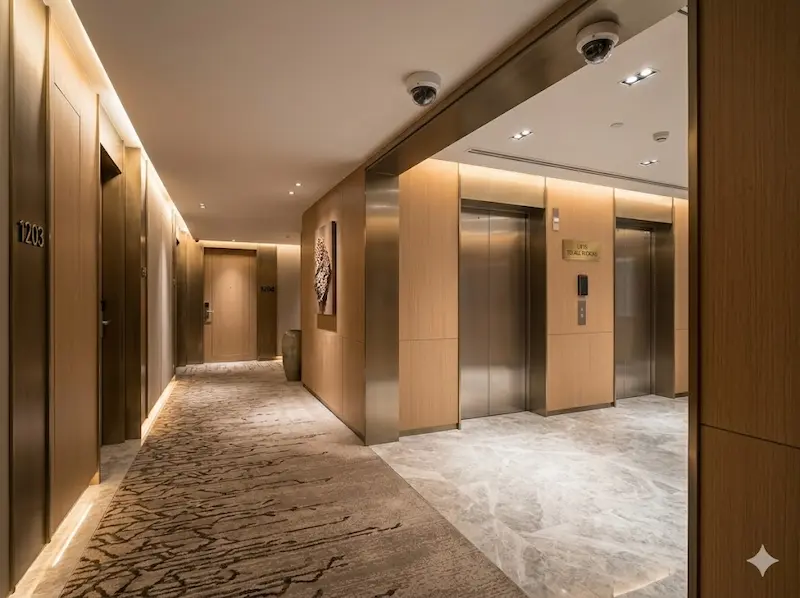
A hotel security system must serve an environment where hundreds of people: guests, staff, contractors, and delivery personnel: move through the property simultaneously, each with different access rights, different areas they are permitted to be in, and different expectations of privacy and service. The system must be invisible to guests experiencing the property and precise enough to enforce zone boundaries that they are never aware exist.
CCTV is the backbone of hotel security: covering the lobby, guest lift lobbies, corridors on residential floors, car park levels, F&B areas, and back-of-house service corridors. AI analytics add meaningful capability at scale: crowd density monitoring at the lobby entrance during check-in peak hours, loitering detection in service corridors, and lost object alerts at car park areas. For incident investigation: a guest theft complaint, a liability dispute, a staff conduct matter: AI-assisted footage search retrieves the relevant clip by zone and time window in seconds rather than requiring a manual trawl through hours of recording.
Access control in a hotel operates across multiple distinct credential populations. Guests receive keycards encoded for their room, their floor, and any amenity zones included in their booking: the gym, the pool deck, the executive lounge. Staff credentials are role-based: housekeeping accesses guest floors during assigned windows, engineering accesses plant rooms and utility areas, management accesses everything. Lift floor restriction is a standard part of the architecture: a guest keycard calls only the floors they are permitted to access, which prevents unauthorised movement between residential floors without affecting the guest experience at check-in. All credential management: issuing, modifying, revoking: runs from a central access management platform, not from individual door reader configurations. An IP PBX ties the front desk, guest room phones, back-of-house extensions, and management mobiles into one system: with SIP trunking for external calls and a mobile app for staff who need to be reachable away from their desk.
Installation in an Occupied Property: Hotel security upgrades must be phased around the occupancy calendar. We plan installations zone by zone: back-of-house infrastructure first, then public areas during low-occupancy windows, then guest floor access controllers floor by floor. No phase goes live until it has been tested and commissioned. Guests experience the transition as a seamless upgrade rather than a building site.
Shopping Malls & Large Retail Complexes
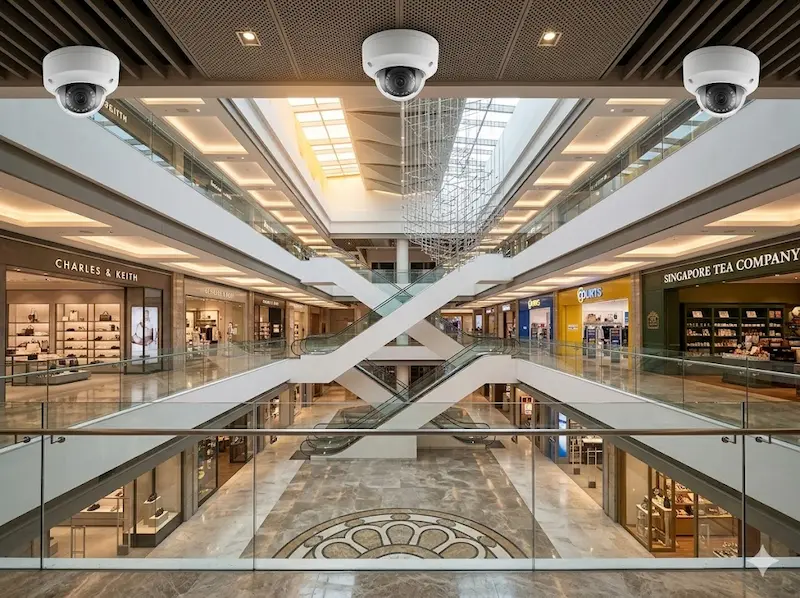
A mall security brief is an estate management brief, not a building brief. The security system must simultaneously serve the mall operator's need for estate-wide visibility, each tenant's need for independent protection of their unit, and the management team's need for the data that underpins operational decisions: foot traffic patterns, crowd density by zone, car park utilisation. No other commercial environment asks as much from its security infrastructure.
CCTV at mall scale requires deliberate zone-by-zone specification. Wide-angle fisheye cameras cover atrium floors, where a single ceiling-mounted unit can see the full width of a level without blind spots between fixtures. AI crowd analytics on atrium and entry cameras provide real-time crowd density data to the operations centre: flagging when any zone approaches unsafe capacity during peak periods, and generating the footfall reports that the mall's retail mix and tenancy decisions depend on. Starlight cameras at outdoor car parks and drop-off zones maintain usable colour footage through the transition from afternoon light to evening low light. LPR at car park entry and exit gantries manages vehicle movement logging: the same camera network serves both the security team and the car park operator.
Access control at mall scale separates into two layers: the mall operator's layer (service corridors, loading docks, plant rooms, management offices, and tenant boundary doors) and the individual tenancy layer (each shop's own alarm and back-of-house access, managed independently by the tenant). The mall's managed network infrastructure: PoE switches distributed across each level: carries both the mall's own CCTV and access data and the tenants' systems on separate VLANs. Each tenant's system is isolated from others; the mall operations centre sees estate-level data without access to any individual tenant's operational detail.
Tenancy-Level Alarm Integration: For tenants who want their individual unit alarm monitored centrally rather than relying on a separate monitoring contract, the mall's security infrastructure can aggregate tenancy alarm events through a centralised alarm receiver. The mall operations centre sees which tenancy has triggered and can respond or contact the tenant directly: without each tenant paying for an independent monitoring service.
Commercial Buildings & Multi-Tenancy Developments
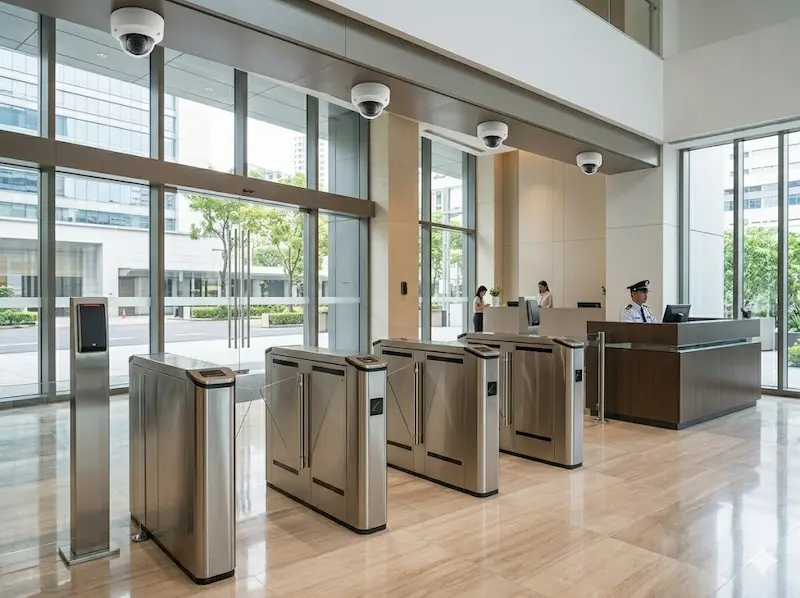
A Grade A commercial building or multi-tenancy office development is defined architecturally by its lobby: and the lobby security system is what separates a professionally managed building from one that is simply a collection of individually secured tenancies. The building's access infrastructure must control who enters, direct them to where they are authorised to go, and do both without creating the kind of friction that diminishes the building's positioning as a premium address.
Turnstiles at the lobby entrance are the defining feature of a controlled-access commercial building. A visitor or staff member who has not presented a valid credential cannot proceed beyond the lobby level: the turnstile enforces this physically, not by convention. Staff with access cards pass through the turnstile in a single motion; visitors receive a temporary day pass from the reception desk or the visitor management system, which permits them through the turnstile and up to the specific floor their host is on. Lift floor restriction enforces the same logic vertically: a credential issued for a tenant on Level 14 cannot access Level 18. This architecture means that an unauthorised person who enters the building cannot simply take a lift to any floor; they are constrained by the system to exactly where their credential permits them to be.
CCTV covers the lobby, all lift lobbies, the car park, and the building perimeter. LPR at the car park entry manages season pass holders: whose plates are recognised automatically: and visitor parking, with timestamped vehicle movement logs available to building management. Each tenancy on each floor has its own access control at the floor entry door, managed independently by the tenant: the building provides the infrastructure and the credential management platform, but the tenant administers their own floor access without involvement from building management. Plant rooms, electrical switch rooms, and rooftop mechanical plant are access-controlled and alarmed: door contacts at these rooms feed into the building management system, and any out-of-hours access or environmental alert is flagged to the facilities team immediately. Throughout, PoE managed switches on each floor distribution board carry the building's CCTV, access, and tenant network traffic on separate VLANs: structured cabling installed at construction is the foundation that everything else runs on.
Visitor Management at Scale: A commercial building receiving several hundred visitors daily cannot rely on a reception desk and a paper logbook. A digital visitor management terminal at the lobby allows visitors to register, have their identity verified against the appointment record, receive a printed or digital day pass, and pass through the turnstile: all without requiring a receptionist to process each one manually. The access log is automatic, searchable, and available to building management and individual tenants for their own records.
Common Mistakes We See in Commercial Security Projects
After reviewing commercial properties across Singapore: retail shops, offices, hotels, malls, and commercial buildings: several issues appear repeatedly.
Applying the Same Design to Different Environments
A retail outlet, office, hotel, and commercial building do not operate the same way: and a security system that works well in one environment will create blind spots and friction in another. The most common version of this mistake is applying an office-style access control template to a retail environment that needs analytics-led loss prevention, or specifying hotel-grade credential management for a small office that only needs a card reader at the door. The system should be designed around the operational requirements of the specific environment, not adapted from a template used for a different one.
Choosing Equipment Before Understanding Workflow
Many commercial security projects begin with a product specification: a number of cameras, a type of access reader, a particular alarm system. The better approach begins with understanding how people, vehicles, visitors, and staff move through the property, and which specific points in that workflow represent genuine risk. A bottleneck at the visitor verification step is a different problem from a coverage gap at the loading dock, and they require different interventions. Starting from workflow rather than from equipment almost always produces a better outcome at lower cost.
Treating Security as Separate from Operations
Security systems that create friction for legitimate daily operations: access control that slows shift changes, cameras positioned where they capture compliance evidence but not actual incidents, visitor management that requires more staff time than the paper logbook it replaced: generate pressure from operations teams to bypass or disable them. A security system that supports how the business runs is used. One that fights daily operations is worked around. The design should account for operational workflow from the outset, not treat it as a secondary consideration.
Underestimating the Network
Most security problems in commercial properties are blamed on cameras or access readers. Surprisingly often, the real issue is the network underneath: a managed switch that is overloaded, a PoE budget that was not calculated against the full camera count, a VLAN configuration that causes interoperability issues between systems from different vendors. Network infrastructure is rarely visible and almost never discussed in a standard security sales conversation. It is the layer that determines whether the security system performs reliably for its service life or becomes a source of recurring faults and technician call-outs.
A Practitioner Observation
The most productive commercial security conversations we have start with a walk-through of the property and a description of a specific operational problem: a visitor handling issue, an incident that took too long to investigate, a recurring loss at a particular point in the retail floor. Starting from a real operational problem produces a much better security design than starting from a product catalogue or a square footage estimate.
What Every Commercial Property Has in Common
Five different environments, five different system configurations: but the same underlying principle across all of them: effective commercial security is the result of matching the right system to the right environment, not applying a standard specification to every site.
CCTV appears on every list, but the camera type, placement logic, and analytics requirement are different in a retail shop and a hotel corridor. Access control appears on every list, but a card reader at a shop storeroom and a lobby turnstile with lift control are not the same system applied at different scales: they are different briefs entirely. The network infrastructure that carries all of these systems is rarely visible and almost never discussed in a sales conversation, but it is the layer that determines whether the security system performs reliably for its service life or becomes a source of recurring faults and technician call-outs.
Securevision designs, supplies, and maintains security systems across all five commercial environments described on this page. Every project starts with a site assessment: not a quotation based on square footage.
The Brands Behind the Systems
Hikvision
IP cameras for all commercial environments: AI analytics models for retail and mall, Starlight for outdoor areas, standard IP67 models for car parks and service areas.
View Specification →RISCO
Wired and wireless burglar alarm systems for retail and office: PIR, contacts, glass break, external siren, and environmental sensor integration for server room monitoring.
View Specification →Akuvox
IP video intercom panels for office main doors and hotel reception: mobile app call answering, RFID and facial recognition access, and SIP integration with the IP PBX.
View Specification →Hikvision LPR
Licence plate recognition cameras for mall and commercial building car parks: season pass automation, visitor vehicle logging, and barrier integration.
View LPR Systems →Yeastar
IP PBX for offices and hotels: SIP trunking, desk phones, and mobile app integration for staff who need to be reachable away from their desk.
View Specification →Omada & Ruijie
Managed PoE switches and WiFi 6 access points: the network infrastructure that carries CCTV, access control, IP phones, and tenant data across all commercial environments.
View Specification →Frequently Asked Questions
Questions we hear from commercial property owners, facilities managers, and tenants evaluating security systems.
What security systems does a commercial property typically need?
Most commercial properties require CCTV covering entrances, common areas, and operational zones; access control managing who can enter specific areas; burglar alarm protection for after-hours security; and IP communications connecting staff across the property. The specific system configuration depends on the property type: a retail shop, office, hotel, shopping mall, and commercial building each have different operational requirements that shape the system design.
What is the difference between office and retail security?
Office security centres on access control: managing which staff and visitors can enter which areas, with audit trails for compliance. Retail security has two distinct components: after-hours protection from a burglar alarm, and during-trading-hours protection from CCTV with analytics at the point of sale and stockroom. An office is primarily protecting assets and data through access restriction. A retail shop is primarily protecting inventory and revenue through visibility and deterrence during operating hours.
Can existing commercial security systems be upgraded rather than fully replaced?
Often yes. Existing cameras, cabling, access readers, barriers, and network infrastructure may be retained depending on their age and condition. The objective should not be replacing everything: it should be improving operational visibility and control while making best use of previous investments. We assess existing infrastructure reuse potential during the site assessment before any scope is agreed.
How do I know which security systems are right for my commercial property?
The starting point is understanding how the property operates: how people move through it, which areas require different levels of access control, what the primary risks are during and after operating hours, and what compliance or audit requirements apply. A site assessment that begins with those operational questions produces a much more appropriate system design than one that begins with a product catalogue. We visit every site before producing a proposal.
Do all commercial properties require access control?
Not necessarily. A small single-tenancy retail shop may only need a burglar alarm and CCTV: access control adds complexity that is not proportionate to the risk. A corporate office, hotel, or commercial building with multiple user groups and restricted zones almost always benefits from access control. The decision depends on how many distinct user categories the property serves and how important it is to restrict and log movement between zones.
Can multiple commercial sites be managed from one platform?
Yes. A centralised video management and access control platform allows a security manager or operations centre to view any site, review footage, and receive alerts from a single dashboard. For retail chain operators, cloud-managed CCTV allows a central manager to review any store feed from headquarters without visiting the site. Multi-site access control consolidates credential management: one credential database covering all locations with site-specific access rules per staff member.
What affects the cost of commercial security?
The key factors are property type, number of entry points, number of cameras required, the extent of access control needed, existing infrastructure condition, visitor volume, vehicle access requirements, and whether multiple sites need to be managed centrally. Two commercial properties of similar floor area may require very different systems depending on their operational complexity. A retail shop in a single unit and a Grade A commercial building receiving several hundred daily visitors are not comparable briefs.
How often should commercial security systems be reviewed?
We recommend a formal review when the property's operational requirements change significantly: new tenants, change of use, expansion, or a security incident: or when the system is more than five years old. Annual maintenance servicing covers hardware condition and software updates. A security review: examining whether the system still covers the right areas with the right logic for the property's current risk profile: should be triggered by operational changes rather than a fixed calendar.
Go Deeper Into Your Environment
Each sector has a dedicated solutions page covering the operational context, common system failures, and what a well-designed installation actually looks like.
Retail Shops & Outlets
Loss prevention, POS analytics, after-hours alarm protection, and multi-outlet cloud management for Singapore's retail operators.
Offices & Workplaces
Access control, visitor management, CCTV, server room protection, and IP communications for Singapore offices from SME to corporate HQ.
Hotels & Hospitality
Multi-zone access control, guest and staff credential management, AI surveillance, and IP phone systems for Singapore hotel and hospitality properties.
Shopping Malls & Retail Complexes
Estate-wide CCTV, crowd analytics, multi-tenant access infrastructure, and LPR car park management for Singapore shopping malls.
Commercial Buildings & Multi-Tenancy
Lobby turnstiles, lift floor control, visitor management at scale, and per-tenancy access infrastructure for Grade A commercial buildings.
Ready to Get the Right System for Your Property?
Every commercial property is different. Book a site assessment: we will visit, understand your brief, and design a system that fits your environment and your budget.
Licensed by the Police Force: Licence · Serving Singapore since 2006