Entry & Access

Control Who Enters. Know Who Was There.

Entry and access control is two systems working as one; an access control system that verifies identity and manages doors, and an intercom system that handles visitor communication and remote entry. Together, they give you complete control over who enters your property.

Engineered for Singapore Properties Since 2006

Police Licensed | | Sites Protected

In Short

Entry and access control is two systems working together. An access control system verifies identity and manages doors, gates, and lifts, for people already registered in the system. An IP intercom manages visitors, communication, and remote entry, for everyone else. Access control handles authorised users. Intercom handles everyone who arrives without a credential. Together they give complete control over who enters your property, when they enter, and how that entry is recorded.

Two Systems. One Purpose.

Entry & Access Is Not One Thing: It Is Two

Most properties need two distinct systems that work together; an access control system that verifies identity and controls door hardware, and an intercom system that manages visitor communication and remote entry. Each is effective on its own. Together, they give you complete control over who enters, when, and from where.

Access Control: Identity & Door Management

Access control verifies identity at every entry point using face recognition, palm vein, fingerprint, card, or PIN, and controls the door hardware based on the result. Every entry and exit is logged with a timestamp and identity record, giving you a complete audit trail across your property.

IP Intercom: Visitor Communication & Remote Entry

An IP intercom handles the visitor experience; two-way video and audio between the visitor at the door and the resident, guard, or receptionist. The person answering can see who is there, speak to them, and release the door remotely from a phone, tablet, or guard workstation without being physically at the entrance.

Managed Together on One Platform

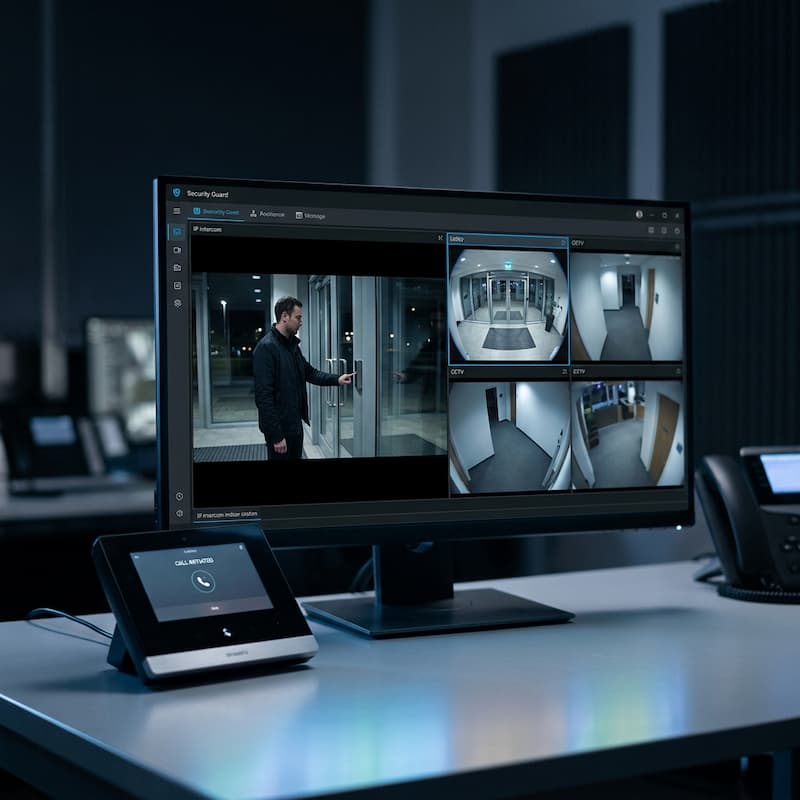
When both systems are IP-connected and integrated on a platform like VESTA or the access controller's own software, credentials, audit trails, and door status are managed from a single dashboard. A visitor call on the intercom triggers the access controller to log the entry; one event, one record, one system.

System 1 of 2: Access Control

From Keys and Cards to Multi-Modal Identity

The shift in access control is not just from mechanical to digital; it is from single-credential to multi-modal identity. The right credential type depends on the property, the risk level, and the user population.

Traditional Access: Keys & Basic Cards

  • Physical keys can be lost, duplicated, or passed on without accountability
  • Basic proximity cards offer no identity verification; anyone with the card enters
  • Zero audit trail; no record of who entered, when, or how many times
  • Revoking access requires collecting the key or card physically
  • No scheduling; access is all-or-nothing, 24 hours a day
  • Cannot integrate with CCTV or intercom systems

Modern Access: Multi-Modal Identity

  • Face recognition; touchless, fast, no credential to carry or lose
  • Palm vein; contactless biometric with very low false acceptance rate
  • Fingerprint; established biometric for high-throughput access points
  • Smart card; encrypted credential with identity binding, not just a token
  • Mobile credential; phone-based access via Bluetooth or NFC
  • Full audit trail; every event logged with identity, timestamp, and door

Choosing the Right Credential

No single credential type is right for every property. Face recognition is ideal for high-traffic lobbies where touchless speed matters. Palm vein suits hygiene-sensitive environments like healthcare. Fingerprint works well for staff access in commercial and industrial sites. Smart cards remain the standard for large multi-tenant buildings. We specify the credential type based on your user population, throughput requirements, and integration needs, not on what is easiest to install.

In Singapore, biometric data; facial images, fingerprints, palm vein scans; is classified as sensitive personal data under the PDPA. Organisations collecting biometric credentials have additional obligations around consent, data storage, and purpose limitation. We advise on PDPA-compliant credential selection and data handling as part of the system design process.

Access Control Brands We Specify

Four Platforms. Different Strengths.

We carry four access control brands; each suited to a different scale and installation type. The right platform depends on the number of doors, the credential types required, and how deeply the system needs to integrate with your wider security architecture.

Apollo Security

A US-manufactured access control platform with over 40 years of field-proven reliability across 70+ countries. Apollo's APACS Pro X software handles large-scale installations; multi-site, multi-door, with deep integration to CCTV and alarm systems. The EZ-Kit offers a ready-to-install package for smaller sites requiring no software installation. ISO 9001:2015 certified. Best for: commercial, institutional, and multi-site deployments requiring an enterprise management platform.

View Specification →

ZKTeco

One of the most widely deployed biometric access control brands globally; strong on face recognition, palm vein, and fingerprint readers. ZKTeco's product range covers everything from single-door standalone readers to networked enterprise systems. Well-supported in Singapore with a broad range of compatible hardware. Best for: commercial offices, industrial sites, and any deployment requiring biometric credential at scale.

View Specification →

EntryPass

A Singapore-developed access control platform with a strong track record in local commercial and institutional installations. EntryPass software is straightforward to configure and manage, with solid integration to third-party hardware. Well-suited to properties that want a locally supported system with responsive technical backup. Best for: commercial buildings, schools, and mid-scale institutional deployments.

View Specification →

Microengine

A Malaysia-headquartered access control brand with a wide installed base across Singapore commercial and industrial properties. Microengine offers reliable card-based and biometric access hardware at a competitive price point, with well-established local support. Best for: cost-sensitive commercial and industrial installations where proven reliability and local parts availability matter most.

View Specification →
System 2 of 2: IP Intercom

From Buzzers to Video-Verified Remote Entry

The intercom system is often the first point of contact between a visitor and your property. Modern IP intercoms have transformed this from a simple audio buzz to a full video-verified, remotely managed entry experience; accessible from anywhere on any device.

Old Model: Analogue Intercom

  • Audio only; no way to see who is at the door
  • Fixed indoor station; must be at the panel to answer
  • One-to-one call only; cannot forward to multiple people
  • No integration with access control or CCTV systems
  • No record of calls, failed entries, or visitor activity
  • Wired infrastructure; difficult to expand or relocate

New Model: IP Video Intercom

  • HD video and two-way audio; see and speak to the visitor clearly
  • Answer from any device; phone, tablet, PC, or guard workstation
  • Remote door release; unlock from anywhere, no need to be on-site
  • Integrated with access control; visitor entry logged as an access event
  • Call forwarding and simultaneous ring to multiple devices or users
  • Full call log; every visitor interaction recorded with timestamp

What the Intercom Does That Access Control Cannot

An access control system manages credentialled users; people already registered in the system. It cannot handle an unregistered visitor, a delivery driver, or a contractor arriving for the first time. That is the intercom's role, to create a managed communication point between an unknown visitor and a responsible person who can verify identity visually and decide whether to grant entry. Together, the two systems handle every type of entry: credentialled and uncredentialled.

Intercom Brands We Specify

Two Platforms. Different Strengths.

We specify two IP intercom brands; each suited to a different deployment type. The choice depends on the scale of the installation, the integration requirements, and the user experience expected by residents or staff.

Operational Reality

How Both Systems Work in Real Life

These scenarios show each system doing what it does best, and what happens when both work together.

Staff Entry at Office: Face Recognition

An employee walks up to the lobby turnstile. The face recognition reader identifies them in under a second, releases the gate, and logs the entry. No card to tap, no PIN to remember. The system records who entered, at what time, and at which door; automatically.

Visitor at Condominium: IP Intercom

A visitor presses the intercom at the guardhouse. The resident receives a video call on their phone, sees the visitor clearly, speaks to them, and taps to release the lobby door, from their apartment two floors up, or from their office across town.

Revoked Access: Instant Lockout

A contractor's engagement ends. Their credential is revoked in the access control dashboard immediately, from any device, in seconds. The next time they present their card or face at any door, access is denied. No key to collect, no lock to change, no site visit required.

Healthcare Ward: Zone Restriction

A healthcare facility restricts ward access to registered nursing staff only. The access control system enforces zone permissions by role; admin staff can enter the lobby and offices but not the wards. Any attempt to access a restricted zone is logged and flagged for review.

System Capabilities

What Each System Enables

Access Control

A Practitioner Observation

The question is not whether the reader can recognise a face. The question is whether the system fits how people actually move through the building every day. A face recognition reader at a high-traffic turnstile handles 600 staff in the morning rush without a queue. The same technology at a rarely used service entrance is over-specified and harder to maintain. Credential type should follow workflow, not the other way round.

Multi-Modal Identity

Face, palm vein, fingerprint, smart card, mobile credential; specify the right technology for each entry point and user group.

Control Access Based on Time and Role

Define precisely when individuals or groups can access specific zones; time-of-day, day-of-week, and date-range restrictions all configurable. A cleaner working after hours accesses only the lobby. A contractor accesses the server room only during their approved window.

If an Incident Occurs, You Can See Exactly What Happened

Every entry, exit, and denied attempt is logged with identity, timestamp, and door. If something happens on site, you can pull the exact record of who entered, which door they used, and when; searchable and exportable for compliance or investigation.

Prevent Staff From Sharing Access Cards

Anti-passback requires an exit record before the same credential can be used for re-entry. This prevents one person from using a card to let in another, and ensures time-attendance records reflect actual movement through the building, not card-passing at the door.

Lift & Zone Control

Restrict floor access by identity; residents reach their floor, staff reach their zone, visitors reach the lobby only.

Remove Access Immediately When Someone Leaves

Add, modify, or revoke credentials from any device; no site visit required. When a staff member resigns or a contractor's engagement ends, their access is removed in seconds from wherever you are. Contractor access can also be set to expire automatically on a pre-set date.

IP Intercom

HD Video Verification

See the visitor clearly before deciding to grant entry; wide-angle lens, night visibility, and HD resolution as standard on modern IP intercom panels.

Remote Door Release

Answer and release the door from any device; phone, tablet, or workstation. No need to be at the panel or on-site.

Multi-Device Ring

A visitor call rings simultaneously to multiple devices; guard station, management office, and the resident's phone; so no call goes unanswered.

Visitor Call Log

Every intercom call logged with timestamp, door, and outcome; answered, missed, or entry granted. Full visitor activity record.

QR & Mobile Entry

Issue a time-limited QR code to a visitor or contractor in advance; they scan at the panel and the door releases without a call being made.

Access Control Integration

Intercom entry events feed directly into the access control audit trail; one log, one record, regardless of how entry was granted.

The Architecture

Part of a Larger Security Architecture

Access control and intercom form the identity and entry layer of the property. Surveillance sees what happens. Vehicle systems manage how vehicles move. The platform coordinates everything from one operational view.

Connected Intelligence

How Access and Intercom Work With Other Systems

  • Access event triggers camera pop-up: When a door is opened or an access attempt is denied, the guard's monitor automatically displays the camera covering that entry point; no hunting for the right feed.
  • Intercom call linked to CCTV: When a visitor calls the intercom, the relevant camera feed appears alongside the call; the guard sees both the intercom panel view and the wider camera coverage simultaneously.
  • Credentials sync across systems: Resident or staff credentials registered in the access control system can be synchronised with vehicle LPR and management platforms; one identity across all entry layers.
  • Single dashboard via platform: VESTA or the access controller's own software displays door status, live intercom calls, and access events in one operational view; guard sees the full picture without switching between systems.
Learn more about Platform & Management →
Access control and intercom integration dashboard
Is This Right for You?

Who Entry & Access Control Is For, and When to Start

Access control and intercom are not one-size-fits-all. Here is an honest guide to when these systems make sense, and when they may not be your priority.

This Is For You If…

  • You manage a building or facility where controlling who enters is an operational or compliance requirement; offices, condominiums, schools, healthcare facilities, data centres
  • You are still relying on physical keys for staff access and have had issues with lost keys, unauthorised duplication, or difficulty revoking access after staff changes
  • Your intercom is a legacy analogue system, or visitors must call your desk phone to gain entry, with no visual verification
  • You are an MCST or Managing Agent responsible for controlling resident, contractor, and visitor access across multiple entry points
  • You are building or renovating and want access infrastructure designed in, not added later
  • You need an audit trail; knowing who was in a space, when, and for how long

You May Not Need This Yet If…

  • Your property has a single entry point managed by a full-time guard who knows every resident or staff member by sight; a basic video intercom may be sufficient
  • You are a home owner looking for front door security only; a smart video doorbell or standalone IP intercom is a simpler starting point
  • Your primary concern is surveillance or intrusion detection: CCTV and alarm systems address that separately

Not Sure Where to Start?

Access control systems range from a single-door reader to enterprise-wide multi-building platforms. A site assessment clarifies which tier is appropriate for your property and budget, at no cost and no obligation.

From Real Projects

Common Mistakes We See

Most access control problems are not caused by the hardware. They usually start with planning decisions made before the system is installed.

Choosing the Credential Before Defining the Workflow

Many buyers focus on whether they want face recognition, fingerprint, cards, or mobile credentials. The more important question is who needs access, where they need access, and how the system will be managed day to day. We regularly find that the credential decision has been made before anyone has mapped the access hierarchy, which leads to systems that are technically correct but operationally awkward.

Upgrading the Intercom but Ignoring Access Control

Properties often replace an ageing intercom but leave the access control system untouched. The result is two separate systems that cannot share information, creating additional administration and reducing operational visibility. If the intercom is reaching end of life, it is worth reviewing the access control system at the same time; the infrastructure overlap makes a combined upgrade significantly more cost-effective.

Installing Too Few Controlled Entry Points

Some projects focus only on the main entrance and ignore side doors, loading bays, and service entrances. Security is only as strong as the least controlled access point. We regularly find that side gates, carpark pedestrian access, and roof plant rooms are left uncontrolled on sites where the lobby has a sophisticated biometric system. An access audit maps all entry points, not just the obvious ones.

Treating Access Control as an IT Project

Access control is not only software. Door hardware, emergency release requirements, fire alarm integration, power failure behaviour, user workflow, and long-term maintenance all affect reliability. A system specified purely from a software perspective often encounters problems at the physical layer; doors that fail insecure, locks incompatible with the controller, or fire safety integration that was never designed in.

A Practitioner Observation

Most organisations spend more time deciding on the reader than on defining who should have access. In practice, the access hierarchy, who can go where, under what conditions, and what happens when they leave; is almost always more important than the credential technology. We spend the first part of every access control assessment on the workflow, not the hardware.

Planning Considerations

What Affects the Cost of an Access Control System?

Access control systems range from a single-door card reader at SGD 600–900 installed to enterprise multi-site platforms. Understanding the cost drivers helps calibrate expectations before a site assessment.

Number of Doors

The number of controlled entry points is typically the biggest cost driver. Each door requires a reader, controller capacity, a lock mechanism, and wiring. A four-door system costs significantly less per door than a single-door system because the controller and software costs are shared.

Credential Type

Card-based access uses the most cost-effective hardware. Face recognition, palm vein, and mobile credential systems have higher reader costs and may involve per-user licensing fees for the management software. For high-throughput applications, the operational savings from touchless access often offset the hardware premium over time.

Door Hardware

Existing mortice locks can sometimes be retained with a separate electric strike or magloc addition. In other cases, door closers, strikes, or the lock itself must be upgraded; particularly on heavy doors, glass doors, or doors required to fail-safe under fire alarm conditions. Door hardware is often the variable that most surprises clients during a site assessment.

Integration Requirements

Lift control, visitor management, CCTV pop-up on access event, intercom integration, and time-attendance reporting all increase system complexity and cost. Each integration needs to be scoped during the design stage; adding these after installation is significantly more expensive than designing them in from the start.

Upgrade or Replace?

One of the most common questions we receive is whether an existing access control system can be upgraded rather than replaced. The answer depends on the age of the controllers, reader compatibility with the replacement software, and whether replacement parts are still available from the manufacturer. In many Singapore commercial buildings and condominiums, readers and cards can sometimes be retained while the controller and management software are upgraded; preserving the existing wiring investment. A site assessment is usually the fastest way to determine what can realistically be reused and what must be replaced.

A Practitioner Observation

Very few customers regret controlling too many doors. Many regret controlling too few. The incremental cost of adding a door during the original installation is small. The cost of adding it later; cabling, controller capacity, door hardware works; is usually three to five times higher. If a door is on the boundary of the decision, include it.

Our Process

How We Work With You: From Assessment to Handover

Every access control and intercom installation follows the same disciplined sequence. The design happens before any equipment is quoted.

  1. Site Assessment

    We map every entry point; doors, gates, lifts, car parks, and service access. We assess door hardware compatibility, cable routing options, and whether existing readers or intercoms can be retained or must be replaced. We document the access hierarchy: who needs access to what, and under what conditions.

  2. System Design & Proposal

    We produce a written proposal specifying reader positions, controller locations, intercom station layout, credential types (card, PIN, biometric, mobile), and software platform. You receive a clear breakdown of what is being installed and why, not a generic package price.

  3. Installation by Our Own Team

    All installation is carried out by our own technicians, not subcontracted. We are Police Licensed (Licence No. ) and BCA Registered. Door hardware, cable management, controller commissioning, and end-to-end testing are completed before handover.

  4. Database Setup & User Enrolment

    We configure the access management software, enrol initial users, and set access levels and schedules. For larger sites, we work with your HR or facilities team to import user data in bulk.

  5. Handover & Admin Training

    We train your system administrator on how to add and remove users, set schedules, run access reports, and respond to door faults or alarms. Ongoing support is available through a maintenance contract.

What to Prepare Before the Assessment

  • A floor plan or site map if available; even a rough sketch helps
  • A list of entry points you want to control and the approximate number of users
  • Whether you need time and attendance data in addition to access control
  • Whether visitors or contractors need temporary or escorted access
  • Any existing access control or intercom equipment; brand and age

Typical Timeline

Single-door or small office systems: 1–2 weeks from proposal approval to completion. Multi-door commercial or condominium installations: typically 3–8 weeks depending on door hardware works and user database size.

Solving a Specific Problem?

These pages address common operational challenges that entry and access control systems directly resolve:

PLRD-Licensed Access Control Installer for Singapore

Securevision is licensed by the Police Licensing & Regulatory Department (PLRD): Licence No. , to install and maintain access control and intercom systems in Singapore. We are bizSAFE Level 3 certified and have delivered access control deployments across condominiums, commercial buildings, data centres, healthcare facilities, and industrial properties since .

For MCST councils and managing agents evaluating contractors for access control tenders, our full licence and certification documentation is available on request.

Common Questions

Frequently Asked Questions: Entry & Access Control

What is an access control system?

An access control system verifies identity at each entry point using a credential; card, biometric, PIN, or mobile, and controls the door hardware based on the result. Every entry and exit is logged with a timestamp and identity record. Unlike a key, credentials can be issued, modified, and revoked remotely without visiting the site or changing a lock.

What is the difference between access control and intercom?

Access control manages credentialled users; people already registered in the system. An intercom manages everyone else: visitors, deliveries, and contractors arriving without a credential. Access control verifies identity automatically. Intercom creates a communication point where a human decides whether to grant entry after seeing and speaking with the visitor. Both systems are needed for complete entry management.

Can I use my phone as an access credential?

Yes. Modern access control systems support mobile credentials via Bluetooth, NFC, or QR code through a smartphone app. Mobile credentials are convenient for staff who frequently lose cards, for temporary contractor access with time-limited codes, and for visitor pre-registration where a QR code is sent in advance. The phone replaces the card without requiring any infrastructure change to the reader hardware on most current platforms.

Can access control be integrated with lifts?

Yes. Lift control integration restricts which floors a credential can access; a resident reaches their floor, a contractor reaches only the plant room, and a visitor reaches the lobby only. Integration is done at the lift controller level and typically requires coordination with the lift maintenance contractor. It is significantly easier to design in during new installation than to retrofit later.

Can I upgrade my existing system instead of replacing it?

Sometimes. Whether an existing system can be upgraded depends on the age of the controllers, software support from the manufacturer, and whether compatible readers are still available. In many Singapore commercial buildings, the wiring and readers can be retained while the controller and software are replaced. A site assessment is the fastest way to determine what can realistically be reused.

Which is better; card access or face recognition?

Neither is universally better. Card access is faster to deploy, lower in hardware cost, and has no PDPA implications around biometric data. Face recognition is better where card loss or sharing is a concern, or where touchless throughput at a high-traffic point is important. In Singapore, the PDPA treats biometric data as sensitive personal data; additional obligations apply when collecting and storing it. We recommend credential type based on your specific user population and risk profile.

Can visitor management integrate with access control?

Yes. Visitor management systems log arrivals, issue temporary QR passes, and feed visitor entry events into the access control audit trail. The visitor's pass expires automatically at the end of their appointment. For condominiums, this means a resident can pre-register a contractor from the SmartPlus app; the contractor receives a QR code, presents it at the gate, and enters without guardian intervention.

How long does an access control installation take?

A single-door or small office system typically takes 1–2 weeks from proposal approval to completion. A multi-door commercial or condominium installation typically takes 3–8 weeks depending on door hardware works, cable routing complexity, and the size of the user database to be enrolled. We provide a project timeline in every proposal before work begins.

Do I need access control for a Singapore landed home?

A full access control system is rarely necessary for a single-family landed home. A smart video intercom at the gate, with remote viewing and door release via a phone app, typically addresses the requirement at a fraction of the cost. Access control becomes appropriate for landed homes when there are multiple staff or contractors requiring managed, scheduled access with an audit trail, or when integrating with a smart home automation platform.

Is PDPA compliance a consideration for biometric access control in Singapore?

Yes. Under Singapore's Personal Data Protection Act, biometric data; facial images, fingerprints, palm vein scans; is classified as sensitive personal data. Organisations collecting biometric credentials must obtain informed consent, limit data use to the stated purpose, implement appropriate security measures, and have a data retention and deletion policy. We advise on PDPA-compliant credential selection and system design as part of every biometric access control engagement.
Go Deeper

More Resources on Entry & Access Control

Ready to Secure Your Property?

Tell us about your site. We'll assess it and design a system that works as one.

Police Licence · Serving Singapore Since 2006